
Skavien
Members
-
Joined
-
Last visited
Everything posted by Skavien
-
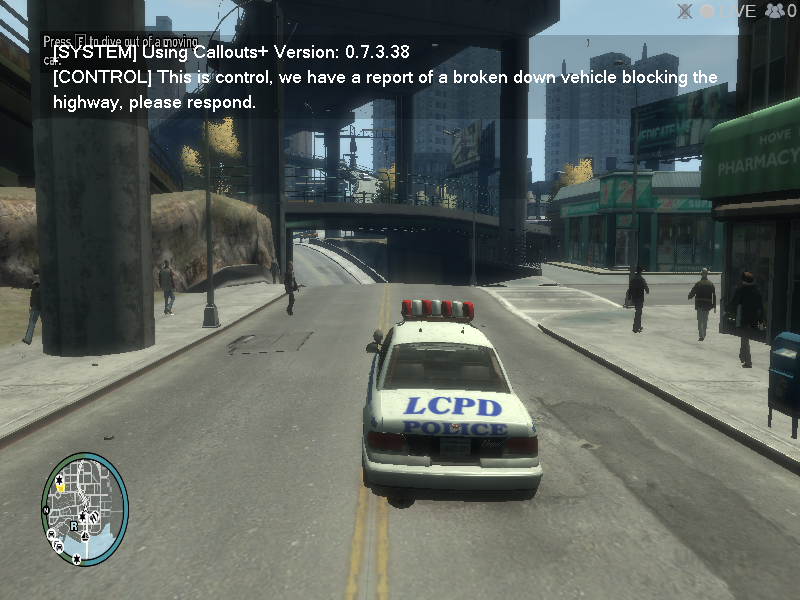
Here is what happened, I installed a call out mod and changed the max call out time to 5 secs in the LCPDFR config, I ran GTA IV and became an officer. I set myself to busy but nothing really happened . I decided to take a risk and unset it and I started getting call outs like crazy from the mod I installed. From what I could see I did not see a single LCPDFR call out only the mods call out (this picture show below was taken 5 secs after I turned off myself as busy.
-
Alright, I will try this and please dont stress yourself on trying to figure this out, you are really helping me out and I appreciate every single bit of help you give me.
-
Well don't stress yourself trying to figure this out, you are really helping me out and I appreciate every single bit of help you give me, i will get back to you as soon as I can buddy
-
Well here is what happened, after I finished reinstalling GTA IV and when I ran it and the intro (Rockstar logos) and everything worked fine, I did the first mission when you have to drive Roman to the safe house and I saved. I installed LCPDFR and sadly when I started the game it skipped the intro and went to main menu. I started LCPDFR and became a police officer and sat inside the police car and sadly there was no radio audio. I drove around hoping to get a call out when something odd happened. It said in the top left corner that "LCPDFR as encounted an error and etc" when this happened my entire game froze so badly I had to press my windows key and sign out to close GTA IV. My log is below (MY LOG) [INFO - 9:57:14 PM] [Log] Started [INFO - 9:57:14 PM] [Main] Main: Initializing... [INFO - 9:57:14 PM] [Main] Main: LCPDFR Engine (C) 2011-2013 LMS [INFO - 9:57:14 PM] [Main] Main: DO NOT USE THIS WITHOUT PERMISSION. YOU MAY NOT SHARE, MODIFY OR DECOMPILE THIS FILE. [INFO - 9:57:14 PM] [PluginManager] Initialize: Loading custom plugins [WARNING - 9:57:14 PM] [Settings] ReadSettings: Invalid entry [INFO - 9:57:14 PM] [Settings] ReadSettings: Suspect transporter POLICE [INFO - 9:57:14 PM] [Settings] ReadSettings: Suspect transporter POLICE2 [INFO - 9:57:14 PM] [Settings] ReadSettings: Suspect transporter PSTOCKADE [WARNING - 9:57:14 PM] [Settings] ReadSettings: Invalid entry [INFO - 9:57:14 PM] [Plugin.Main] Changing language to en-US [INFO - 9:57:14 PM] [Main] Main: Initializing done [INFO - 9:57:14 PM] [ServerCommunication] InitializeConnection: Internet connection available [WARNING - 9:57:15 PM] [ServerCommunication] InitializeConnection: Failed to get public IP Address [WARNING - 9:57:16 PM] [ServerCommunication] InitializeConnection: Error while connecting to master server: The request was aborted: Could not create SSL/TLS secure channel. at System.Net.HttpWebRequest.GetResponse() at .(String ) in d:\GTA IV\LCPDFR\SVN\trunk\LCPD First Response\Engine\Networking\ServerCommunication.cs:line 658 at .() in d:\GTA IV\LCPDFR\SVN\trunk\LCPD First Response\Engine\Networking\ServerCommunication.cs:line 191 [WARNING - 9:57:16 PM] [ServerCommunication] InitializeConnection: Couldn't reach server [WARNING - 9:57:16 PM] [ServerCommunication] InitializeConnection: Failed to connect to the LCPDFR server (No server connection). Multiplayer is deactivated [INFO - 9:57:16 PM] [Authentication] Authentication: Server not available, trying to authenticate offline [ERROR - 9:57:16 PM] [Authentication] Authentication: Authentication failed. Couldn't reach server or no valid lease available [INFO - 9:57:16 PM] [Authentication] Authentication: User is in offline mode [INFO - 9:57:17 PM] [NetworkManager] NetworkManager: In network session: False Is host: False [INFO - 9:57:53 PM] [Plugin.Main] Running LCPD First Response LCPDFR 1.1 2011-2015 LMS (1.0.5557.28243) 3/20/2015 3:41:26 PM [INFO - 9:57:53 PM] [Plugin.Main] Copyright © 2010-2015, G17 Media, www.lcpdfr.com [INFO - 9:59:06 PM] [Script.Ambient] Saving game [WARNING - 9:59:22 PM] [ContentManager] AddPed: Ped already has a non-default content manager. It's recommended to properly reset the content manager, before changing [INFO - 9:59:43 PM] [Script.Ambient] Saving game [WARNING - 10:00:06 PM] [ContentManager] AddPed: Ped already has a non-default content manager. It's recommended to properly reset the content manager, before changing [INFO - 10:00:13 PM] [Script.Ambient] Saving game [WARNING - 10:00:39 PM] [ContentManager] AddPed: Ped already has a non-default content manager. It's recommended to properly reset the content manager, before changing [INFO - 10:00:43 PM] [Script.Ambient] Saving game [INFO - 10:01:13 PM] [Script.Ambient] Saving game [INFO - 10:01:43 PM] [Script.Ambient] Saving game [INFO - 10:02:13 PM] [Script.Ambient] Saving game [WARNING - 10:02:32 PM] [ServerCommunication] UpdateServerValue: Failed to update server stat: backup [INFO - 10:02:43 PM] [Script.Ambient] Saving game [INFO - 10:03:13 PM] [Script.Ambient] Saving game [ERROR - 10:03:34 PM] [Main] CRITICAL ERROR DURING MAINLOOP! REPORT THIS ISSUE AT LCPDFR.COM BY INCLUDING THIS LOGFILE. [ERROR - 10:03:34 PM] [] GTA.NonExistingObjectException: Invalid call to an object that doesnt exist anymore at GTA.Ped.get_Gender() at ..ctor( ped) in d:\GTA IV\LCPDFR\SVN\trunk\LCPD First Response\Engine\Scripting\Entities\Persona.cs:line 57 at ..ctor( ped) in d:\GTA IV\LCPDFR\SVN\trunk\LCPD First Response\Engine\Scripting\Entities\PedData.cs:line 110 at .() in d:\GTA IV\LCPDFR\SVN\trunk\LCPD First Response\Engine\Scripting\Entities\CPed.cs:line 530 at ..ctor(Boolean isPlayer) in d:\GTA IV\LCPDFR\SVN\trunk\LCPD First Response\Engine\Scripting\Entities\CPed.cs:line 453 at .get_Ped() in d:\GTA IV\LCPDFR\SVN\trunk\LCPD First Response\Engine\Scripting\Entities\CPlayer.cs:line 173 at .get_IsDown() in d:\GTA IV\LCPDFR\SVN\trunk\LCPD First Response\LCPDFR\Input\LCPDFRKeys.cs:line 555 at .(ELCPDFRKeys Boolean ) in d:\GTA IV\LCPDFR\SVN\trunk\LCPD First Response\LCPDFR\Input\KeyHandler.cs:line 164 at .(Object ) in d:\GTA IV\LCPDFR\SVN\trunk\LCPD First Response\LCPDFR\Scripts\AreaBlocker.cs:line 146 at LCPD_First_Response.Engine.Timers.Timer.Process() in d:\GTA IV\LCPDFR\SVN\trunk\LCPD First Response\Engine\Timers\Timer.cs:line 69 at LCPD_First_Response.Engine.Timers.SystemTaskTimed.LCPD_First_Response.Engine.Timers.ISystemTask.InternalProcess() in d:\GTA IV\LCPDFR\SVN\trunk\LCPD First Response\Engine\Timers\SystemTaskTimed.cs:line 31 at LCPD_First_Response.Engine.Timers.TaskManager.Process() in d:\GTA IV\LCPDFR\SVN\trunk\LCPD First Response\Engine\Timers\TaskManager.cs:line 49 at LCPD_First_Response.Engine.Main.() in d:\GTA IV\LCPDFR\SVN\trunk\LCPD First Response\Engine\Main.cs:line 265 [ERROR - 10:03:34 PM] [ExceptionHandler] GTA.Ped.get_Gender() L_000d ..ctor( ped) L_002f ..ctor( ped) L_004d .() L_04e6 ..ctor(Boolean isPlayer) L_005e .get_Ped() L_00ec .get_IsDown() L_0151 .(ELCPDFRKeys , Boolean ) L_0000 .(Object ) L_0000 LCPD_First_Response.Engine.Timers.Timer.Process() L_0000 LCPD_First_Response.Engine.Timers.SystemTaskTimed.LCPD_First_Response.Engine.Timers.ISystemTask.InternalProcess() L_000e LCPD_First_Response.Engine.Timers.TaskManager.Process() L_0029 LCPD_First_Response.Engine.Main.() L_018a Error hash: 8599B176CC70914A8D11CB04654F13D644288B3A [ERROR - 10:03:34 PM] [Main] CRITICAL ERROR DURING MAINLOOP! REPORT THIS ISSUE AT LCPDFR.COM BY INCLUDING THIS LOGFILE. [ERROR - 10:03:34 PM] [] GTA.NonExistingObjectException: Invalid call to an object that doesnt exist anymore at GTA.Ped.get_Gender() at ..ctor( ped) in d:\GTA IV\LCPDFR\SVN\trunk\LCPD First Response\Engine\Scripting\Entities\Persona.cs:line 57 at ..ctor( ped) in d:\GTA IV\LCPDFR\SVN\trunk\LCPD First Response\Engine\Scripting\Entities\PedData.cs:line 110 at .() in d:\GTA IV\LCPDFR\SVN\trunk\LCPD First Response\Engine\Scripting\Entities\CPed.cs:line 530 at ..ctor(Boolean isPlayer) in d:\GTA IV\LCPDFR\SVN\trunk\LCPD First Response\Engine\Scripting\Entities\CPed.cs:line 453 at .get_Ped() in d:\GTA IV\LCPDFR\SVN\trunk\LCPD First Response\Engine\Scripting\Entities\CPlayer.cs:line 173 at .get_IsDown() in d:\GTA IV\LCPDFR\SVN\trunk\LCPD First Response\LCPDFR\Input\LCPDFRKeys.cs:line 555 at .(ELCPDFRKeys Boolean ) in d:\GTA IV\LCPDFR\SVN\trunk\LCPD First Response\LCPDFR\Input\KeyHandler.cs:line 164 at .(Object ) in d:\GTA IV\LCPDFR\SVN\trunk\LCPD First Response\LCPDFR\Scripts\AreaBlocker.cs:line 146 at LCPD_First_Response.Engine.Timers.Timer.Process() in d:\GTA IV\LCPDFR\SVN\trunk\LCPD First Response\Engine\Timers\Timer.cs:line 69 at LCPD_First_Response.Engine.Timers.SystemTaskTimed.LCPD_First_Response.Engine.Timers.ISystemTask.InternalProcess() in d:\GTA IV\LCPDFR\SVN\trunk\LCPD First Response\Engine\Timers\SystemTaskTimed.cs:line 31 at LCPD_First_Response.Engine.Timers.TaskManager.Process() in d:\GTA IV\LCPDFR\SVN\trunk\LCPD First Response\Engine\Timers\TaskManager.cs:line 49 at LCPD_First_Response.Engine.Main.() in d:\GTA IV\LCPDFR\SVN\trunk\LCPD First Response\Engine\Main.cs:line 265 [ERROR - 10:03:34 PM] [ExceptionHandler] GTA.Ped.get_Gender() L_000d ..ctor( ped) L_002f ..ctor( ped) L_004d .() L_04e6 ..ctor(Boolean isPlayer) L_005e .get_Ped() L_00ec .get_IsDown() L_0151 .(ELCPDFRKeys , Boolean ) L_0000 .(Object ) L_0000 LCPD_First_Response.Engine.Timers.Timer.Process() L_0000 LCPD_First_Response.Engine.Timers.SystemTaskTimed.LCPD_First_Response.Engine.Timers.ISystemTask.InternalProcess() L_000e LCPD_First_Response.Engine.Timers.TaskManager.Process() L_0029 LCPD_First_Response.Engine.Main.() L_018a Error hash: 8599B176CC70914A8D11CB04654F13D644288B3A
-
Well I removed all my commandlines, mods and scripts other than "-availablevidmem 9.0" because without it my will have a infinite loading screen. anyway I Uninstalled GTA IV and LCPDFR and deleted any leftover folders i could find, than ran Piriform CC Cleaner and currently reinstalling GTA IV. I will let you know when I get done and tell you the results. Wish me luck!
-
I looked in the LCPDFR.ini and it was set to false. I reinstalled GTA IV and LCPDFR again today... and still no dice. The reason this started is because I was trying to solve a crashing issue (which was just my car mod) but before I knew that I would add and remove commandlines, I reinstalled LCPDFR as a administrator do you think that maybe I messed something up? Also I notice that when I run GTA IV with LCPDFR it skips the intro (where it shows the Rockstar logos) and heads straight to the main menu. I just hope something I do fixes it.
-
so how could i fix it? I have completely turned my game upside down and I don't understand how take a break so easily.
-
if I am not mistaken you can disable auto save by going to the LCPDFR config and unchecking autosave. this will prevent any old sessions of LCPDFR of being restored after a crash or whatever.
-
I have faced issue before, and there's an easy solution so you don't have to use a manual install. When you install GTA IV be sure to run the game first before installing LCPDFR. I'm guessing since the game has it been ran yet the automatic installer can't find it.
-
You can decrease the amounts of crashes by reducing mods,lowering graphics or even adding or removing command from your commandline.
-
Thanks :)
-
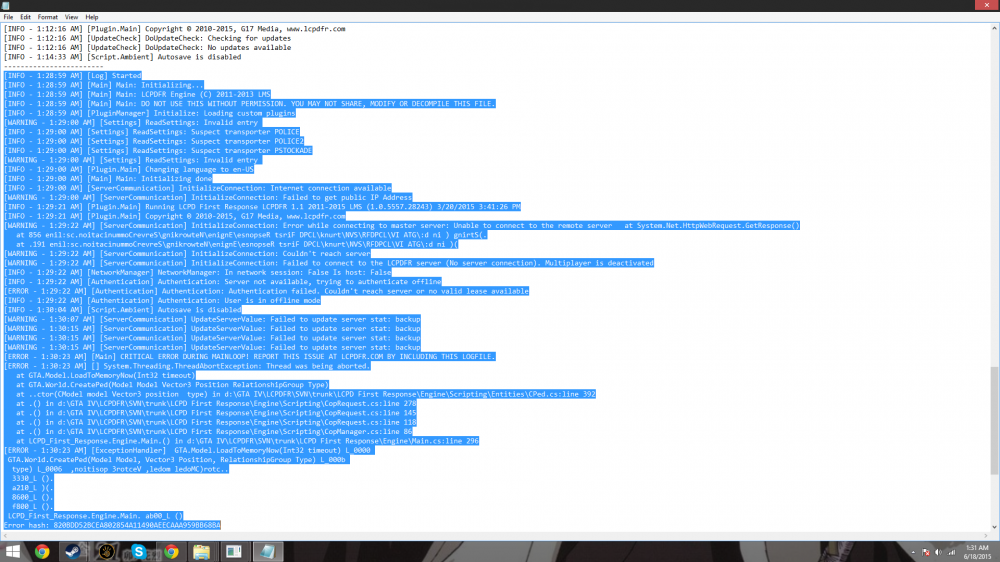
I reinstalled GTA IV and LCPDFR 1.1 twice (with no mods or scrpits), I even uninstalled LCPDFR 1.1 and installed 1.0d with still no luck. I checked the LCPD:FR config and still nothing. here is my log along with my computer specs and commandlist (My Computer Specs) OS- Windows 8.1 Processor- Intel Core i5-4460 CPU @ 3.20GHz 3.20GHz (Quad Core Processor) Ram- 8GB System Type- 64-bit Operating System, x64-based processor Graphics Card- Intel HD Graphics 4600 (Integrated/Built in) (My Command List) -nomemrestrict -restrictApp 0 -norestrictions -availablevidmem 9.0 -noBlockOnLostFocus -forcehighqualitymirrors -noswapdelay -nomemrestric I appreciate any info and advice given but I need more so I can figure out how to fix. Posts merged - Staff
-
I have a annoying issue, after some bad glitches with LCPDFR 1.1 and GTA IV (STEAM) I finally decided to completely reinstall GTA IV and LCPDFR 1.1 with no mods other than a couple of scripts. I soon came to realize that every time I run LCPDFR that the dispatch don't say anything even when I call for back up and the only I can get any sounds is by alt-tabbing and that can cause a crash. I looked in the auido file of LCPDFR and all the sounds files are there. I honestly don't know what else to do, I have done everything from reinstalling the game to changing it's compatibility. If anyone could provide a fix for this I would really appreciate it
-
I reinstalled GTA IV and LCPDFR 1.1, I think ELS and my police car mods are causing the crash, because when I didn't have those mods I would rarely crash
-
I fixed the issue, I am back to crashing after 30 min to an hour..
-
Would the missing of the file cause the game to crash after loading?
-
So I have been experiencing some odd crashes lately, every time I load my GTA IV (STEAM) I crash imminently after the loading screen. I thought that this was not an LCPDFR 1.1 problem until I uninstalled LCPDFR 1.1. After that my game loaded perfectly, I installed LCPDFR 1.1 as administrator and turned off "Read Only" on my root GTA IV folder. P.S my compatibility is set to Windows 8. (My Computer Specs) OS- Windows 8.1 Processor- Intel Core i5-4460 CPU @ 3.20GHz 3.20GHz (Quad Core Processor) Ram- 8GB System Type- 64-bit Operating System, x64-based processor Graphics Card- Intel HD Graphics 4600 (Integrated/Built in) (My Commandline.txt) -nomemrestrict -restrictApp 0 -norestrictions -availablevidmem 20.0 -noBlockOnLostFocus -forcehighqualitymirrors -noswapdelay -nomemrestrict -width 1920 -height 1080
-
-
I made the same mistake too when I replaced some car models, Luckily they original vehicles.img can be found on the internet
-
I am not new to GTA IV, I am new to modding the game though which honestly is not that complictated, and I do have 1GB is dedicated Graphics
-
Well I have very solid gameplay and I am able to play for an hour or two, but I do experience some sort of crash here and there. I am just trying to find a way to completely eliminate the crashing all together.
-
Yes, I have ELS 8.5, 2 Police car mods, Towing Script, and Breathalyzer Script.
-
I have installed LCPDFR 1.1 for my GTA IV (STEAM) and I have been experiencing random crashes. It just says "Grand Theft Auto IV has stopped working" and I click "close program" and restart the game, I think these crashes are not related to LCPDFR in any way but if you think there is I will upload a picture of my log along with a list of my computer specs below. (My Computer Specs) OS- Windows 8.1 Processor- Intel Core i5-4460 CPU @ 3.20GHz 3.20GHz (Quad Core Processor) Ram- 8GB System Type- 64-bit Operating System, x64-based processor Graphics Card- Intel HD Graphics 4600 (Integrated/Built in)