
lilmisschloe
Members
-
Joined
-
Last visited
Everything posted by lilmisschloe
-
If you find the popgroups.ymt file , this is the file that tells the game which cars to spawn. You can add and remove vehicles that spawn, just be careful on the layout of the sections. It uses in game asset names, like Police2 is the Buffalo police car etc. So find the vehicles you wish to add/remove and adjust it to suit your needs. IMPORTANT: As long as you keep to the format of the file (having the sections in the correct format <item> </item> etc then it will work.
-
I have cops back on the beat, they will assist you if shots are fired, they dont technically know your a cop, or that your even part of the situation, but they just target the guy your shooting at because he has a gun, it goes off native combat behaviour, its just a coincidence that your "helping" I hope you understand what Im saying aha :) They wont help you in a persuit, unless shots are fired either, but thats why you have LSPDFR backup options :-p
-
I found a solution :) I just removed LSPDFR from the startup file you get with Ragehook, so I can play story and get chased if I wish....then if I want to be a cop, just use the console command to load LSPDFR :) Thanks for the calification of the issue though guys :) I appreciate it :)
-
So Im playing as Franklin without LSPDFR running and I cannot shoot cops, the game wont let me and when I get a wanted level they dont know where I am LOL My trainer hasnt been set to make them ignore me....what could cause this?
-
This involves replacing dinput8.dll, only removing it on a temp basis.
-
Use FinKones Police Radio mod - in an upcoming patch to the mod you will be able to call a K-9 drugs dog and a back-up car.... Until those features get implimented, just call in a local unit code 2 using LSPDFR.
-
Can't load the game, I keep getting this message pop up, I checked the link, and it says the servers are "UP" hmmm It was fine like an hour ago....now this....Im not even trying to go online, just open the game!?!?
-
[15/07/2015 23:27:34.347] LSPD First Response: PlayAction: Failed to find UNIT_RESPONDING_DISPATCH, reverted to random voice [15/07/2015 23:28:05.381] LSPD First Response: Error while processing callout: StreetRace: Operation is not valid because this Rage.Ped is invalid. at Rage.Entity.get_IsDead() [15/07/2015 23:28:05.381] at CalloutsV.Callouts.StreetRace.Process() [15/07/2015 23:28:05.381] at ?.?() [15/07/2015 23:28:05.381] LSPD First Response: EndCurrentCallout: Finishing... [15/07/2015 23:28:33.741] LSPD First Response: Creating Escort Game crashed at that point...
-
 Thanks for the update to the mod 0.5 :) Alex, is it possible to press the L key once to spawn the spikes and again to delete them?
- 131 comments
- 20 reviews
-
So you fixed it yourself -.-
-
OpenIV is a program you can use to modify GTA V game files. It comes with an ASI loader which can be used to load your .asi mods. If you had OpenIV you would find the ASI manager on it that allows you to install/uninstall the loader for .asi mods.
-
Will this clash with "OpenAllInteriors" mod?
-
***PLEASE SCROLL DOWN TO MY MOST RECENT POST 07-Aug2015 for a file that SHOULD allow you to use the console.*** If you have the issue where the RageHook is not opening the console...I THINK I have found the culprit. Try this: Delete dinput8.dll (I think thats it) Then download and install Scripthook BUT ONLY COPY OVER THE MAIN .DLL file. Load Open IV and uninstall the two options in the built in ASI manager, the install them again. (This will in turn give you the correct dinput8.dll file back) Close Open IV and try your game. If that DID NOT work for you, then delete any files that you get with ScriptHook.net. Try your game again. let me know if this works for you!
-
If you have the issue where the RageHook is not opening the console...I THINK I have found the culprit. Try this: Delete dinput8.dll (I think thats it) Then download and install Scripthook BUT ONLY COPY OVER THE MAIN .DLL file. Load Open IV and uninstall the two options in the built in ASI manager, the install them again. Close Open IV and try your game. If that DID NOT work for you, then delete any files that you get with ScriptHook.net. Try your game again. let me know if this works for you!
-
Some of the names of the peds are hilarious, I crashed once cause I was laughing so hard lmao Hello, I had the same issue as you regarding the Rage not opening the console...I THINK I have found the culprit. Try this: Delete dinput8.dll (I think thats it) Then download and install Scripthook BUT ONLY COPY OVER THE MAIN .DLL file. Load Open IV and uninstall the two options in the built in ASI manager, the install them again. Close Open IV and try your game. If that DID NOT work for you, then delete any files that you get with ScriptHook.net. Try your game again. let me know if this works for you!
-
FIX: At the very bottom of this red warning page there is a link, click that to proceed through the warning. It will download the file.
-
-
Thats how the mod changes them, funnily enough I just removed mine as I thought they were too washed out and bright. Its blinding, especially on night time patrols. ***USING OPENIV*** >>> If you wish to revert back to the old normal in game lights, just tgo to update>update.rpf>common>data Remove the file VisualSettings.dat KEEP IT ON YOUR DESKTOP though just in case. Load your game and it should be back to regular lights.
-
https://www.gta5-mods.com/scripts/enhanced-native-trainer
-
Turn off SLI & make sure the refresh rate in game matches your monitor, then enable V-Sync, it does wonders in this game. I know in other games its crappy, but for GTA 5 seems to work very well, it fixed my stuttering. Also, I know you have a powerful GPU, but turn any settings in game that are on "Very High" down to "high", make sure you have 8x anistropic or something I think it is....most other values like 4x 16x seem to cause issues. If you have mods installed that affect AI behaviour like traffic, try taking them out as a test, some are not optimised well enough yet.
-
So I un-installed a mod that changes the lighting in game, in the form of a VisualSetting.dat file. I removed the file, and tested the game, and the lighting has gone back to normal (the original lighting from the Vanilla GTA5) This is what I wanted.....Im concerned that the file is not there as a result, my question is "Does it actually need a default visualsettings.dat file?" My opinion is, it does not as the game seems to be fine without it. Just like some clarity really :) Chloe x
-
How do I ask a random ped on foot for ID?
-
The website went down to add the countdown timer for 0.2, try it now...
-
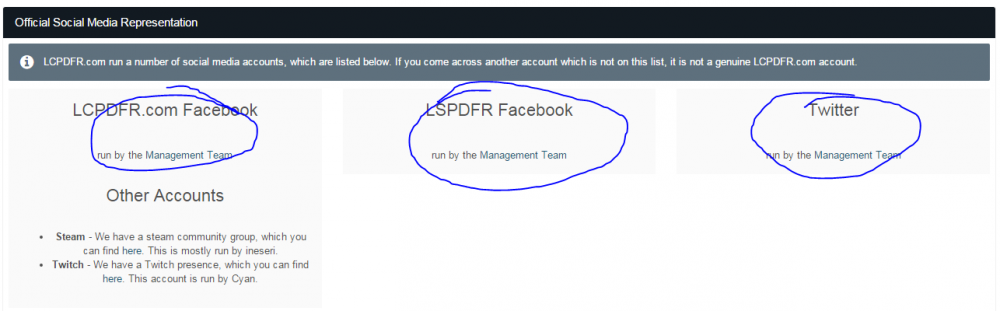
Check out the snapshot I took, no logo's or links to click on for Twitter, Facebook etc?
-
I dont see a countdown either, but at a GUESS Im going to say the 0.2 update is out in about , hmm lets say 1 hour 45 minutes at the time of writing this??? :-p Hmmmm haha