


evanscornelius
-
Joined
Everything posted by evanscornelius
-
Thank you very much LMS, I have begun my lessons, it's confusing but i'm a fast learner...lol
-
Hello everyone, I am a modeler who has modeled and custom made vehicles, peds, and equipment and now have turned my sights to scripting. I've seen some amazing scripts and awesome suggestions, and even have a few of my own. So i've decided to put other things on the backburner for now and focus on that. I want to base my script on my actual experiences and make them as realistic as possible. I want scenes where you have to actually investigate, question, and pursue scenes. I want more options. I want to be able to walk my suspects into a jail cell and do paperwork like i do in real life. I want to sit in my patrol vehicle and write traffic tickets and incident reports. I want to be able to respond to scenes that's already been taped off or have fellow officers on scene, well you guys no what i mean. I want to do it based on realistic events, not true events, but to make a long story short i want to do this and am ready to go. But i need to be pointed in the right direction, tutorials, vids or anything to tell me how to read codes and c#. I won't post anything until i know i can do it. I would hate to get everyones hopes up and it never happen. I've seen it happen a few times on this site. So please be nice to me, for i am a newbie in this field. and like always, happy modding.....
-
But they are pretty accurate also.
-
Try HD road textures. http://www.gta4-mods.com/misc/different-hd-roads-f23499
-
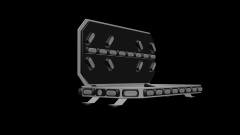
![Whelen M2 Series Super LED Surface Mount [WIP]](//s3-gallery.int-cdn.lcpdfrusercontent.com/gallery/album_2910/sml_gallery_138650_2910_2360463.png) It's a work of art.
It's a work of art. -
Actually the peds are done, It's the bug fixing which is the problem. I have to experiment with enveloping and adding weights to certain parts of the body to keep other parts of the peds from moving. That is the taxing part. I have to add alittle, try in game, add a little try in game, take away alittle, try in game. That sort of thing.
-
I fixed the glow but i don't know about making the mouth move. Don't know if it'll really matter to people.
-
i had an eta set, but now because schools out i have to work extra patrols, which set my eta back a little
-
The update will be the entire gta v emergency pack...lol
-
OK guys, sorry it took so long, here's the hats..... http://www.mediafire.com/download/kacxw4ent7c3e3d/Hats.rar
-
I'll upload them to mediafire
-
 The reason i responded on gtaxboss's pic is because of what he did to me, but i didn't post on here to make any discouraging remarks or criticism. And if it came out that way then i apologize to him. But he has not at all been nice to me in the past, but it's water under the bridge. I'm a fan of all of his work.
 -
Sorry, not a 100% like the model. mine will have 100% full detail, every hole every screw, but still i like it, excellent job.
-
In case anyone is wondering, Yes it will be a new pack, If you check out my k9 patrol vid on youtube you'll see a couple of the peds being tested, like the snow cop, a k9 cop ped, female cops with the hats. Yeah, i'll contact Sam and see what happened.
-
It should've been released by now
-
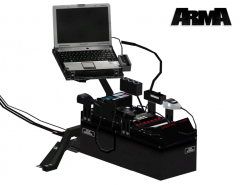 Actually no, The console is not stolen, If the console is Stolen then The cop made by policeman456 is also stolen because it also came from Arma. I have the same cop model, just with better detail On the belt.
 -
No this console is from Arma not Arma 2, it was ported over to Arma 2 .
-
You can find the optimax and medimax at 3dwarehouse.com. download it for free. It's where a lot of people get there models from.
-
Did you remove all els v7 files before installing v8
-
I actually made a ped that has this feature. it was a request.
-
My K9 Tahoe uses the arrow board modification to open and close the laptop and raise and lower the spotlight.
-
You don't need any modeling prorams, just openiv
-
If you need help i can show you if you have skype and teamviewer.
-
Thank you sssssoooo much, I didn't know that.
-
Hey guys, i have EVI's legacy that i mapped myself. Take a look at the vid and if you like just pm me and i'll send it to you.


![Whelen M2 Series Super LED Surface Mount [WIP]](http://s3-gallery.int-cdn.lcpdfrusercontent.com/gallery/album_2910/sml_gallery_138650_2910_2360463.png)
