



LCDOJVanderzz
Members
-
Joined
-
Last visited
Everything posted by LCDOJVanderzz
-
Its the mastercom B but now on their new cars they have a dual siren.
-
I'll pitch in
-
Ive been needing the sirens on the perennial perennial2 and moonbeam I've tried to figure it out but i can never get it to work and this is for multiplayer..
-
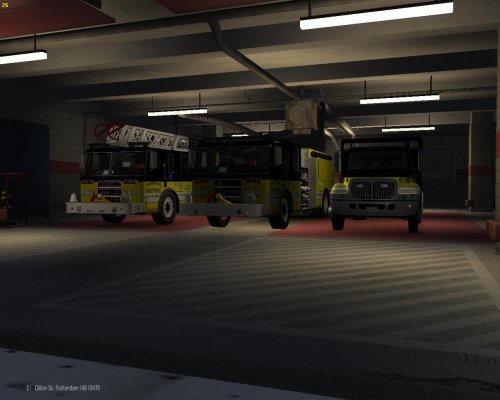 I present you a LCFD mini pack it contains a Ladder, Engine, And Ambulance. Name files to your own liking's Handling Lines (By Sgt. Kanyo): Ladder- 28122 0.6 95 0.0 0.0 -0.2 0.5 4 0.08 1.0 95 0.3 0.50 0.2 40 0.8 1.2 11 0.09 0.5 3.0 2.3 2.3 0.25 -0.12 0.03 0.58 1.5 1.0 1.6 2.2 0.0 40000 48 300000 2 Engine- 12700 0.6 95 0.0 0.0 -0.24 0.5 8 0.08 1.0 110 0.35 0.50 0.1 40 0.8 1.2 11 0.09 0.5 3.0 2.3 2.3 0.25 -0.12 0.0 0.5 1.5 1.0 1.6 2.2 0.0 40000 48 300000 2 DOWNLOAD LINKS PIERCE DASH PACK: http://www.lcpdfr.com/files/file/2955-pierce-dash-ladder-and-engine-pack/ iNTERNATIONAL DURASTAR AMBULANCE: http://www.mediafire.com/download/61emb2k61ay7ffi/International+Durastar+Ambulance+-+FDLC+-+V1FQ+ELS.rar *CREDITS TO GO THE OWNERS OF THE MODELS*
 -
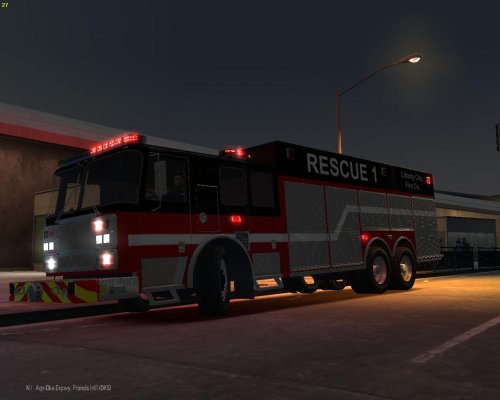 Seagrave HAZ-MAT/ Heavy Rescue By Firefighter767 I hope you guys like it. My first upload as well and I hope to upload more :) Please leave feed back in comments Link to vehicle: http://www.lcpdfr.com/files/file/7329-seagrave-haz-mat-heavy-rescue/ *handling line is on Firefighter767 Model File download the file above* **DO NOT REUPLOAD WITHOUT MY PERMISSION**


