Skip to content
View in the app

A better way to browse. Learn more.

LCPDFR.com

A full-screen app on your home screen with push notifications, badges and more.

To install this app on iOS and iPadOS
  1. Tap the Share icon in Safari
  2. Scroll the menu and tap Add to Home Screen.
  3. Tap Add in the top-right corner.
To install this app on Android
  1. Tap the 3-dot menu (⋮) in the top-right corner of the browser.
  2. Tap Add to Home screen or Install app.
  3. Confirm by tapping Install.

HANAKO

Members
  • Joined

  • Last visited

  1.    Rs180500 reacted to a file: EUP Clothes Pack
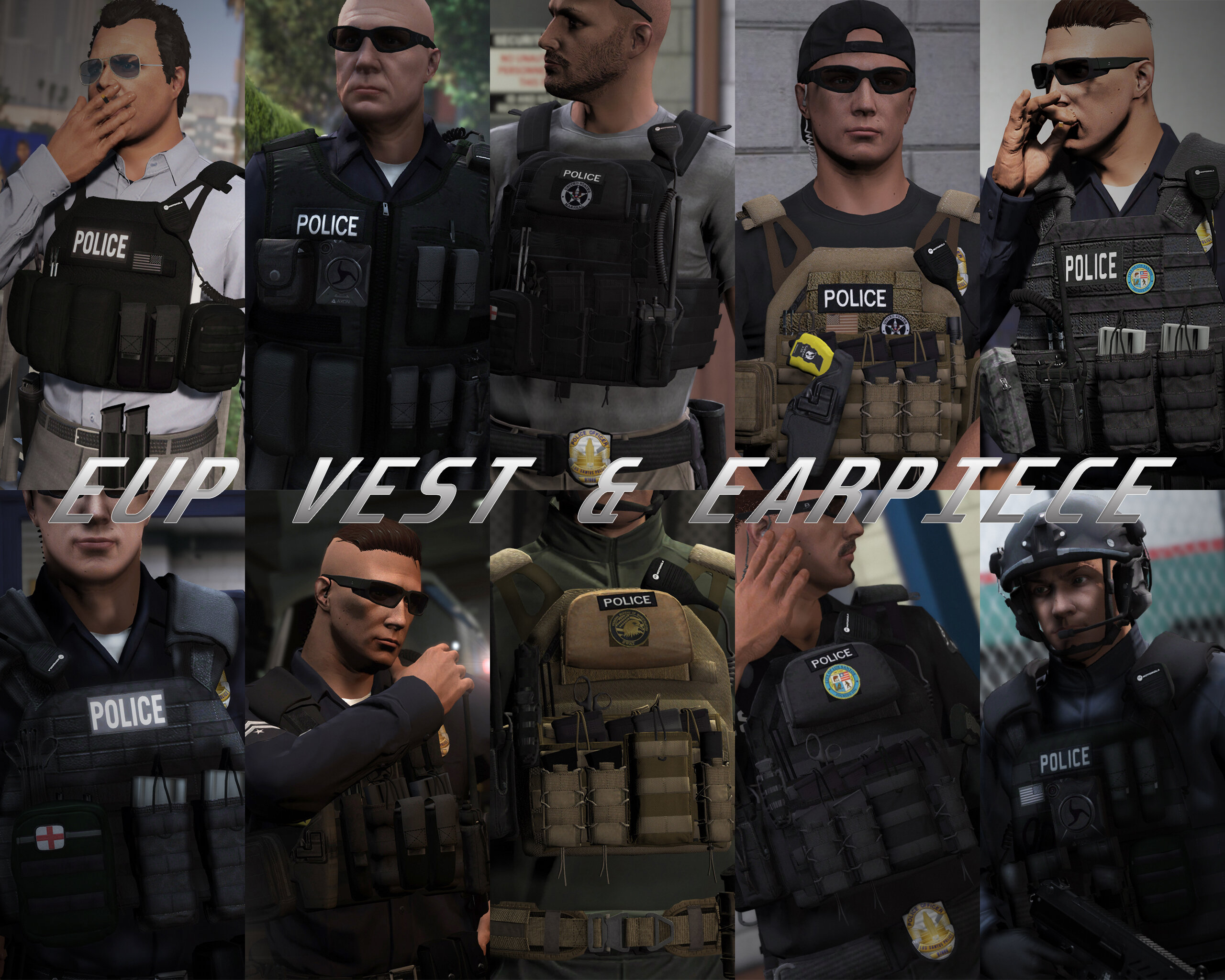
  2.    Skydrohz reacted to a file: EUP VEST&EARPIECE
  3. MacPanther7815 started following HANAKO
  4. JB LSPDFR started following HANAKO
  5.    Fedeik423 reacted to a file: EUP VEST&EARPIECE
  6.    Zaylikespatrol reacted to a file: EUP VEST&EARPIECE
  7. BIGboby12 started following HANAKO
  8. CopGuy2015 started following HANAKO
  9. Cst.Dan started following HANAKO
  10. RedAmish started following HANAKO
  11. Brocobi started following HANAKO
  12.    HANAKO reacted to a comment on a file: EUP Simple Polo Shirt Pack [Add-on]
  13. Hot WaTEr started following HANAKO
  14. Wdunks57 started following HANAKO
  15.    HANAKO reacted to a comment on a file: EUP Simple Polo Shirt Pack [Add-on]
  16. Mr.Alexandru started following HANAKO
  17.    HANAKO reacted to a file: Lore Duty Pants
  18.    HANAKO reacted to a comment on a file: EUP Simple Polo Shirt Pack [Add-on]
  19.    HANAKO reacted to a comment on a file: EUP Simple Polo Shirt Pack [Add-on]
  20.    HANAKO reacted to a comment on a file: EUP Simple Polo Shirt Pack [Add-on]
  21.    HANAKO reacted to a comment on a file: EUP Simple Polo Shirt Pack [Add-on]
  22.    HANAKO reacted to a comment on a file: EUP Simple Polo Shirt Pack [Add-on]
    • 2,813 downloads
    • Version 1.0.0
    Hello everyone, it has been a while! This is my first release in some time because I have spent the past few years studying and improving my 3D modeling skills. As a result of that effort, I am excited to share this new mod with you. I will continue creating various mods in the future, not only for GTA V but also for the upcoming PC version of GTA VI, so I would greatly appreciate your support! Features: This mod adds fully scratch made polo shirts for GTA V and FiveM. All models were created by Hanako with clean textures, proper LODs, blood mapping, and other optimizations. This pack includes the following four variations of polo shirts for both male and female characters (each variation also comes with a editable decal/patch mesh): Short-sleeve Polo Shirt Short-sleeve Polo Shirt (with long-sleeve undershirt) Long-sleeve Polo Shirt Long-sleeve Polo Shirt (watch-compatible) Note: This mod is compatible only with the legacy versions of GTA V and FiveM. Installation: [Single Player] 1. Add poloshirtpack001 to Grand Theft Auto V\mods\update\x64\dlcpacks using OpenIV 2. Go to Grand Theft Auto V\mods\update\update.rpf\common\data and open dlclist.xml 3. Add the line <Item>dlcpacks:/poloshirtpack001/</Item> and save the file Done! In the game, using the trainer, change the "Jbib" to switch the shirt model and change the "Decal" to switch the emblem on the shoulder or chest. These are usually near the end of the list. If the arm model clips through the clothing, switch to a short-sleeve or wrist-only version. [FiveM] 1. Drag and drop all files in the [FiveM] folder to your stream folder 2. Done! In the game, using the trainer, change the "Jbib" to switch the shirt model and change the "Decal" to switch the emblem on the shoulder or chest. These are usually near the end of the list. If the arm model clips through the clothing, switch to a short-sleeve or wrist-only version. I do not play FiveM, so I cannot provide support for FiveM-related issues. Terms of Use: - Do not claim the model as your own. - Unlocking, importing into 3D software, or converting the model for use in other games is strictly prohibited, even for personal use. - Selling the model is prohibited. - When releasing a retexture, do not include any 3D model files (such as YDD). Include only texture files (such as YTD, DDS, PNG, or JPEG), and make sure to provide proper credits. Credits: - Modeled and textured from scratch by HANAKO - Beta testing and screenshots by crunchycat
  23.    HANAKO reacted to a file: EUP Tactical Belts
  24. The current version is compatible with EUP 8.4. I will upload a new version compatible with the latest EUP soon, so stay tuned.
  25. The number of textures that can be loaded is controlled by YMT. So, just adding textures will not load them.
  26. It is not a part of this mod. Also, please stop mentioning me every time you leave a comment.
    • 22,399 downloads
    • Version 2.0
    Discriptions: This mod will change some of the cover animations to NPC style. It also includes other changes to the cover idle animation, intro, outro, and weapon holding animations. Options include changing the shooting stance and action mode animations for police attribute peds. This mod is an improved, reworked version of the AI Cover Animations I posted a long time ago. In addition, with the help of Wolf Fire Modz, several new features have been added. Also, I've changed all installations to OIV format to improve the complexity of the installation process that was pointed out in previous versions. I hope you all enjoy it! Installation: 0. It is recommended to make a backup of update.rpf before installing this mod. 1. install 0.Core.oiv. Notes: This mod will replace peds.ymt, pedpersonality.ymt, combattasks.ymt, and weaponanimations.meta. So it is not compatible with other mods that modify these files. How to make it compatible with AI Cover, Taunts, & Idle Animations by Wolf Fire Modz is described separately. 2. install options if necessary. The following is a description of the function of the options. 0. New weapon holding animation This option is included in Core and changes the holding animation of two-handed weapons to a more realistic one. Some weapons are not implemented due to the position of the hands in the animation. To remove this, use option 4 oiv. 1. New shooting stance This option enables the shooting stance in stealth mode at all times. Affected weapons are Pistol, Combat Pistol, Pistol MK2, Ceramic Pistol, Stungun Carbine Rifle, Carbine Rifle MK2. 2. New action mode This option changes the animation of the sprints during combat (Action Mode). (Trevor will be affected by this option regardless of whether it is enabled or not, as it modifies a portion of Trevor's action mode animation). 3. New shooting stance + action mode This option installs both options 1 and 2. 4. Remove new weapon holding animations This option removes the new weapon retention animation included in Core. To remove all options, run "Uninstaller of all options.oiv". Notes: "1. for police peds only" will only change the animations of police peds such as s_m_y_cop_01, s_f_y_cop_01, etc. "2. for police peds + mp freemode characters" will change the animations of police peds and EUP characters such as mp_m_freemode_01, mp_f_freemode_01. If you want to uninstall this mod, please run "NPC Cover Animations Uninstaller.oiv" and then delete NPCCover from dlclist.xml manually! How to make it compatible with AI Cover, Taunts, & Idle Animations by Wolf Fire Modz: 0.Download his mod from 5mods. 1.mods\upload\x64\dlcpacks\NPCCover\dlc.rpf\x64\anim\ingame\clip_cover@.rpf\. 2. Place all the files of the mods x64c.rp \anim\ingame\clip_cover@.rpf\ included in his mod. You can overwrite the original files(be sure to rewrite combattasks.ymt. Otherwise, the cover strafe will not work correctly). 3. Install all files except peds.ymt and pedpersonality.ymt from his mod. If you want to run the SWAT strafe with a specific character, change the personality in peds.ymt to "swat". Done! If you have any bugs, installation issues, or suggestions, please post them in the comments section. Credits: YMT, YCD, meta editing and some screenshots by HANAKO Icons for OIV and main screenshots by crunchycat Special thanks to Wolf Fire Modz -Without his mods, this mod would not have been updated, and he provided various information about editing YCD! Special thanks to Shadow 0f Raven -His release of the NPC Cover Animations mod was the basis for my mod!
  27. 8.3 or later Since many people use LML to install the EUP, there is some confusion on how to install this mod.
  28. Do you have a picture of the problem you are having?
  29. You may have failed to install this mod. The position of the models for female and male version are different, and such a problem occurs when they are installed swapped.
  30. It is only compatible with belts and shirts with EUP 8.2 or later. If you are using 8.2 and it does not work correctly then it may not have been installed correctly. Make sure you have the male and female versions installed in the correct slots. The female and male versions have different positions for all objects and are not compatible.
  31. You may be using female version
  32. This vest is not for females It is not possible to install all the vests at the same time due to slot limitations.
  33. In game? You can change it in the interior color section in Menyoo or Simple Trainer If you want to change the color when spawn, you need to edit Carvariations.meta. Fixed in the current version Sorry for the inconvenience
  34. No, it does not configure with ELS VCF except for the yellow lights in the back. There must be a mistake in carcols or carvariations.meta. Use the Add-on if you are using it as Replace. Replace can cause some installation problems.

Account

Navigation

Search

Search

Configure browser push notifications

Chrome (Android)
  1. Tap the lock icon next to the address bar.
  2. Tap Permissions → Notifications.
  3. Adjust your preference.
Chrome (Desktop)
  1. Click the padlock icon in the address bar.
  2. Select Site settings.
  3. Find Notifications and adjust your preference.