
HANAKO
Members
-
Joined
-
Last visited
Reputation Activity
-
 HANAKO got a reaction from punisher844 for a file, FEMALE EUP VESTDescription:
This is a mod that adds female EUP Stuff The current version includes four vests and one belt More vests and other stuff will be added in the future
INSTLLATION
First, install the EUP
Please make a backup of eup_componentpeds.rpf before installing this MOD 1.Open the "File" folder. 2.Go to "Grand Theft Auto V\mods\update\x64\dlcpacks\eup\dlc.rpf\x64\eup_componentpeds.rpf" using OpenIV 3.Place the mp_m_freemode_01_mp_m_vinewood folder in eup_componentpeds.rp (add the Vinewood folder as it is not included in the default EUP) 4.Change the "TASK"(Please check the table below for categories.) category in the game. 5.If your character's vest(or other) has been changed to the one you installed, it's a success. Do not ask me!!
Texture request Request to unlock a model Asset Release Request How to install these to FiveM
Credits:
Rockstar Games
Activision/Infinity Ward
-COD:MW2019 Assets
DICE/Electronic Arts
-Battlefield 4 Assets
UBI SOFT
-Ghost Recon Wildlands, Rainbow Sis Siege Assets
Battlestate
-Escape From Tarkov Assets
Hanako
xiphos
Hussky9
CG ARTStudio
Oleg
ericapg
Code4Mods
Alex Ashfold
Beta-testers(crunchycat, Howard)
Screenshots by crunchycat
-
HANAKO got a reaction from DanielJrZzSwat for a file, FEMALE EUP VESTDescription:
This is a mod that adds female EUP Stuff The current version includes four vests and one belt More vests and other stuff will be added in the future
INSTLLATION
First, install the EUP
Please make a backup of eup_componentpeds.rpf before installing this MOD 1.Open the "File" folder. 2.Go to "Grand Theft Auto V\mods\update\x64\dlcpacks\eup\dlc.rpf\x64\eup_componentpeds.rpf" using OpenIV 3.Place the mp_m_freemode_01_mp_m_vinewood folder in eup_componentpeds.rp (add the Vinewood folder as it is not included in the default EUP) 4.Change the "TASK"(Please check the table below for categories.) category in the game. 5.If your character's vest(or other) has been changed to the one you installed, it's a success. Do not ask me!!
Texture request Request to unlock a model Asset Release Request How to install these to FiveM
Credits:
Rockstar Games
Activision/Infinity Ward
-COD:MW2019 Assets
DICE/Electronic Arts
-Battlefield 4 Assets
UBI SOFT
-Ghost Recon Wildlands, Rainbow Sis Siege Assets
Battlestate
-Escape From Tarkov Assets
Hanako
xiphos
Hussky9
CG ARTStudio
Oleg
ericapg
Code4Mods
Alex Ashfold
Beta-testers(crunchycat, Howard)
Screenshots by crunchycat
-
 HANAKO got a reaction from nel4127 for a file, FEMALE EUP VESTDescription:
This is a mod that adds female EUP Stuff The current version includes four vests and one belt More vests and other stuff will be added in the future
INSTLLATION
First, install the EUP
Please make a backup of eup_componentpeds.rpf before installing this MOD 1.Open the "File" folder. 2.Go to "Grand Theft Auto V\mods\update\x64\dlcpacks\eup\dlc.rpf\x64\eup_componentpeds.rpf" using OpenIV 3.Place the mp_m_freemode_01_mp_m_vinewood folder in eup_componentpeds.rp (add the Vinewood folder as it is not included in the default EUP) 4.Change the "TASK"(Please check the table below for categories.) category in the game. 5.If your character's vest(or other) has been changed to the one you installed, it's a success. Do not ask me!!
Texture request Request to unlock a model Asset Release Request How to install these to FiveM
Credits:
Rockstar Games
Activision/Infinity Ward
-COD:MW2019 Assets
DICE/Electronic Arts
-Battlefield 4 Assets
UBI SOFT
-Ghost Recon Wildlands, Rainbow Sis Siege Assets
Battlestate
-Escape From Tarkov Assets
Hanako
xiphos
Hussky9
CG ARTStudio
Oleg
ericapg
Code4Mods
Alex Ashfold
Beta-testers(crunchycat, Howard)
Screenshots by crunchycat
-
HANAKO got a reaction from NUV3X for a file, EUP Safariland Holster & Taser Drop Leg HolsterINSTLLATION
First, install the EUP
Put all folders in this location Grand Theft Auto V\mods\update\x64\dlcpacks\eup\dlc.rpf\x64\eup_componentpeds.rpf You can find these in the "Teef" section in game
Do not ask me!!
Request for Textures Request to unlock a model Request for the release of development parts The source of model
FREQUENTLY ASKED QUESTIONS
Q.How do I use multiple textures? A.Rename the YTD and YDD correctly and install them in, for example, January2016, or edit the YMT to enable multi-textures. Q.Will it work with FiveM? A.YDDs with a file size of 26 MB or less can be used with no problem. However, don't ask me how to install it on FiveM. Q.Can I upload a texture? A.Textures only, no problem.
Credits:
HANAKO Hussky9 Alex Ashfold
ATTENTION
Do not unlock, edit, leak or sell the file Editing textures at non-profit is allowed
My other mods
https://www.gta5-mods.com/misc/ai-cover-animations-mod-hanako
Highly Recommended
-
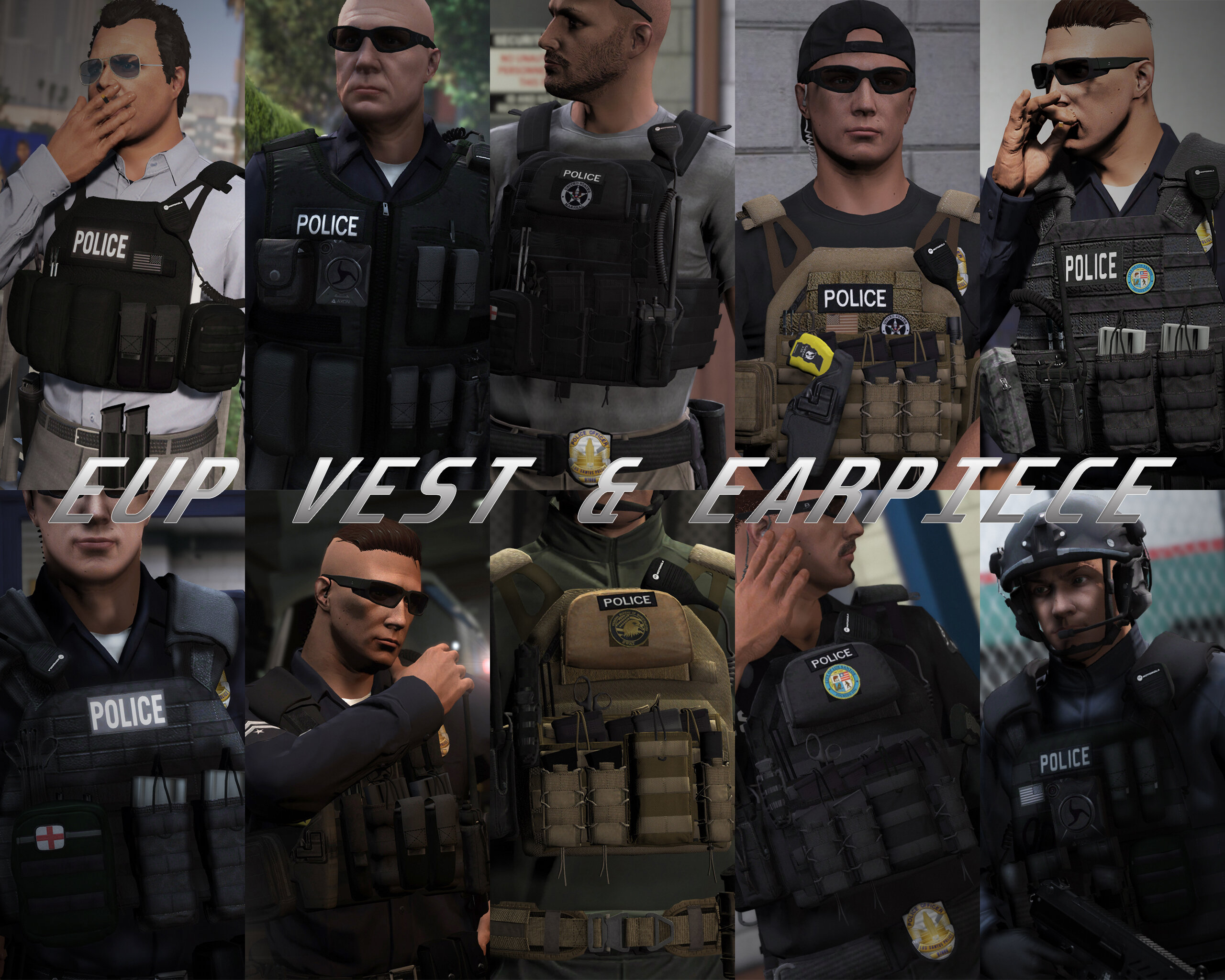
HANAKO got a reaction from Skydrohz for a file, EUP VEST&EARPIECEAwesome showcase video by Alex Preacher
Thanks to all of you, total downloads have now exceeded 60,000!
I hope you continue to enjoy this mod!
Description
This mod adds police vests, belts, and other equipment to GTA V.
Features
The vests fit properly with various outfits! No awkward gaps or improper sizing!
Realistic gear such as earpieces and realistic vests!
List of included vests
Installation
First, install EUP.
To use the new vests, you must install this mod too.
It is strongly recommended to back up the original files before installation!
Open the File folder.
Using OpenIV, navigate to:
Grand Theft Auto V\mods\update\x64\dlcpacks\eup\dlc.rpf\x64\eup_componentpeds.rpf
Open the corresponding folder (e.g., vest, earpiece, etc.), and place the folder (e.g., mp_m_freemode_01_mp_m_vinewood) that contains the files you want to use.
In-game, change the TASK category.
If your character’s vest (or other item) has changed to the one you installed, the installation was successful.
If installed correctly, the added folders should look like this:
Installation Q&A
Version History
DO NOT ASK
Requests for custom textures Requests to unlock the model Requests for DEV models Questions about installing this mod on FiveM Credits
Rockstar Games
Activision / Infinity Ward
Call of Duty: Modern Warfare (2019) Assets
DICE / Electronic Arts
Battlefield 4 Assets
Ubisoft
Ghost Recon: Wildlands Assets
Rainbow Six: Siege Assets
Battlestate Games
Escape From Tarkov Assets
Contributors
Hanako (me)
Xiphos
Hussky9
CG ARTStudio
Oleg
ericapg
Code4Mods
Alex Ashfold
Beta Testers (crunchycat, Howard)
Special Thanks
crunchycat, Theofficialthrowaway, gabe., Alex Preacher
(for taking many screenshots)
Attention
Do not unlock, edit, or sell models.
Do not attempt to profit from any part included in this mod.
Please follow these rules when releasing textures for this mod:
Always credit all names listed in this mod.
Do not include any files other than texture files (PNG, DDS).
Including any other files violates the guidelines and may result in your mod being deleted and disciplinary action taken.
Do not profit from retextures of my publicly released mods.
Do not release textures on any sites other than LSPDFR and GTA5-Mods.
Looking for the same quality PEDs?👉 Check this out!
Highly Recommended
-
HANAKO reacted to KLE0 for a file, [ELS] 2014 LAPD Dodge ChargerFeatures
- Updated base model with improved exterior, completely remapped and retextured interior, and heavily optimized LODs.
- Replicates real LAPD lighting patterns.
- Digital speed display in the instrument cluster.
- Breaking glass, working dials, pushbar collision, and bullet resistant windshield.
- ELS Takedown with spotlight.
- Authentic LAPD livery.
- Accurate and beautiful environmental lighting with each light module featuring its own corona.
Optional Equipment
- Pushbar (extra 10)
- LoJack system (extra 12)
PLEASE NOTE that this is a ELS/non-ELS hybrid vehicle which means it requires custom carcols/carvariations for the lights to work properly. For ease of installation I've provided a DLC pack for replacing the police2 slot. The included vehicles.meta is also mandatory install for correct dashboard and extra spawning behavior.
You're welcome to follow my WIP gallery where I'll be posting updates as I work on the vehicle.
That should be it. Hope you guys enjoy the car as much as I did making it!
Acknowledgements
- See credits tab for base/parts used.
- PNWParksFan for his Live Lights plugin which makes customizing and debugging siren settings actually fun.
- LMS for his DevHelper (part of LML), which makes developing vehicles immeasurably easier (countless of hours saved).
- vladimir850 for his excellent LAPD graphics template.
Permissions
- You MAY NOT upload this mod to other websites or redistribute via other channels without my permission.
- You MAY NOT, in any circumstances, use this model for your financial gain in any way, shape or form.
-
HANAKO got a reaction from NUV3X for a file, EUP Clothes PackDescriptions:
This mod is a pack of a variety of clothes extracted from another games More variety of clothes will be added in the future
Awesome video by Crunhycat
Features:
All clothes are made to fit my latest vests Patches are easy to edit Different color variations
Included Contents:
mp_m_freemode_01_mp_m_gunrunning_01
Jbib_014=Tactical Hoodie Jacket (Rolled up sleeves version) Jbib_015=Tactical Hoodie Jackte (Rolled up Sleeves , Tucked in Version) Jbib_016=Tactical Hoodie Jacket(For vest) Jbib_017=Tactical Hoodie Jacket(For vest, Tucked in Version) Jbib_018=Tactical Hoodie Jacket(Normal)
mp_m_freemode_01_mp_m_vinewood
Jbib_012=Condor Combat Shirt Jbib_013=Condor Short Sleeve Combat Shirt lowr_000_u=Joggers1 mp_m_freemode_01_mp_m_smuggler_01 jbib_008_u=Hoodie1
mp_m_freemode_01_p_mp_m_heist3
p_head_002=Fast Helmet with NVGs (flip down) p_head_003=Fast Helmet with NVGs (flip up)
mp_m_freemode_01_p_mp_m_heist4
p_head_001=The North Face Beanie p_head_002=Under Armour Beanie
mp_m_freemode_01_p_mp_m_vinewood
p_head_000=Fast Helmet p_head_001=Fast Helmet with headset
INSTLLATION:
Please make a backup of eup_componentpeds.rpf before installing this MOD
[Clothes]
1.install the EUP 2.Drag and drop all folders in "Main" to eup_componentpeds.rpf (mods\update\x64\dlcpacks\eup\dlc.rpf\x64) 3.Change Jbib, Torso2, Shirt Overlay, or Lower(in case of pants) using Trainer Mod in game (you can find at the end of the menu)
[Accessories]
1.install the EUP 2.Drag and drop all folders in "Accessories" to eup_componentpeds_p.rpf(mods\update\x64\dlcpacks\eup\dlc.rpf\x64) 3.Change Hat,Helmet or glasses(in the case of sunglasses) using Trainer Mod in game (you can find at the end of the menu)
If your character's appearance is changed, you've succeeded
VERSION HISTORY:
Do not ask me!!
Texture request Request to unlock a model Asset Release Request How to install these to FiveM
FREQUENTLY ASKED QUESTIONS
Credits:
Activision/Infinity Ward
-COD:MW2019 Assets
DICE/Electronic Arts
-Battlefield 4 Assets
Beta-testers:
crunchycat, Syther Screenshots:
crunchycat Alex_Ashfold, EUP team(patch textures)
ATTENTION
Do not unlock, edit, leak or sell the file Editing textures at non-profit is allowed Please do not upload any texture mods to sites other than this site and GTA5 MODS
My other mods
https://www.gta5-mods.com/misc/ai-cover-animations-mod-hanako
Highly Recommended
-
HANAKO got a reaction from Julian Tillman for a file, EUP Safariland Holster & Taser Drop Leg HolsterINSTLLATION
First, install the EUP
Put all folders in this location Grand Theft Auto V\mods\update\x64\dlcpacks\eup\dlc.rpf\x64\eup_componentpeds.rpf You can find these in the "Teef" section in game
Do not ask me!!
Request for Textures Request to unlock a model Request for the release of development parts The source of model
FREQUENTLY ASKED QUESTIONS
Q.How do I use multiple textures? A.Rename the YTD and YDD correctly and install them in, for example, January2016, or edit the YMT to enable multi-textures. Q.Will it work with FiveM? A.YDDs with a file size of 26 MB or less can be used with no problem. However, don't ask me how to install it on FiveM. Q.Can I upload a texture? A.Textures only, no problem.
Credits:
HANAKO Hussky9 Alex Ashfold
ATTENTION
Do not unlock, edit, leak or sell the file Editing textures at non-profit is allowed
My other mods
https://www.gta5-mods.com/misc/ai-cover-animations-mod-hanako
Highly Recommended
-
HANAKO reacted to tramter for a file, UK EUP Pack 2 OIVIt is finally here, the UK EUP Pack 2 OIV!
This download actually includes the models, which makes life for you 10x easier.
With permission from Hanako and Marko, i have been able to create an OIV download version of the EUP Pack, which means installing it is a lot easier than doing it manually. Some textures arent included in his pack, so make sure to download the manual version for the full experience.
Watch this video if you are struggling with installation:
https://www.youtube.com/watch?v=mSV3cFXBs0A&ab_channel=SAOGaming
This is a work in progress, and when i create new texutres, they will be added to this pack and the manual install.
Manual install:
https://www.gta5-mods.com/player/uk-eup-pack-2
**MAKE SURE YOU HAVE EUP L&O INSTALLED! This will not work without it.**
Massive thank you to HANAKO and MARKO for allowing me to use their models. here are the links to the models used:
https://www.lcpdfr.com/downloads/gta5mods/character/25692-eup-vest&earpiece/
https://www.gta5-mods.com/player/patrol-detective-vest-eup-fivem
----------------------------------------------------------------------------------------
Links:
My discord. Be the first to know when i make new releases, updates and more.
https://discord.gg/7V5YySv
My youtube (not really in use):
https://www.youtube.com/channel/UCQD8087xaOlgYgS8hYSNqaQ/
----------------------------------------------------------------------------------------
Markos discord server:
https://discord.gg/HphD5TM
Hanakos discord server:
https://discord.gg/ZZ8qXvP
-
HANAKO got a reaction from NoahNRW for a file, EUP Clothes PackDescriptions:
This mod is a pack of a variety of clothes extracted from another games More variety of clothes will be added in the future
Awesome video by Crunhycat
Features:
All clothes are made to fit my latest vests Patches are easy to edit Different color variations
Included Contents:
mp_m_freemode_01_mp_m_gunrunning_01
Jbib_014=Tactical Hoodie Jacket (Rolled up sleeves version) Jbib_015=Tactical Hoodie Jackte (Rolled up Sleeves , Tucked in Version) Jbib_016=Tactical Hoodie Jacket(For vest) Jbib_017=Tactical Hoodie Jacket(For vest, Tucked in Version) Jbib_018=Tactical Hoodie Jacket(Normal)
mp_m_freemode_01_mp_m_vinewood
Jbib_012=Condor Combat Shirt Jbib_013=Condor Short Sleeve Combat Shirt lowr_000_u=Joggers1 mp_m_freemode_01_mp_m_smuggler_01 jbib_008_u=Hoodie1
mp_m_freemode_01_p_mp_m_heist3
p_head_002=Fast Helmet with NVGs (flip down) p_head_003=Fast Helmet with NVGs (flip up)
mp_m_freemode_01_p_mp_m_heist4
p_head_001=The North Face Beanie p_head_002=Under Armour Beanie
mp_m_freemode_01_p_mp_m_vinewood
p_head_000=Fast Helmet p_head_001=Fast Helmet with headset
INSTLLATION:
Please make a backup of eup_componentpeds.rpf before installing this MOD
[Clothes]
1.install the EUP 2.Drag and drop all folders in "Main" to eup_componentpeds.rpf (mods\update\x64\dlcpacks\eup\dlc.rpf\x64) 3.Change Jbib, Torso2, Shirt Overlay, or Lower(in case of pants) using Trainer Mod in game (you can find at the end of the menu)
[Accessories]
1.install the EUP 2.Drag and drop all folders in "Accessories" to eup_componentpeds_p.rpf(mods\update\x64\dlcpacks\eup\dlc.rpf\x64) 3.Change Hat,Helmet or glasses(in the case of sunglasses) using Trainer Mod in game (you can find at the end of the menu)
If your character's appearance is changed, you've succeeded
VERSION HISTORY:
Do not ask me!!
Texture request Request to unlock a model Asset Release Request How to install these to FiveM
FREQUENTLY ASKED QUESTIONS
Credits:
Activision/Infinity Ward
-COD:MW2019 Assets
DICE/Electronic Arts
-Battlefield 4 Assets
Beta-testers:
crunchycat, Syther Screenshots:
crunchycat Alex_Ashfold, EUP team(patch textures)
ATTENTION
Do not unlock, edit, leak or sell the file Editing textures at non-profit is allowed Please do not upload any texture mods to sites other than this site and GTA5 MODS
My other mods
https://www.gta5-mods.com/misc/ai-cover-animations-mod-hanako
Highly Recommended
-
HANAKO got a reaction from Wesakaiconic for a file, EUP Clothes PackDescriptions:
This mod is a pack of a variety of clothes extracted from another games More variety of clothes will be added in the future
Awesome video by Crunhycat
Features:
All clothes are made to fit my latest vests Patches are easy to edit Different color variations
Included Contents:
mp_m_freemode_01_mp_m_gunrunning_01
Jbib_014=Tactical Hoodie Jacket (Rolled up sleeves version) Jbib_015=Tactical Hoodie Jackte (Rolled up Sleeves , Tucked in Version) Jbib_016=Tactical Hoodie Jacket(For vest) Jbib_017=Tactical Hoodie Jacket(For vest, Tucked in Version) Jbib_018=Tactical Hoodie Jacket(Normal)
mp_m_freemode_01_mp_m_vinewood
Jbib_012=Condor Combat Shirt Jbib_013=Condor Short Sleeve Combat Shirt lowr_000_u=Joggers1 mp_m_freemode_01_mp_m_smuggler_01 jbib_008_u=Hoodie1
mp_m_freemode_01_p_mp_m_heist3
p_head_002=Fast Helmet with NVGs (flip down) p_head_003=Fast Helmet with NVGs (flip up)
mp_m_freemode_01_p_mp_m_heist4
p_head_001=The North Face Beanie p_head_002=Under Armour Beanie
mp_m_freemode_01_p_mp_m_vinewood
p_head_000=Fast Helmet p_head_001=Fast Helmet with headset
INSTLLATION:
Please make a backup of eup_componentpeds.rpf before installing this MOD
[Clothes]
1.install the EUP 2.Drag and drop all folders in "Main" to eup_componentpeds.rpf (mods\update\x64\dlcpacks\eup\dlc.rpf\x64) 3.Change Jbib, Torso2, Shirt Overlay, or Lower(in case of pants) using Trainer Mod in game (you can find at the end of the menu)
[Accessories]
1.install the EUP 2.Drag and drop all folders in "Accessories" to eup_componentpeds_p.rpf(mods\update\x64\dlcpacks\eup\dlc.rpf\x64) 3.Change Hat,Helmet or glasses(in the case of sunglasses) using Trainer Mod in game (you can find at the end of the menu)
If your character's appearance is changed, you've succeeded
VERSION HISTORY:
Do not ask me!!
Texture request Request to unlock a model Asset Release Request How to install these to FiveM
FREQUENTLY ASKED QUESTIONS
Credits:
Activision/Infinity Ward
-COD:MW2019 Assets
DICE/Electronic Arts
-Battlefield 4 Assets
Beta-testers:
crunchycat, Syther Screenshots:
crunchycat Alex_Ashfold, EUP team(patch textures)
ATTENTION
Do not unlock, edit, leak or sell the file Editing textures at non-profit is allowed Please do not upload any texture mods to sites other than this site and GTA5 MODS
My other mods
https://www.gta5-mods.com/misc/ai-cover-animations-mod-hanako
Highly Recommended
-
HANAKO got a reaction from BradSoEazy for a file, EUP Clothes PackDescriptions:
This mod is a pack of a variety of clothes extracted from another games More variety of clothes will be added in the future
Awesome video by Crunhycat
Features:
All clothes are made to fit my latest vests Patches are easy to edit Different color variations
Included Contents:
mp_m_freemode_01_mp_m_gunrunning_01
Jbib_014=Tactical Hoodie Jacket (Rolled up sleeves version) Jbib_015=Tactical Hoodie Jackte (Rolled up Sleeves , Tucked in Version) Jbib_016=Tactical Hoodie Jacket(For vest) Jbib_017=Tactical Hoodie Jacket(For vest, Tucked in Version) Jbib_018=Tactical Hoodie Jacket(Normal)
mp_m_freemode_01_mp_m_vinewood
Jbib_012=Condor Combat Shirt Jbib_013=Condor Short Sleeve Combat Shirt lowr_000_u=Joggers1 mp_m_freemode_01_mp_m_smuggler_01 jbib_008_u=Hoodie1
mp_m_freemode_01_p_mp_m_heist3
p_head_002=Fast Helmet with NVGs (flip down) p_head_003=Fast Helmet with NVGs (flip up)
mp_m_freemode_01_p_mp_m_heist4
p_head_001=The North Face Beanie p_head_002=Under Armour Beanie
mp_m_freemode_01_p_mp_m_vinewood
p_head_000=Fast Helmet p_head_001=Fast Helmet with headset
INSTLLATION:
Please make a backup of eup_componentpeds.rpf before installing this MOD
[Clothes]
1.install the EUP 2.Drag and drop all folders in "Main" to eup_componentpeds.rpf (mods\update\x64\dlcpacks\eup\dlc.rpf\x64) 3.Change Jbib, Torso2, Shirt Overlay, or Lower(in case of pants) using Trainer Mod in game (you can find at the end of the menu)
[Accessories]
1.install the EUP 2.Drag and drop all folders in "Accessories" to eup_componentpeds_p.rpf(mods\update\x64\dlcpacks\eup\dlc.rpf\x64) 3.Change Hat,Helmet or glasses(in the case of sunglasses) using Trainer Mod in game (you can find at the end of the menu)
If your character's appearance is changed, you've succeeded
VERSION HISTORY:
Do not ask me!!
Texture request Request to unlock a model Asset Release Request How to install these to FiveM
FREQUENTLY ASKED QUESTIONS
Credits:
Activision/Infinity Ward
-COD:MW2019 Assets
DICE/Electronic Arts
-Battlefield 4 Assets
Beta-testers:
crunchycat, Syther Screenshots:
crunchycat Alex_Ashfold, EUP team(patch textures)
ATTENTION
Do not unlock, edit, leak or sell the file Editing textures at non-profit is allowed Please do not upload any texture mods to sites other than this site and GTA5 MODS
My other mods
https://www.gta5-mods.com/misc/ai-cover-animations-mod-hanako
Highly Recommended
-
HANAKO got a reaction from Fedeik423 for a file, EUP VEST&EARPIECEAwesome showcase video by Alex Preacher
Thanks to all of you, total downloads have now exceeded 60,000!
I hope you continue to enjoy this mod!
Description
This mod adds police vests, belts, and other equipment to GTA V.
Features
The vests fit properly with various outfits! No awkward gaps or improper sizing!
Realistic gear such as earpieces and realistic vests!
List of included vests
Installation
First, install EUP.
To use the new vests, you must install this mod too.
It is strongly recommended to back up the original files before installation!
Open the File folder.
Using OpenIV, navigate to:
Grand Theft Auto V\mods\update\x64\dlcpacks\eup\dlc.rpf\x64\eup_componentpeds.rpf
Open the corresponding folder (e.g., vest, earpiece, etc.), and place the folder (e.g., mp_m_freemode_01_mp_m_vinewood) that contains the files you want to use.
In-game, change the TASK category.
If your character’s vest (or other item) has changed to the one you installed, the installation was successful.
If installed correctly, the added folders should look like this:
Installation Q&A
Version History
DO NOT ASK
Requests for custom textures Requests to unlock the model Requests for DEV models Questions about installing this mod on FiveM Credits
Rockstar Games
Activision / Infinity Ward
Call of Duty: Modern Warfare (2019) Assets
DICE / Electronic Arts
Battlefield 4 Assets
Ubisoft
Ghost Recon: Wildlands Assets
Rainbow Six: Siege Assets
Battlestate Games
Escape From Tarkov Assets
Contributors
Hanako (me)
Xiphos
Hussky9
CG ARTStudio
Oleg
ericapg
Code4Mods
Alex Ashfold
Beta Testers (crunchycat, Howard)
Special Thanks
crunchycat, Theofficialthrowaway, gabe., Alex Preacher
(for taking many screenshots)
Attention
Do not unlock, edit, or sell models.
Do not attempt to profit from any part included in this mod.
Please follow these rules when releasing textures for this mod:
Always credit all names listed in this mod.
Do not include any files other than texture files (PNG, DDS).
Including any other files violates the guidelines and may result in your mod being deleted and disciplinary action taken.
Do not profit from retextures of my publicly released mods.
Do not release textures on any sites other than LSPDFR and GTA5-Mods.
Looking for the same quality PEDs?👉 Check this out!
Highly Recommended
-
HANAKO got a reaction from Operation for a file, EUP Clothes PackDescriptions:
This mod is a pack of a variety of clothes extracted from another games More variety of clothes will be added in the future
Awesome video by Crunhycat
Features:
All clothes are made to fit my latest vests Patches are easy to edit Different color variations
Included Contents:
mp_m_freemode_01_mp_m_gunrunning_01
Jbib_014=Tactical Hoodie Jacket (Rolled up sleeves version) Jbib_015=Tactical Hoodie Jackte (Rolled up Sleeves , Tucked in Version) Jbib_016=Tactical Hoodie Jacket(For vest) Jbib_017=Tactical Hoodie Jacket(For vest, Tucked in Version) Jbib_018=Tactical Hoodie Jacket(Normal)
mp_m_freemode_01_mp_m_vinewood
Jbib_012=Condor Combat Shirt Jbib_013=Condor Short Sleeve Combat Shirt lowr_000_u=Joggers1 mp_m_freemode_01_mp_m_smuggler_01 jbib_008_u=Hoodie1
mp_m_freemode_01_p_mp_m_heist3
p_head_002=Fast Helmet with NVGs (flip down) p_head_003=Fast Helmet with NVGs (flip up)
mp_m_freemode_01_p_mp_m_heist4
p_head_001=The North Face Beanie p_head_002=Under Armour Beanie
mp_m_freemode_01_p_mp_m_vinewood
p_head_000=Fast Helmet p_head_001=Fast Helmet with headset
INSTLLATION:
Please make a backup of eup_componentpeds.rpf before installing this MOD
[Clothes]
1.install the EUP 2.Drag and drop all folders in "Main" to eup_componentpeds.rpf (mods\update\x64\dlcpacks\eup\dlc.rpf\x64) 3.Change Jbib, Torso2, Shirt Overlay, or Lower(in case of pants) using Trainer Mod in game (you can find at the end of the menu)
[Accessories]
1.install the EUP 2.Drag and drop all folders in "Accessories" to eup_componentpeds_p.rpf(mods\update\x64\dlcpacks\eup\dlc.rpf\x64) 3.Change Hat,Helmet or glasses(in the case of sunglasses) using Trainer Mod in game (you can find at the end of the menu)
If your character's appearance is changed, you've succeeded
VERSION HISTORY:
Do not ask me!!
Texture request Request to unlock a model Asset Release Request How to install these to FiveM
FREQUENTLY ASKED QUESTIONS
Credits:
Activision/Infinity Ward
-COD:MW2019 Assets
DICE/Electronic Arts
-Battlefield 4 Assets
Beta-testers:
crunchycat, Syther Screenshots:
crunchycat Alex_Ashfold, EUP team(patch textures)
ATTENTION
Do not unlock, edit, leak or sell the file Editing textures at non-profit is allowed Please do not upload any texture mods to sites other than this site and GTA5 MODS
My other mods
https://www.gta5-mods.com/misc/ai-cover-animations-mod-hanako
Highly Recommended
-
HANAKO got a reaction from vietnam for a file, EUP Clothes PackDescriptions:
This mod is a pack of a variety of clothes extracted from another games More variety of clothes will be added in the future
Awesome video by Crunhycat
Features:
All clothes are made to fit my latest vests Patches are easy to edit Different color variations
Included Contents:
mp_m_freemode_01_mp_m_gunrunning_01
Jbib_014=Tactical Hoodie Jacket (Rolled up sleeves version) Jbib_015=Tactical Hoodie Jackte (Rolled up Sleeves , Tucked in Version) Jbib_016=Tactical Hoodie Jacket(For vest) Jbib_017=Tactical Hoodie Jacket(For vest, Tucked in Version) Jbib_018=Tactical Hoodie Jacket(Normal)
mp_m_freemode_01_mp_m_vinewood
Jbib_012=Condor Combat Shirt Jbib_013=Condor Short Sleeve Combat Shirt lowr_000_u=Joggers1 mp_m_freemode_01_mp_m_smuggler_01 jbib_008_u=Hoodie1
mp_m_freemode_01_p_mp_m_heist3
p_head_002=Fast Helmet with NVGs (flip down) p_head_003=Fast Helmet with NVGs (flip up)
mp_m_freemode_01_p_mp_m_heist4
p_head_001=The North Face Beanie p_head_002=Under Armour Beanie
mp_m_freemode_01_p_mp_m_vinewood
p_head_000=Fast Helmet p_head_001=Fast Helmet with headset
INSTLLATION:
Please make a backup of eup_componentpeds.rpf before installing this MOD
[Clothes]
1.install the EUP 2.Drag and drop all folders in "Main" to eup_componentpeds.rpf (mods\update\x64\dlcpacks\eup\dlc.rpf\x64) 3.Change Jbib, Torso2, Shirt Overlay, or Lower(in case of pants) using Trainer Mod in game (you can find at the end of the menu)
[Accessories]
1.install the EUP 2.Drag and drop all folders in "Accessories" to eup_componentpeds_p.rpf(mods\update\x64\dlcpacks\eup\dlc.rpf\x64) 3.Change Hat,Helmet or glasses(in the case of sunglasses) using Trainer Mod in game (you can find at the end of the menu)
If your character's appearance is changed, you've succeeded
VERSION HISTORY:
Do not ask me!!
Texture request Request to unlock a model Asset Release Request How to install these to FiveM
FREQUENTLY ASKED QUESTIONS
Credits:
Activision/Infinity Ward
-COD:MW2019 Assets
DICE/Electronic Arts
-Battlefield 4 Assets
Beta-testers:
crunchycat, Syther Screenshots:
crunchycat Alex_Ashfold, EUP team(patch textures)
ATTENTION
Do not unlock, edit, leak or sell the file Editing textures at non-profit is allowed Please do not upload any texture mods to sites other than this site and GTA5 MODS
My other mods
https://www.gta5-mods.com/misc/ai-cover-animations-mod-hanako
Highly Recommended
-
HANAKO got a reaction from Zaylikespatrol for a file, EUP VEST&EARPIECEAwesome showcase video by Alex Preacher
Thanks to all of you, total downloads have now exceeded 60,000!
I hope you continue to enjoy this mod!
Description
This mod adds police vests, belts, and other equipment to GTA V.
Features
The vests fit properly with various outfits! No awkward gaps or improper sizing!
Realistic gear such as earpieces and realistic vests!
List of included vests
Installation
First, install EUP.
To use the new vests, you must install this mod too.
It is strongly recommended to back up the original files before installation!
Open the File folder.
Using OpenIV, navigate to:
Grand Theft Auto V\mods\update\x64\dlcpacks\eup\dlc.rpf\x64\eup_componentpeds.rpf
Open the corresponding folder (e.g., vest, earpiece, etc.), and place the folder (e.g., mp_m_freemode_01_mp_m_vinewood) that contains the files you want to use.
In-game, change the TASK category.
If your character’s vest (or other item) has changed to the one you installed, the installation was successful.
If installed correctly, the added folders should look like this:
Installation Q&A
Version History
DO NOT ASK
Requests for custom textures Requests to unlock the model Requests for DEV models Questions about installing this mod on FiveM Credits
Rockstar Games
Activision / Infinity Ward
Call of Duty: Modern Warfare (2019) Assets
DICE / Electronic Arts
Battlefield 4 Assets
Ubisoft
Ghost Recon: Wildlands Assets
Rainbow Six: Siege Assets
Battlestate Games
Escape From Tarkov Assets
Contributors
Hanako (me)
Xiphos
Hussky9
CG ARTStudio
Oleg
ericapg
Code4Mods
Alex Ashfold
Beta Testers (crunchycat, Howard)
Special Thanks
crunchycat, Theofficialthrowaway, gabe., Alex Preacher
(for taking many screenshots)
Attention
Do not unlock, edit, or sell models.
Do not attempt to profit from any part included in this mod.
Please follow these rules when releasing textures for this mod:
Always credit all names listed in this mod.
Do not include any files other than texture files (PNG, DDS).
Including any other files violates the guidelines and may result in your mod being deleted and disciplinary action taken.
Do not profit from retextures of my publicly released mods.
Do not release textures on any sites other than LSPDFR and GTA5-Mods.
Looking for the same quality PEDs?👉 Check this out!
Highly Recommended
-
 HANAKO got a reaction from eazbox for a file, EUP Clothes PackDescriptions:
This mod is a pack of a variety of clothes extracted from another games More variety of clothes will be added in the future
Awesome video by Crunhycat
Features:
All clothes are made to fit my latest vests Patches are easy to edit Different color variations
Included Contents:
mp_m_freemode_01_mp_m_gunrunning_01
Jbib_014=Tactical Hoodie Jacket (Rolled up sleeves version) Jbib_015=Tactical Hoodie Jackte (Rolled up Sleeves , Tucked in Version) Jbib_016=Tactical Hoodie Jacket(For vest) Jbib_017=Tactical Hoodie Jacket(For vest, Tucked in Version) Jbib_018=Tactical Hoodie Jacket(Normal)
mp_m_freemode_01_mp_m_vinewood
Jbib_012=Condor Combat Shirt Jbib_013=Condor Short Sleeve Combat Shirt lowr_000_u=Joggers1 mp_m_freemode_01_mp_m_smuggler_01 jbib_008_u=Hoodie1
mp_m_freemode_01_p_mp_m_heist3
p_head_002=Fast Helmet with NVGs (flip down) p_head_003=Fast Helmet with NVGs (flip up)
mp_m_freemode_01_p_mp_m_heist4
p_head_001=The North Face Beanie p_head_002=Under Armour Beanie
mp_m_freemode_01_p_mp_m_vinewood
p_head_000=Fast Helmet p_head_001=Fast Helmet with headset
INSTLLATION:
Please make a backup of eup_componentpeds.rpf before installing this MOD
[Clothes]
1.install the EUP 2.Drag and drop all folders in "Main" to eup_componentpeds.rpf (mods\update\x64\dlcpacks\eup\dlc.rpf\x64) 3.Change Jbib, Torso2, Shirt Overlay, or Lower(in case of pants) using Trainer Mod in game (you can find at the end of the menu)
[Accessories]
1.install the EUP 2.Drag and drop all folders in "Accessories" to eup_componentpeds_p.rpf(mods\update\x64\dlcpacks\eup\dlc.rpf\x64) 3.Change Hat,Helmet or glasses(in the case of sunglasses) using Trainer Mod in game (you can find at the end of the menu)
If your character's appearance is changed, you've succeeded
VERSION HISTORY:
Do not ask me!!
Texture request Request to unlock a model Asset Release Request How to install these to FiveM
FREQUENTLY ASKED QUESTIONS
Credits:
Activision/Infinity Ward
-COD:MW2019 Assets
DICE/Electronic Arts
-Battlefield 4 Assets
Beta-testers:
crunchycat, Syther Screenshots:
crunchycat Alex_Ashfold, EUP team(patch textures)
ATTENTION
Do not unlock, edit, leak or sell the file Editing textures at non-profit is allowed Please do not upload any texture mods to sites other than this site and GTA5 MODS
My other mods
https://www.gta5-mods.com/misc/ai-cover-animations-mod-hanako
Highly Recommended
-
HANAKO reacted to Markoo for a file, EUP | Vests & BeltsMake sure to join my DISCORD to check out some of my other projects and check out the new wips
Installation:
Using OpenIV go to "Grand Theft Auto V\mods\update\x64\dlcpacks\eup\dlc.rpf\x64\eup_componentpeds.rpf" Open the folder you downloaded and drag and drop the folders you want to use (mp_m_freemode_01, etc.) into the eup_componentpeds.rpf
Versions:
Don't ask me for the unlocked model, do not unlock the model yourself and do not sell or leak these files. You are allowed to edit the textures and upload them on websites like lspdfr and gta5mods but you cannot upload the YDD and you must put the link to this post in the description.
-
HANAKO got a reaction from HasiqTR for a file, EUP Clothes PackDescriptions:
This mod is a pack of a variety of clothes extracted from another games More variety of clothes will be added in the future
Awesome video by Crunhycat
Features:
All clothes are made to fit my latest vests Patches are easy to edit Different color variations
Included Contents:
mp_m_freemode_01_mp_m_gunrunning_01
Jbib_014=Tactical Hoodie Jacket (Rolled up sleeves version) Jbib_015=Tactical Hoodie Jackte (Rolled up Sleeves , Tucked in Version) Jbib_016=Tactical Hoodie Jacket(For vest) Jbib_017=Tactical Hoodie Jacket(For vest, Tucked in Version) Jbib_018=Tactical Hoodie Jacket(Normal)
mp_m_freemode_01_mp_m_vinewood
Jbib_012=Condor Combat Shirt Jbib_013=Condor Short Sleeve Combat Shirt lowr_000_u=Joggers1 mp_m_freemode_01_mp_m_smuggler_01 jbib_008_u=Hoodie1
mp_m_freemode_01_p_mp_m_heist3
p_head_002=Fast Helmet with NVGs (flip down) p_head_003=Fast Helmet with NVGs (flip up)
mp_m_freemode_01_p_mp_m_heist4
p_head_001=The North Face Beanie p_head_002=Under Armour Beanie
mp_m_freemode_01_p_mp_m_vinewood
p_head_000=Fast Helmet p_head_001=Fast Helmet with headset
INSTLLATION:
Please make a backup of eup_componentpeds.rpf before installing this MOD
[Clothes]
1.install the EUP 2.Drag and drop all folders in "Main" to eup_componentpeds.rpf (mods\update\x64\dlcpacks\eup\dlc.rpf\x64) 3.Change Jbib, Torso2, Shirt Overlay, or Lower(in case of pants) using Trainer Mod in game (you can find at the end of the menu)
[Accessories]
1.install the EUP 2.Drag and drop all folders in "Accessories" to eup_componentpeds_p.rpf(mods\update\x64\dlcpacks\eup\dlc.rpf\x64) 3.Change Hat,Helmet or glasses(in the case of sunglasses) using Trainer Mod in game (you can find at the end of the menu)
If your character's appearance is changed, you've succeeded
VERSION HISTORY:
Do not ask me!!
Texture request Request to unlock a model Asset Release Request How to install these to FiveM
FREQUENTLY ASKED QUESTIONS
Credits:
Activision/Infinity Ward
-COD:MW2019 Assets
DICE/Electronic Arts
-Battlefield 4 Assets
Beta-testers:
crunchycat, Syther Screenshots:
crunchycat Alex_Ashfold, EUP team(patch textures)
ATTENTION
Do not unlock, edit, leak or sell the file Editing textures at non-profit is allowed Please do not upload any texture mods to sites other than this site and GTA5 MODS
My other mods
https://www.gta5-mods.com/misc/ai-cover-animations-mod-hanako
Highly Recommended
-
HANAKO got a reaction from Iskeik for a file, EUP Clothes PackDescriptions:
This mod is a pack of a variety of clothes extracted from another games More variety of clothes will be added in the future
Awesome video by Crunhycat
Features:
All clothes are made to fit my latest vests Patches are easy to edit Different color variations
Included Contents:
mp_m_freemode_01_mp_m_gunrunning_01
Jbib_014=Tactical Hoodie Jacket (Rolled up sleeves version) Jbib_015=Tactical Hoodie Jackte (Rolled up Sleeves , Tucked in Version) Jbib_016=Tactical Hoodie Jacket(For vest) Jbib_017=Tactical Hoodie Jacket(For vest, Tucked in Version) Jbib_018=Tactical Hoodie Jacket(Normal)
mp_m_freemode_01_mp_m_vinewood
Jbib_012=Condor Combat Shirt Jbib_013=Condor Short Sleeve Combat Shirt lowr_000_u=Joggers1 mp_m_freemode_01_mp_m_smuggler_01 jbib_008_u=Hoodie1
mp_m_freemode_01_p_mp_m_heist3
p_head_002=Fast Helmet with NVGs (flip down) p_head_003=Fast Helmet with NVGs (flip up)
mp_m_freemode_01_p_mp_m_heist4
p_head_001=The North Face Beanie p_head_002=Under Armour Beanie
mp_m_freemode_01_p_mp_m_vinewood
p_head_000=Fast Helmet p_head_001=Fast Helmet with headset
INSTLLATION:
Please make a backup of eup_componentpeds.rpf before installing this MOD
[Clothes]
1.install the EUP 2.Drag and drop all folders in "Main" to eup_componentpeds.rpf (mods\update\x64\dlcpacks\eup\dlc.rpf\x64) 3.Change Jbib, Torso2, Shirt Overlay, or Lower(in case of pants) using Trainer Mod in game (you can find at the end of the menu)
[Accessories]
1.install the EUP 2.Drag and drop all folders in "Accessories" to eup_componentpeds_p.rpf(mods\update\x64\dlcpacks\eup\dlc.rpf\x64) 3.Change Hat,Helmet or glasses(in the case of sunglasses) using Trainer Mod in game (you can find at the end of the menu)
If your character's appearance is changed, you've succeeded
VERSION HISTORY:
Do not ask me!!
Texture request Request to unlock a model Asset Release Request How to install these to FiveM
FREQUENTLY ASKED QUESTIONS
Credits:
Activision/Infinity Ward
-COD:MW2019 Assets
DICE/Electronic Arts
-Battlefield 4 Assets
Beta-testers:
crunchycat, Syther Screenshots:
crunchycat Alex_Ashfold, EUP team(patch textures)
ATTENTION
Do not unlock, edit, leak or sell the file Editing textures at non-profit is allowed Please do not upload any texture mods to sites other than this site and GTA5 MODS
My other mods
https://www.gta5-mods.com/misc/ai-cover-animations-mod-hanako
Highly Recommended
-
HANAKO got a reaction from MadMaks for a file, EUP Clothes PackDescriptions:
This mod is a pack of a variety of clothes extracted from another games More variety of clothes will be added in the future
Awesome video by Crunhycat
Features:
All clothes are made to fit my latest vests Patches are easy to edit Different color variations
Included Contents:
mp_m_freemode_01_mp_m_gunrunning_01
Jbib_014=Tactical Hoodie Jacket (Rolled up sleeves version) Jbib_015=Tactical Hoodie Jackte (Rolled up Sleeves , Tucked in Version) Jbib_016=Tactical Hoodie Jacket(For vest) Jbib_017=Tactical Hoodie Jacket(For vest, Tucked in Version) Jbib_018=Tactical Hoodie Jacket(Normal)
mp_m_freemode_01_mp_m_vinewood
Jbib_012=Condor Combat Shirt Jbib_013=Condor Short Sleeve Combat Shirt lowr_000_u=Joggers1 mp_m_freemode_01_mp_m_smuggler_01 jbib_008_u=Hoodie1
mp_m_freemode_01_p_mp_m_heist3
p_head_002=Fast Helmet with NVGs (flip down) p_head_003=Fast Helmet with NVGs (flip up)
mp_m_freemode_01_p_mp_m_heist4
p_head_001=The North Face Beanie p_head_002=Under Armour Beanie
mp_m_freemode_01_p_mp_m_vinewood
p_head_000=Fast Helmet p_head_001=Fast Helmet with headset
INSTLLATION:
Please make a backup of eup_componentpeds.rpf before installing this MOD
[Clothes]
1.install the EUP 2.Drag and drop all folders in "Main" to eup_componentpeds.rpf (mods\update\x64\dlcpacks\eup\dlc.rpf\x64) 3.Change Jbib, Torso2, Shirt Overlay, or Lower(in case of pants) using Trainer Mod in game (you can find at the end of the menu)
[Accessories]
1.install the EUP 2.Drag and drop all folders in "Accessories" to eup_componentpeds_p.rpf(mods\update\x64\dlcpacks\eup\dlc.rpf\x64) 3.Change Hat,Helmet or glasses(in the case of sunglasses) using Trainer Mod in game (you can find at the end of the menu)
If your character's appearance is changed, you've succeeded
VERSION HISTORY:
Do not ask me!!
Texture request Request to unlock a model Asset Release Request How to install these to FiveM
FREQUENTLY ASKED QUESTIONS
Credits:
Activision/Infinity Ward
-COD:MW2019 Assets
DICE/Electronic Arts
-Battlefield 4 Assets
Beta-testers:
crunchycat, Syther Screenshots:
crunchycat Alex_Ashfold, EUP team(patch textures)
ATTENTION
Do not unlock, edit, leak or sell the file Editing textures at non-profit is allowed Please do not upload any texture mods to sites other than this site and GTA5 MODS
My other mods
https://www.gta5-mods.com/misc/ai-cover-animations-mod-hanako
Highly Recommended
-
HANAKO got a reaction from Benjamin Compton for a file, EUP VEST&EARPIECEAwesome showcase video by Alex Preacher
Thanks to all of you, total downloads have now exceeded 60,000!
I hope you continue to enjoy this mod!
Description
This mod adds police vests, belts, and other equipment to GTA V.
Features
The vests fit properly with various outfits! No awkward gaps or improper sizing!
Realistic gear such as earpieces and realistic vests!
List of included vests
Installation
First, install EUP.
To use the new vests, you must install this mod too.
It is strongly recommended to back up the original files before installation!
Open the File folder.
Using OpenIV, navigate to:
Grand Theft Auto V\mods\update\x64\dlcpacks\eup\dlc.rpf\x64\eup_componentpeds.rpf
Open the corresponding folder (e.g., vest, earpiece, etc.), and place the folder (e.g., mp_m_freemode_01_mp_m_vinewood) that contains the files you want to use.
In-game, change the TASK category.
If your character’s vest (or other item) has changed to the one you installed, the installation was successful.
If installed correctly, the added folders should look like this:
Installation Q&A
Version History
DO NOT ASK
Requests for custom textures Requests to unlock the model Requests for DEV models Questions about installing this mod on FiveM Credits
Rockstar Games
Activision / Infinity Ward
Call of Duty: Modern Warfare (2019) Assets
DICE / Electronic Arts
Battlefield 4 Assets
Ubisoft
Ghost Recon: Wildlands Assets
Rainbow Six: Siege Assets
Battlestate Games
Escape From Tarkov Assets
Contributors
Hanako (me)
Xiphos
Hussky9
CG ARTStudio
Oleg
ericapg
Code4Mods
Alex Ashfold
Beta Testers (crunchycat, Howard)
Special Thanks
crunchycat, Theofficialthrowaway, gabe., Alex Preacher
(for taking many screenshots)
Attention
Do not unlock, edit, or sell models.
Do not attempt to profit from any part included in this mod.
Please follow these rules when releasing textures for this mod:
Always credit all names listed in this mod.
Do not include any files other than texture files (PNG, DDS).
Including any other files violates the guidelines and may result in your mod being deleted and disciplinary action taken.
Do not profit from retextures of my publicly released mods.
Do not release textures on any sites other than LSPDFR and GTA5-Mods.
Looking for the same quality PEDs?👉 Check this out!
Highly Recommended
-
HANAKO got a reaction from MiBombo for a file, EUP VEST&EARPIECEAwesome showcase video by Alex Preacher
Thanks to all of you, total downloads have now exceeded 60,000!
I hope you continue to enjoy this mod!
Description
This mod adds police vests, belts, and other equipment to GTA V.
Features
The vests fit properly with various outfits! No awkward gaps or improper sizing!
Realistic gear such as earpieces and realistic vests!
List of included vests
Installation
First, install EUP.
To use the new vests, you must install this mod too.
It is strongly recommended to back up the original files before installation!
Open the File folder.
Using OpenIV, navigate to:
Grand Theft Auto V\mods\update\x64\dlcpacks\eup\dlc.rpf\x64\eup_componentpeds.rpf
Open the corresponding folder (e.g., vest, earpiece, etc.), and place the folder (e.g., mp_m_freemode_01_mp_m_vinewood) that contains the files you want to use.
In-game, change the TASK category.
If your character’s vest (or other item) has changed to the one you installed, the installation was successful.
If installed correctly, the added folders should look like this:
Installation Q&A
Version History
DO NOT ASK
Requests for custom textures Requests to unlock the model Requests for DEV models Questions about installing this mod on FiveM Credits
Rockstar Games
Activision / Infinity Ward
Call of Duty: Modern Warfare (2019) Assets
DICE / Electronic Arts
Battlefield 4 Assets
Ubisoft
Ghost Recon: Wildlands Assets
Rainbow Six: Siege Assets
Battlestate Games
Escape From Tarkov Assets
Contributors
Hanako (me)
Xiphos
Hussky9
CG ARTStudio
Oleg
ericapg
Code4Mods
Alex Ashfold
Beta Testers (crunchycat, Howard)
Special Thanks
crunchycat, Theofficialthrowaway, gabe., Alex Preacher
(for taking many screenshots)
Attention
Do not unlock, edit, or sell models.
Do not attempt to profit from any part included in this mod.
Please follow these rules when releasing textures for this mod:
Always credit all names listed in this mod.
Do not include any files other than texture files (PNG, DDS).
Including any other files violates the guidelines and may result in your mod being deleted and disciplinary action taken.
Do not profit from retextures of my publicly released mods.
Do not release textures on any sites other than LSPDFR and GTA5-Mods.
Looking for the same quality PEDs?👉 Check this out!
Highly Recommended
-
HANAKO got a reaction from sinusphi for a file, EUP Safariland Holster & Taser Drop Leg HolsterINSTLLATION
First, install the EUP
Put all folders in this location Grand Theft Auto V\mods\update\x64\dlcpacks\eup\dlc.rpf\x64\eup_componentpeds.rpf You can find these in the "Teef" section in game
Do not ask me!!
Request for Textures Request to unlock a model Request for the release of development parts The source of model
FREQUENTLY ASKED QUESTIONS
Q.How do I use multiple textures? A.Rename the YTD and YDD correctly and install them in, for example, January2016, or edit the YMT to enable multi-textures. Q.Will it work with FiveM? A.YDDs with a file size of 26 MB or less can be used with no problem. However, don't ask me how to install it on FiveM. Q.Can I upload a texture? A.Textures only, no problem.
Credits:
HANAKO Hussky9 Alex Ashfold
ATTENTION
Do not unlock, edit, leak or sell the file Editing textures at non-profit is allowed
My other mods
https://www.gta5-mods.com/misc/ai-cover-animations-mod-hanako
Highly Recommended
-
HANAKO reacted to Xiphos for a file, LAPD Patrol Style Duty Belt (EUP)~~~~~~ LAPD Patrol Style Duty Belt~~~~~~
I've noticed within the gaming community that there hasn't been a detailed LAPD style duty belt.
I have based my duty belt around several images from officers found on flickr.
Please feel free to rate and support my modifications.