
HANAKO
Members
-
Joined
-
Last visited
Reputation Activity
-
 HANAKO got a reaction from NUV3X for a file, EUP Safariland Holster & Taser Drop Leg HolsterINSTLLATION
First, install the EUP
Put all folders in this location Grand Theft Auto V\mods\update\x64\dlcpacks\eup\dlc.rpf\x64\eup_componentpeds.rpf You can find these in the "Teef" section in game
Do not ask me!!
Request for Textures Request to unlock a model Request for the release of development parts The source of model
FREQUENTLY ASKED QUESTIONS
Q.How do I use multiple textures? A.Rename the YTD and YDD correctly and install them in, for example, January2016, or edit the YMT to enable multi-textures. Q.Will it work with FiveM? A.YDDs with a file size of 26 MB or less can be used with no problem. However, don't ask me how to install it on FiveM. Q.Can I upload a texture? A.Textures only, no problem.
Credits:
HANAKO Hussky9 Alex Ashfold
ATTENTION
Do not unlock, edit, leak or sell the file Editing textures at non-profit is allowed
My other mods
https://www.gta5-mods.com/misc/ai-cover-animations-mod-hanako
Highly Recommended
-
 HANAKO got a reaction from Ryan.1K.24 for a file, 2006- Crown Vic HubcapPlease credit me if you use it for your project.
If you want to convert it to another game or sell something that contains this model, please contact me first.
Do not include, release it as a DEV asset.
-
HANAKO got a reaction from varicaI for a file, 2006- Crown Vic HubcapPlease credit me if you use it for your project.
If you want to convert it to another game or sell something that contains this model, please contact me first.
Do not include, release it as a DEV asset.
-
HANAKO got a reaction from RedBullGermany for a file, 2006- Crown Vic HubcapPlease credit me if you use it for your project.
If you want to convert it to another game or sell something that contains this model, please contact me first.
Do not include, release it as a DEV asset.
-
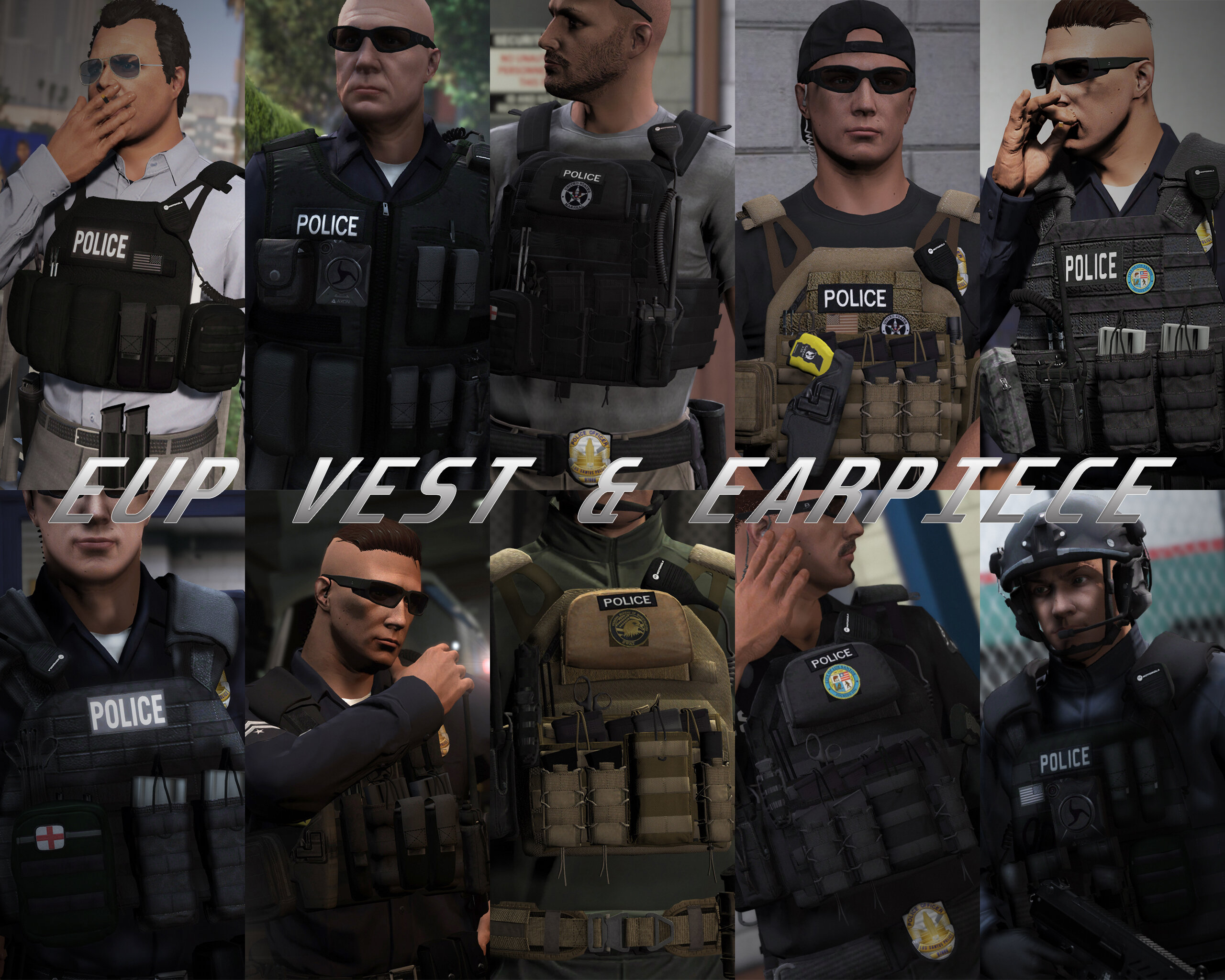
HANAKO got a reaction from Skydrohz for a file, EUP VEST&EARPIECEAwesome showcase video by Alex Preacher
Thanks to all of you, total downloads have now exceeded 60,000!
I hope you continue to enjoy this mod!
Description
This mod adds police vests, belts, and other equipment to GTA V.
Features
The vests fit properly with various outfits! No awkward gaps or improper sizing!
Realistic gear such as earpieces and realistic vests!
List of included vests
Installation
First, install EUP.
To use the new vests, you must install this mod too.
It is strongly recommended to back up the original files before installation!
Open the File folder.
Using OpenIV, navigate to:
Grand Theft Auto V\mods\update\x64\dlcpacks\eup\dlc.rpf\x64\eup_componentpeds.rpf
Open the corresponding folder (e.g., vest, earpiece, etc.), and place the folder (e.g., mp_m_freemode_01_mp_m_vinewood) that contains the files you want to use.
In-game, change the TASK category.
If your character’s vest (or other item) has changed to the one you installed, the installation was successful.
If installed correctly, the added folders should look like this:
Installation Q&A
Version History
DO NOT ASK
Requests for custom textures Requests to unlock the model Requests for DEV models Questions about installing this mod on FiveM Credits
Rockstar Games
Activision / Infinity Ward
Call of Duty: Modern Warfare (2019) Assets
DICE / Electronic Arts
Battlefield 4 Assets
Ubisoft
Ghost Recon: Wildlands Assets
Rainbow Six: Siege Assets
Battlestate Games
Escape From Tarkov Assets
Contributors
Hanako (me)
Xiphos
Hussky9
CG ARTStudio
Oleg
ericapg
Code4Mods
Alex Ashfold
Beta Testers (crunchycat, Howard)
Special Thanks
crunchycat, Theofficialthrowaway, gabe., Alex Preacher
(for taking many screenshots)
Attention
Do not unlock, edit, or sell models.
Do not attempt to profit from any part included in this mod.
Please follow these rules when releasing textures for this mod:
Always credit all names listed in this mod.
Do not include any files other than texture files (PNG, DDS).
Including any other files violates the guidelines and may result in your mod being deleted and disciplinary action taken.
Do not profit from retextures of my publicly released mods.
Do not release textures on any sites other than LSPDFR and GTA5-Mods.
Looking for the same quality PEDs?👉 Check this out!
Highly Recommended
-
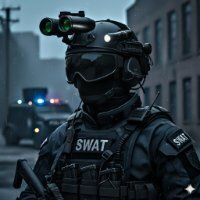
HANAKO got a reaction from Benjamin Compton for a file, GENERIC SWAT PEDDescriptions:
This mod replaces the Vanilla SWAT Ped with a more modern and realistic equipped SWAT Ped.
See all images of the GENERIC SWAT PED
FEATURES:
High quality models
The polygons are reduced as much as possible while maintaining the quality of the original models. High quality textures
Many textures have been reworked (removing dirt, changing colors). Realistic Equipment
It includes some realistic equipment such as Crye's JPC 1.0 and G3 Combat Uniform, Atlantic Signal Combat PTT, Taser x26p and Night Vision Goggles (with glowing lenses). Working LODs
Lower the quality of the models depending on the drawing distance to keep the performance of the game. Working Blood, Bullet Holes
Pants and shirts have accurate Blood and Bullet Hole Mapping based on GTA5 specifications. Multiple Organization Textures
In addition to LSPD SWAT, real-life units textures such as LAPD SWAT and the FBI are also included (this mod does not aim for 100% accuracy).
INSTALLATION:
It is recommended to back up the original files before the installation!
Replace all the files in this location
mods\x64e.rpf\models\cdimages\componentpeds_s_m_y.rpf
If the old Ped is loaded, install it in this location.
mods\update\x64\dlcpacks\patchday22ng\dlc.rpf\x64\models\cdimages\peds\patchday22ng.rpf\
mods\x64e.rpf\models\cdimages\pedprops.rpf
The Optional Colors folder contains other color variations that are available.
It's not a problem if the textures don't display in OpenIV!
ATTENTIONS:
Please observe the following rules when editing and releasing the textures of this mod.
1. Please credit all names included in this mod.
2.Please do not upload files except texture files (YTD).
3.Please do not profit from retexturing.
CREDITS:
Rockstar Games
Activision/Infinity Ward
-COD:MW2019 Assets
DICE/Electronic Arts
-Battlefield 4 Assets
UBI SOFT
-Ghost Recon Wildlands, Rainbow Sis Siege Assets
Battlestate
-Escape From Tarkov Assets
Hanako
Special thanks to crunchycat, Theofficialthrowaway, Alex Preacher, gabe. for taking the screenshots!
And thanks to crunchycat and Howard for the beta test!
Please do not unlock files or make any edits without permission.
Also, please do not try to profit from any of the parts included in this mod.
-
HANAKO got a reaction from Fedeik423 for a file, EUP VEST&EARPIECEAwesome showcase video by Alex Preacher
Thanks to all of you, total downloads have now exceeded 60,000!
I hope you continue to enjoy this mod!
Description
This mod adds police vests, belts, and other equipment to GTA V.
Features
The vests fit properly with various outfits! No awkward gaps or improper sizing!
Realistic gear such as earpieces and realistic vests!
List of included vests
Installation
First, install EUP.
To use the new vests, you must install this mod too.
It is strongly recommended to back up the original files before installation!
Open the File folder.
Using OpenIV, navigate to:
Grand Theft Auto V\mods\update\x64\dlcpacks\eup\dlc.rpf\x64\eup_componentpeds.rpf
Open the corresponding folder (e.g., vest, earpiece, etc.), and place the folder (e.g., mp_m_freemode_01_mp_m_vinewood) that contains the files you want to use.
In-game, change the TASK category.
If your character’s vest (or other item) has changed to the one you installed, the installation was successful.
If installed correctly, the added folders should look like this:
Installation Q&A
Version History
DO NOT ASK
Requests for custom textures Requests to unlock the model Requests for DEV models Questions about installing this mod on FiveM Credits
Rockstar Games
Activision / Infinity Ward
Call of Duty: Modern Warfare (2019) Assets
DICE / Electronic Arts
Battlefield 4 Assets
Ubisoft
Ghost Recon: Wildlands Assets
Rainbow Six: Siege Assets
Battlestate Games
Escape From Tarkov Assets
Contributors
Hanako (me)
Xiphos
Hussky9
CG ARTStudio
Oleg
ericapg
Code4Mods
Alex Ashfold
Beta Testers (crunchycat, Howard)
Special Thanks
crunchycat, Theofficialthrowaway, gabe., Alex Preacher
(for taking many screenshots)
Attention
Do not unlock, edit, or sell models.
Do not attempt to profit from any part included in this mod.
Please follow these rules when releasing textures for this mod:
Always credit all names listed in this mod.
Do not include any files other than texture files (PNG, DDS).
Including any other files violates the guidelines and may result in your mod being deleted and disciplinary action taken.
Do not profit from retextures of my publicly released mods.
Do not release textures on any sites other than LSPDFR and GTA5-Mods.
Looking for the same quality PEDs?👉 Check this out!
Highly Recommended
-
HANAKO got a reaction from NUV3X for a file, EUP Clothes PackDescriptions:
This mod is a pack of a variety of clothes extracted from another games More variety of clothes will be added in the future
Awesome video by Crunhycat
Features:
All clothes are made to fit my latest vests Patches are easy to edit Different color variations
Included Contents:
mp_m_freemode_01_mp_m_gunrunning_01
Jbib_014=Tactical Hoodie Jacket (Rolled up sleeves version) Jbib_015=Tactical Hoodie Jackte (Rolled up Sleeves , Tucked in Version) Jbib_016=Tactical Hoodie Jacket(For vest) Jbib_017=Tactical Hoodie Jacket(For vest, Tucked in Version) Jbib_018=Tactical Hoodie Jacket(Normal)
mp_m_freemode_01_mp_m_vinewood
Jbib_012=Condor Combat Shirt Jbib_013=Condor Short Sleeve Combat Shirt lowr_000_u=Joggers1 mp_m_freemode_01_mp_m_smuggler_01 jbib_008_u=Hoodie1
mp_m_freemode_01_p_mp_m_heist3
p_head_002=Fast Helmet with NVGs (flip down) p_head_003=Fast Helmet with NVGs (flip up)
mp_m_freemode_01_p_mp_m_heist4
p_head_001=The North Face Beanie p_head_002=Under Armour Beanie
mp_m_freemode_01_p_mp_m_vinewood
p_head_000=Fast Helmet p_head_001=Fast Helmet with headset
INSTLLATION:
Please make a backup of eup_componentpeds.rpf before installing this MOD
[Clothes]
1.install the EUP 2.Drag and drop all folders in "Main" to eup_componentpeds.rpf (mods\update\x64\dlcpacks\eup\dlc.rpf\x64) 3.Change Jbib, Torso2, Shirt Overlay, or Lower(in case of pants) using Trainer Mod in game (you can find at the end of the menu)
[Accessories]
1.install the EUP 2.Drag and drop all folders in "Accessories" to eup_componentpeds_p.rpf(mods\update\x64\dlcpacks\eup\dlc.rpf\x64) 3.Change Hat,Helmet or glasses(in the case of sunglasses) using Trainer Mod in game (you can find at the end of the menu)
If your character's appearance is changed, you've succeeded
VERSION HISTORY:
Do not ask me!!
Texture request Request to unlock a model Asset Release Request How to install these to FiveM
FREQUENTLY ASKED QUESTIONS
Credits:
Activision/Infinity Ward
-COD:MW2019 Assets
DICE/Electronic Arts
-Battlefield 4 Assets
Beta-testers:
crunchycat, Syther Screenshots:
crunchycat Alex_Ashfold, EUP team(patch textures)
ATTENTION
Do not unlock, edit, leak or sell the file Editing textures at non-profit is allowed Please do not upload any texture mods to sites other than this site and GTA5 MODS
My other mods
https://www.gta5-mods.com/misc/ai-cover-animations-mod-hanako
Highly Recommended
-
HANAKO reacted to Crunching for a file, LSPD SWAT mini-packA small pack of content for Hanako's vest pack and fast helmet.
This contains three vest textures and a helmet texture. The uniform in the screenshot is currently on sale in my discord.
Join my discord to see upcoming textures or commission custom work. The full uniform pack for this mod is now on sale!
https://discord.gg/G4cvQqT
-
HANAKO got a reaction from Zaylikespatrol for a file, EUP VEST&EARPIECEAwesome showcase video by Alex Preacher
Thanks to all of you, total downloads have now exceeded 60,000!
I hope you continue to enjoy this mod!
Description
This mod adds police vests, belts, and other equipment to GTA V.
Features
The vests fit properly with various outfits! No awkward gaps or improper sizing!
Realistic gear such as earpieces and realistic vests!
List of included vests
Installation
First, install EUP.
To use the new vests, you must install this mod too.
It is strongly recommended to back up the original files before installation!
Open the File folder.
Using OpenIV, navigate to:
Grand Theft Auto V\mods\update\x64\dlcpacks\eup\dlc.rpf\x64\eup_componentpeds.rpf
Open the corresponding folder (e.g., vest, earpiece, etc.), and place the folder (e.g., mp_m_freemode_01_mp_m_vinewood) that contains the files you want to use.
In-game, change the TASK category.
If your character’s vest (or other item) has changed to the one you installed, the installation was successful.
If installed correctly, the added folders should look like this:
Installation Q&A
Version History
DO NOT ASK
Requests for custom textures Requests to unlock the model Requests for DEV models Questions about installing this mod on FiveM Credits
Rockstar Games
Activision / Infinity Ward
Call of Duty: Modern Warfare (2019) Assets
DICE / Electronic Arts
Battlefield 4 Assets
Ubisoft
Ghost Recon: Wildlands Assets
Rainbow Six: Siege Assets
Battlestate Games
Escape From Tarkov Assets
Contributors
Hanako (me)
Xiphos
Hussky9
CG ARTStudio
Oleg
ericapg
Code4Mods
Alex Ashfold
Beta Testers (crunchycat, Howard)
Special Thanks
crunchycat, Theofficialthrowaway, gabe., Alex Preacher
(for taking many screenshots)
Attention
Do not unlock, edit, or sell models.
Do not attempt to profit from any part included in this mod.
Please follow these rules when releasing textures for this mod:
Always credit all names listed in this mod.
Do not include any files other than texture files (PNG, DDS).
Including any other files violates the guidelines and may result in your mod being deleted and disciplinary action taken.
Do not profit from retextures of my publicly released mods.
Do not release textures on any sites other than LSPDFR and GTA5-Mods.
Looking for the same quality PEDs?👉 Check this out!
Highly Recommended
-
HANAKO reacted to DylanTangy for a file, Detective/Gang Unit Mini-PackHello, these vehicles are meant to serve a low profile detective/gang unit role. The lighting is fairly minimum however, still very effective. I also did include a cage, dashcam, radar, and laptop which are assigned to extra 11 and 12 if you intend to use it as a patrol vehicle. This vehicle is set-up for a single stage lighting system and does include a functional flip-down sunvisor light that utilizes the ELS arrowboard function. You can toggle the sunvisor light by pressing ALT + [. Included is a replacement and addon version as well as a red and blue and all blue option.
Lighting Showcase - https://gyazo.com/63f28b54617003722d5ae1df178426f1
https://gyazo.com/6976c22f6a9d50632d8ab6fc639d4156
https://gyazo.com/7eef5f2a658c67e00555573ed860b080
_______________________________________________________________________________
Feel free to join my discord for support, custom model requests, and more ---> https://discord.gg/P4Xgxjs
-
HANAKO got a reaction from Benjamin Compton for a file, EUP VEST&EARPIECEAwesome showcase video by Alex Preacher
Thanks to all of you, total downloads have now exceeded 60,000!
I hope you continue to enjoy this mod!
Description
This mod adds police vests, belts, and other equipment to GTA V.
Features
The vests fit properly with various outfits! No awkward gaps or improper sizing!
Realistic gear such as earpieces and realistic vests!
List of included vests
Installation
First, install EUP.
To use the new vests, you must install this mod too.
It is strongly recommended to back up the original files before installation!
Open the File folder.
Using OpenIV, navigate to:
Grand Theft Auto V\mods\update\x64\dlcpacks\eup\dlc.rpf\x64\eup_componentpeds.rpf
Open the corresponding folder (e.g., vest, earpiece, etc.), and place the folder (e.g., mp_m_freemode_01_mp_m_vinewood) that contains the files you want to use.
In-game, change the TASK category.
If your character’s vest (or other item) has changed to the one you installed, the installation was successful.
If installed correctly, the added folders should look like this:
Installation Q&A
Version History
DO NOT ASK
Requests for custom textures Requests to unlock the model Requests for DEV models Questions about installing this mod on FiveM Credits
Rockstar Games
Activision / Infinity Ward
Call of Duty: Modern Warfare (2019) Assets
DICE / Electronic Arts
Battlefield 4 Assets
Ubisoft
Ghost Recon: Wildlands Assets
Rainbow Six: Siege Assets
Battlestate Games
Escape From Tarkov Assets
Contributors
Hanako (me)
Xiphos
Hussky9
CG ARTStudio
Oleg
ericapg
Code4Mods
Alex Ashfold
Beta Testers (crunchycat, Howard)
Special Thanks
crunchycat, Theofficialthrowaway, gabe., Alex Preacher
(for taking many screenshots)
Attention
Do not unlock, edit, or sell models.
Do not attempt to profit from any part included in this mod.
Please follow these rules when releasing textures for this mod:
Always credit all names listed in this mod.
Do not include any files other than texture files (PNG, DDS).
Including any other files violates the guidelines and may result in your mod being deleted and disciplinary action taken.
Do not profit from retextures of my publicly released mods.
Do not release textures on any sites other than LSPDFR and GTA5-Mods.
Looking for the same quality PEDs?👉 Check this out!
Highly Recommended
-
HANAKO got a reaction from MiBombo for a file, EUP VEST&EARPIECEAwesome showcase video by Alex Preacher
Thanks to all of you, total downloads have now exceeded 60,000!
I hope you continue to enjoy this mod!
Description
This mod adds police vests, belts, and other equipment to GTA V.
Features
The vests fit properly with various outfits! No awkward gaps or improper sizing!
Realistic gear such as earpieces and realistic vests!
List of included vests
Installation
First, install EUP.
To use the new vests, you must install this mod too.
It is strongly recommended to back up the original files before installation!
Open the File folder.
Using OpenIV, navigate to:
Grand Theft Auto V\mods\update\x64\dlcpacks\eup\dlc.rpf\x64\eup_componentpeds.rpf
Open the corresponding folder (e.g., vest, earpiece, etc.), and place the folder (e.g., mp_m_freemode_01_mp_m_vinewood) that contains the files you want to use.
In-game, change the TASK category.
If your character’s vest (or other item) has changed to the one you installed, the installation was successful.
If installed correctly, the added folders should look like this:
Installation Q&A
Version History
DO NOT ASK
Requests for custom textures Requests to unlock the model Requests for DEV models Questions about installing this mod on FiveM Credits
Rockstar Games
Activision / Infinity Ward
Call of Duty: Modern Warfare (2019) Assets
DICE / Electronic Arts
Battlefield 4 Assets
Ubisoft
Ghost Recon: Wildlands Assets
Rainbow Six: Siege Assets
Battlestate Games
Escape From Tarkov Assets
Contributors
Hanako (me)
Xiphos
Hussky9
CG ARTStudio
Oleg
ericapg
Code4Mods
Alex Ashfold
Beta Testers (crunchycat, Howard)
Special Thanks
crunchycat, Theofficialthrowaway, gabe., Alex Preacher
(for taking many screenshots)
Attention
Do not unlock, edit, or sell models.
Do not attempt to profit from any part included in this mod.
Please follow these rules when releasing textures for this mod:
Always credit all names listed in this mod.
Do not include any files other than texture files (PNG, DDS).
Including any other files violates the guidelines and may result in your mod being deleted and disciplinary action taken.
Do not profit from retextures of my publicly released mods.
Do not release textures on any sites other than LSPDFR and GTA5-Mods.
Looking for the same quality PEDs?👉 Check this out!
Highly Recommended
-
HANAKO got a reaction from TheRealRGTV for a file, EUP VEST&EARPIECEAwesome showcase video by Alex Preacher
Thanks to all of you, total downloads have now exceeded 60,000!
I hope you continue to enjoy this mod!
Description
This mod adds police vests, belts, and other equipment to GTA V.
Features
The vests fit properly with various outfits! No awkward gaps or improper sizing!
Realistic gear such as earpieces and realistic vests!
List of included vests
Installation
First, install EUP.
To use the new vests, you must install this mod too.
It is strongly recommended to back up the original files before installation!
Open the File folder.
Using OpenIV, navigate to:
Grand Theft Auto V\mods\update\x64\dlcpacks\eup\dlc.rpf\x64\eup_componentpeds.rpf
Open the corresponding folder (e.g., vest, earpiece, etc.), and place the folder (e.g., mp_m_freemode_01_mp_m_vinewood) that contains the files you want to use.
In-game, change the TASK category.
If your character’s vest (or other item) has changed to the one you installed, the installation was successful.
If installed correctly, the added folders should look like this:
Installation Q&A
Version History
DO NOT ASK
Requests for custom textures Requests to unlock the model Requests for DEV models Questions about installing this mod on FiveM Credits
Rockstar Games
Activision / Infinity Ward
Call of Duty: Modern Warfare (2019) Assets
DICE / Electronic Arts
Battlefield 4 Assets
Ubisoft
Ghost Recon: Wildlands Assets
Rainbow Six: Siege Assets
Battlestate Games
Escape From Tarkov Assets
Contributors
Hanako (me)
Xiphos
Hussky9
CG ARTStudio
Oleg
ericapg
Code4Mods
Alex Ashfold
Beta Testers (crunchycat, Howard)
Special Thanks
crunchycat, Theofficialthrowaway, gabe., Alex Preacher
(for taking many screenshots)
Attention
Do not unlock, edit, or sell models.
Do not attempt to profit from any part included in this mod.
Please follow these rules when releasing textures for this mod:
Always credit all names listed in this mod.
Do not include any files other than texture files (PNG, DDS).
Including any other files violates the guidelines and may result in your mod being deleted and disciplinary action taken.
Do not profit from retextures of my publicly released mods.
Do not release textures on any sites other than LSPDFR and GTA5-Mods.
Looking for the same quality PEDs?👉 Check this out!
Highly Recommended
-
HANAKO got a reaction from NoahNRW for a file, EUP Clothes PackDescriptions:
This mod is a pack of a variety of clothes extracted from another games More variety of clothes will be added in the future
Awesome video by Crunhycat
Features:
All clothes are made to fit my latest vests Patches are easy to edit Different color variations
Included Contents:
mp_m_freemode_01_mp_m_gunrunning_01
Jbib_014=Tactical Hoodie Jacket (Rolled up sleeves version) Jbib_015=Tactical Hoodie Jackte (Rolled up Sleeves , Tucked in Version) Jbib_016=Tactical Hoodie Jacket(For vest) Jbib_017=Tactical Hoodie Jacket(For vest, Tucked in Version) Jbib_018=Tactical Hoodie Jacket(Normal)
mp_m_freemode_01_mp_m_vinewood
Jbib_012=Condor Combat Shirt Jbib_013=Condor Short Sleeve Combat Shirt lowr_000_u=Joggers1 mp_m_freemode_01_mp_m_smuggler_01 jbib_008_u=Hoodie1
mp_m_freemode_01_p_mp_m_heist3
p_head_002=Fast Helmet with NVGs (flip down) p_head_003=Fast Helmet with NVGs (flip up)
mp_m_freemode_01_p_mp_m_heist4
p_head_001=The North Face Beanie p_head_002=Under Armour Beanie
mp_m_freemode_01_p_mp_m_vinewood
p_head_000=Fast Helmet p_head_001=Fast Helmet with headset
INSTLLATION:
Please make a backup of eup_componentpeds.rpf before installing this MOD
[Clothes]
1.install the EUP 2.Drag and drop all folders in "Main" to eup_componentpeds.rpf (mods\update\x64\dlcpacks\eup\dlc.rpf\x64) 3.Change Jbib, Torso2, Shirt Overlay, or Lower(in case of pants) using Trainer Mod in game (you can find at the end of the menu)
[Accessories]
1.install the EUP 2.Drag and drop all folders in "Accessories" to eup_componentpeds_p.rpf(mods\update\x64\dlcpacks\eup\dlc.rpf\x64) 3.Change Hat,Helmet or glasses(in the case of sunglasses) using Trainer Mod in game (you can find at the end of the menu)
If your character's appearance is changed, you've succeeded
VERSION HISTORY:
Do not ask me!!
Texture request Request to unlock a model Asset Release Request How to install these to FiveM
FREQUENTLY ASKED QUESTIONS
Credits:
Activision/Infinity Ward
-COD:MW2019 Assets
DICE/Electronic Arts
-Battlefield 4 Assets
Beta-testers:
crunchycat, Syther Screenshots:
crunchycat Alex_Ashfold, EUP team(patch textures)
ATTENTION
Do not unlock, edit, leak or sell the file Editing textures at non-profit is allowed Please do not upload any texture mods to sites other than this site and GTA5 MODS
My other mods
https://www.gta5-mods.com/misc/ai-cover-animations-mod-hanako
Highly Recommended
-
HANAKO got a reaction from DanielJrZzSwat for a file, EUP VEST&EARPIECEAwesome showcase video by Alex Preacher
Thanks to all of you, total downloads have now exceeded 60,000!
I hope you continue to enjoy this mod!
Description
This mod adds police vests, belts, and other equipment to GTA V.
Features
The vests fit properly with various outfits! No awkward gaps or improper sizing!
Realistic gear such as earpieces and realistic vests!
List of included vests
Installation
First, install EUP.
To use the new vests, you must install this mod too.
It is strongly recommended to back up the original files before installation!
Open the File folder.
Using OpenIV, navigate to:
Grand Theft Auto V\mods\update\x64\dlcpacks\eup\dlc.rpf\x64\eup_componentpeds.rpf
Open the corresponding folder (e.g., vest, earpiece, etc.), and place the folder (e.g., mp_m_freemode_01_mp_m_vinewood) that contains the files you want to use.
In-game, change the TASK category.
If your character’s vest (or other item) has changed to the one you installed, the installation was successful.
If installed correctly, the added folders should look like this:
Installation Q&A
Version History
DO NOT ASK
Requests for custom textures Requests to unlock the model Requests for DEV models Questions about installing this mod on FiveM Credits
Rockstar Games
Activision / Infinity Ward
Call of Duty: Modern Warfare (2019) Assets
DICE / Electronic Arts
Battlefield 4 Assets
Ubisoft
Ghost Recon: Wildlands Assets
Rainbow Six: Siege Assets
Battlestate Games
Escape From Tarkov Assets
Contributors
Hanako (me)
Xiphos
Hussky9
CG ARTStudio
Oleg
ericapg
Code4Mods
Alex Ashfold
Beta Testers (crunchycat, Howard)
Special Thanks
crunchycat, Theofficialthrowaway, gabe., Alex Preacher
(for taking many screenshots)
Attention
Do not unlock, edit, or sell models.
Do not attempt to profit from any part included in this mod.
Please follow these rules when releasing textures for this mod:
Always credit all names listed in this mod.
Do not include any files other than texture files (PNG, DDS).
Including any other files violates the guidelines and may result in your mod being deleted and disciplinary action taken.
Do not profit from retextures of my publicly released mods.
Do not release textures on any sites other than LSPDFR and GTA5-Mods.
Looking for the same quality PEDs?👉 Check this out!
Highly Recommended
-
HANAKO reacted to YobB1n for a file, Door ControlDoor Control
By YobB1n | Version 1.0.0.0 | Released November 25, 2020
Discord Server Link: https://discord.com/invite/Wj522qa5mT
This is a simple LSPDFR Plugin that allows you to change when the door stays open after exiting your police vehicle, and makes managing your police vehicle while on duty a touch easier and more realistic. It requires you to be on duty through LSPDFR. It is not intended as a direct replacement for KTFDO, as it is not a standalone RPH plugin. It rather implements a feature I personally wanted to add to LSPDFR. Door control, as well as the menu, only works for police vehicles.
Features
DOOR CONTROL - The door of your police vehicle will always remain open after exiting. DOOR CONTROL ONLY ON TRAFFIC STOPS/PURSUITS - More Realistic, the door of your police vehicle will only remain open when on a traffic stop, active pursuit, or if the player is in combat. This was the main reason I made this plugin, I wanted a more realistic option - The main times a police officer will leave the door open is for cover, usually on a pursuit, traffic stop, or other high-risk pullover. OTHER VEHICLE OPTIONS - Including Opening/Closing police vehicle doors, cleaning/repairing police vehicle, teleporting to your most recent police vehicle, and spawning your favourite police vehicle. FULL CONTROLLER SUPPORT - The Default Controller Key to Exit the Vehicle is set to 'Y'. If Door Control does not engage, you may have to change it in the .ini. The default menu toggle key is Right Control Key, and there is none for Controller, so you will also have to add it in the .ini if you do not want to use the keyboard. If you have KTFDO already installed, this plugin is still compatible. Simply set "Load Door Control on Startup" to false in the .ini settings, and you can still choose whether or not to keep the door open with the key press. If you enable Door Control on Pursuits/Traffic Stops Only, this makes it very convenient.
Requirements
LSPDFR 0.4.8 (Or Newer, if applicable)
RagePluginHook 1.81.1410.16064 (Or Newer, if applicable)
RageNativeUI
Most Recent, Legal Copy of GTAV (Retail, Epic Games, or Steam all Work)
Installation
Unzip the file. Copy ALL of the Contents of the “Grand Theft Auto V” folder into your MAIN “Grand Theft Auto V” or “GTAV” Directory, which contains “GTAV.exe” in it.
How to Use
Go on duty, either by using a police station or typing 'forceduty' into the RPH console. Do NOT load this plugin through the RPH console. This plugin will load automatically once you go on duty. If you can load this plugin through RPH console, you did not install it correctly. Press "Right Control Key" or Whatever You Changed the Key to, to open the menu. By Default, Door Control will be enabled on startup. Door Control only during traffic stops and Pursuits is not. You can change what is enabled on startup in the .ini Settings file, or enable/disable features in-game, using the menu. Please note, if you enable/disable Door Control while currently in a police vehicle, you will have to exit, then re-enter the vehicle for the changes to take effect. What to Do if you Have a Bug/Recommendation
Please, report any/all bugs or issues so that I can work on them. Do NOT report bugs in the review of the plugin. Instead, leave a message in my discord server, or comment on the plugin page of LSPDFR (the page you downloaded this pack from) with a concise description of the problem and a solution if you have one.
Support the Effort
If you enjoy my plugins, please share them with your friends and leave a positive review, and report bugs so the experience can be better for everyone. Also, it would mean a lot if you consider supporting me on PayPal, https://paypal.me/pools/c/8sIvqh6VGs
Thanks a lot, and Enjoy!
-
HANAKO got a reaction from connor088 for a file, GENERIC SWAT PEDDescriptions:
This mod replaces the Vanilla SWAT Ped with a more modern and realistic equipped SWAT Ped.
See all images of the GENERIC SWAT PED
FEATURES:
High quality models
The polygons are reduced as much as possible while maintaining the quality of the original models. High quality textures
Many textures have been reworked (removing dirt, changing colors). Realistic Equipment
It includes some realistic equipment such as Crye's JPC 1.0 and G3 Combat Uniform, Atlantic Signal Combat PTT, Taser x26p and Night Vision Goggles (with glowing lenses). Working LODs
Lower the quality of the models depending on the drawing distance to keep the performance of the game. Working Blood, Bullet Holes
Pants and shirts have accurate Blood and Bullet Hole Mapping based on GTA5 specifications. Multiple Organization Textures
In addition to LSPD SWAT, real-life units textures such as LAPD SWAT and the FBI are also included (this mod does not aim for 100% accuracy).
INSTALLATION:
It is recommended to back up the original files before the installation!
Replace all the files in this location
mods\x64e.rpf\models\cdimages\componentpeds_s_m_y.rpf
If the old Ped is loaded, install it in this location.
mods\update\x64\dlcpacks\patchday22ng\dlc.rpf\x64\models\cdimages\peds\patchday22ng.rpf\
mods\x64e.rpf\models\cdimages\pedprops.rpf
The Optional Colors folder contains other color variations that are available.
It's not a problem if the textures don't display in OpenIV!
ATTENTIONS:
Please observe the following rules when editing and releasing the textures of this mod.
1. Please credit all names included in this mod.
2.Please do not upload files except texture files (YTD).
3.Please do not profit from retexturing.
CREDITS:
Rockstar Games
Activision/Infinity Ward
-COD:MW2019 Assets
DICE/Electronic Arts
-Battlefield 4 Assets
UBI SOFT
-Ghost Recon Wildlands, Rainbow Sis Siege Assets
Battlestate
-Escape From Tarkov Assets
Hanako
Special thanks to crunchycat, Theofficialthrowaway, Alex Preacher, gabe. for taking the screenshots!
And thanks to crunchycat and Howard for the beta test!
Please do not unlock files or make any edits without permission.
Also, please do not try to profit from any of the parts included in this mod.
-
HANAKO got a reaction from Operation for a file, GENERIC SWAT PEDDescriptions:
This mod replaces the Vanilla SWAT Ped with a more modern and realistic equipped SWAT Ped.
See all images of the GENERIC SWAT PED
FEATURES:
High quality models
The polygons are reduced as much as possible while maintaining the quality of the original models. High quality textures
Many textures have been reworked (removing dirt, changing colors). Realistic Equipment
It includes some realistic equipment such as Crye's JPC 1.0 and G3 Combat Uniform, Atlantic Signal Combat PTT, Taser x26p and Night Vision Goggles (with glowing lenses). Working LODs
Lower the quality of the models depending on the drawing distance to keep the performance of the game. Working Blood, Bullet Holes
Pants and shirts have accurate Blood and Bullet Hole Mapping based on GTA5 specifications. Multiple Organization Textures
In addition to LSPD SWAT, real-life units textures such as LAPD SWAT and the FBI are also included (this mod does not aim for 100% accuracy).
INSTALLATION:
It is recommended to back up the original files before the installation!
Replace all the files in this location
mods\x64e.rpf\models\cdimages\componentpeds_s_m_y.rpf
If the old Ped is loaded, install it in this location.
mods\update\x64\dlcpacks\patchday22ng\dlc.rpf\x64\models\cdimages\peds\patchday22ng.rpf\
mods\x64e.rpf\models\cdimages\pedprops.rpf
The Optional Colors folder contains other color variations that are available.
It's not a problem if the textures don't display in OpenIV!
ATTENTIONS:
Please observe the following rules when editing and releasing the textures of this mod.
1. Please credit all names included in this mod.
2.Please do not upload files except texture files (YTD).
3.Please do not profit from retexturing.
CREDITS:
Rockstar Games
Activision/Infinity Ward
-COD:MW2019 Assets
DICE/Electronic Arts
-Battlefield 4 Assets
UBI SOFT
-Ghost Recon Wildlands, Rainbow Sis Siege Assets
Battlestate
-Escape From Tarkov Assets
Hanako
Special thanks to crunchycat, Theofficialthrowaway, Alex Preacher, gabe. for taking the screenshots!
And thanks to crunchycat and Howard for the beta test!
Please do not unlock files or make any edits without permission.
Also, please do not try to profit from any of the parts included in this mod.
-
HANAKO got a reaction from DanielJrZzSwat for a file, GENERIC SWAT PEDDescriptions:
This mod replaces the Vanilla SWAT Ped with a more modern and realistic equipped SWAT Ped.
See all images of the GENERIC SWAT PED
FEATURES:
High quality models
The polygons are reduced as much as possible while maintaining the quality of the original models. High quality textures
Many textures have been reworked (removing dirt, changing colors). Realistic Equipment
It includes some realistic equipment such as Crye's JPC 1.0 and G3 Combat Uniform, Atlantic Signal Combat PTT, Taser x26p and Night Vision Goggles (with glowing lenses). Working LODs
Lower the quality of the models depending on the drawing distance to keep the performance of the game. Working Blood, Bullet Holes
Pants and shirts have accurate Blood and Bullet Hole Mapping based on GTA5 specifications. Multiple Organization Textures
In addition to LSPD SWAT, real-life units textures such as LAPD SWAT and the FBI are also included (this mod does not aim for 100% accuracy).
INSTALLATION:
It is recommended to back up the original files before the installation!
Replace all the files in this location
mods\x64e.rpf\models\cdimages\componentpeds_s_m_y.rpf
If the old Ped is loaded, install it in this location.
mods\update\x64\dlcpacks\patchday22ng\dlc.rpf\x64\models\cdimages\peds\patchday22ng.rpf\
mods\x64e.rpf\models\cdimages\pedprops.rpf
The Optional Colors folder contains other color variations that are available.
It's not a problem if the textures don't display in OpenIV!
ATTENTIONS:
Please observe the following rules when editing and releasing the textures of this mod.
1. Please credit all names included in this mod.
2.Please do not upload files except texture files (YTD).
3.Please do not profit from retexturing.
CREDITS:
Rockstar Games
Activision/Infinity Ward
-COD:MW2019 Assets
DICE/Electronic Arts
-Battlefield 4 Assets
UBI SOFT
-Ghost Recon Wildlands, Rainbow Sis Siege Assets
Battlestate
-Escape From Tarkov Assets
Hanako
Special thanks to crunchycat, Theofficialthrowaway, Alex Preacher, gabe. for taking the screenshots!
And thanks to crunchycat and Howard for the beta test!
Please do not unlock files or make any edits without permission.
Also, please do not try to profit from any of the parts included in this mod.
-
HANAKO got a reaction from Roman McCartney for a file, GENERIC SWAT PEDDescriptions:
This mod replaces the Vanilla SWAT Ped with a more modern and realistic equipped SWAT Ped.
See all images of the GENERIC SWAT PED
FEATURES:
High quality models
The polygons are reduced as much as possible while maintaining the quality of the original models. High quality textures
Many textures have been reworked (removing dirt, changing colors). Realistic Equipment
It includes some realistic equipment such as Crye's JPC 1.0 and G3 Combat Uniform, Atlantic Signal Combat PTT, Taser x26p and Night Vision Goggles (with glowing lenses). Working LODs
Lower the quality of the models depending on the drawing distance to keep the performance of the game. Working Blood, Bullet Holes
Pants and shirts have accurate Blood and Bullet Hole Mapping based on GTA5 specifications. Multiple Organization Textures
In addition to LSPD SWAT, real-life units textures such as LAPD SWAT and the FBI are also included (this mod does not aim for 100% accuracy).
INSTALLATION:
It is recommended to back up the original files before the installation!
Replace all the files in this location
mods\x64e.rpf\models\cdimages\componentpeds_s_m_y.rpf
If the old Ped is loaded, install it in this location.
mods\update\x64\dlcpacks\patchday22ng\dlc.rpf\x64\models\cdimages\peds\patchday22ng.rpf\
mods\x64e.rpf\models\cdimages\pedprops.rpf
The Optional Colors folder contains other color variations that are available.
It's not a problem if the textures don't display in OpenIV!
ATTENTIONS:
Please observe the following rules when editing and releasing the textures of this mod.
1. Please credit all names included in this mod.
2.Please do not upload files except texture files (YTD).
3.Please do not profit from retexturing.
CREDITS:
Rockstar Games
Activision/Infinity Ward
-COD:MW2019 Assets
DICE/Electronic Arts
-Battlefield 4 Assets
UBI SOFT
-Ghost Recon Wildlands, Rainbow Sis Siege Assets
Battlestate
-Escape From Tarkov Assets
Hanako
Special thanks to crunchycat, Theofficialthrowaway, Alex Preacher, gabe. for taking the screenshots!
And thanks to crunchycat and Howard for the beta test!
Please do not unlock files or make any edits without permission.
Also, please do not try to profit from any of the parts included in this mod.
-
HANAKO got a reaction from nel4127 for a file, EUP VEST&EARPIECEAwesome showcase video by Alex Preacher
Thanks to all of you, total downloads have now exceeded 60,000!
I hope you continue to enjoy this mod!
Description
This mod adds police vests, belts, and other equipment to GTA V.
Features
The vests fit properly with various outfits! No awkward gaps or improper sizing!
Realistic gear such as earpieces and realistic vests!
List of included vests
Installation
First, install EUP.
To use the new vests, you must install this mod too.
It is strongly recommended to back up the original files before installation!
Open the File folder.
Using OpenIV, navigate to:
Grand Theft Auto V\mods\update\x64\dlcpacks\eup\dlc.rpf\x64\eup_componentpeds.rpf
Open the corresponding folder (e.g., vest, earpiece, etc.), and place the folder (e.g., mp_m_freemode_01_mp_m_vinewood) that contains the files you want to use.
In-game, change the TASK category.
If your character’s vest (or other item) has changed to the one you installed, the installation was successful.
If installed correctly, the added folders should look like this:
Installation Q&A
Version History
DO NOT ASK
Requests for custom textures Requests to unlock the model Requests for DEV models Questions about installing this mod on FiveM Credits
Rockstar Games
Activision / Infinity Ward
Call of Duty: Modern Warfare (2019) Assets
DICE / Electronic Arts
Battlefield 4 Assets
Ubisoft
Ghost Recon: Wildlands Assets
Rainbow Six: Siege Assets
Battlestate Games
Escape From Tarkov Assets
Contributors
Hanako (me)
Xiphos
Hussky9
CG ARTStudio
Oleg
ericapg
Code4Mods
Alex Ashfold
Beta Testers (crunchycat, Howard)
Special Thanks
crunchycat, Theofficialthrowaway, gabe., Alex Preacher
(for taking many screenshots)
Attention
Do not unlock, edit, or sell models.
Do not attempt to profit from any part included in this mod.
Please follow these rules when releasing textures for this mod:
Always credit all names listed in this mod.
Do not include any files other than texture files (PNG, DDS).
Including any other files violates the guidelines and may result in your mod being deleted and disciplinary action taken.
Do not profit from retextures of my publicly released mods.
Do not release textures on any sites other than LSPDFR and GTA5-Mods.
Looking for the same quality PEDs?👉 Check this out!
Highly Recommended
-
HANAKO reacted to KLE0 for a file, [ELS] LAPD FPIS Mini-PackVehicles
- 2014 Ford Police Interceptor Sedan LAPD Arjent
- 2015 Ford Police Interceptor Sedan LAPD Slicktop
Features
- Full 3-stage lighting with real LAPD lighting patterns.
- Takedown via Arjent and dual outward-facing spotlights (slicktop only).
- Breaking glass, working dials, animated exhaust, and bullet-resistant windshield.
- Authentic 4K LAPD livery (including 4 liveries for each vehicle).
- Accurate and beautiful environmental lighting with each light module featuring its own corona.
- Optimized file sizes (Arjent: 12.07MB, Slicktop: 11.73MB, including all 4K liveries).
Optional Equipment
- LoJack system (extra 10)
- Laird antennas (extra 12, Arjent only)
- Dashcam (extra 12, slicktop only)
Please note that this is a ELS/non-ELS hybrid vehicle which means it requires custom carcols/carvariations for the lights to work properly.
When using the replace option, the included vehicles.meta files are required for correct dials and extra spawning behavior.
You're welcome to follow my WIP gallery where I'll be posting updates as I work on my projects.
Acknowledgements
- @Alex0365 and @Repticide for helping me with beta testing.
- PNWParksFan for his Live Lights plugin which makes customizing and debugging siren settings actually fun.
- LMS for his DevHelper (part of LML), which makes vehicle development immeasurably easier (countless of hours saved).
- vladimir850 for his excellent LAPD graphics template.
Permissions
- You MAY NOT upload this mod to other websites or redistribute via other channels without my permission.
- You MAY NOT, in any circumstances, use this model for your financial gain in any way, shape or form.
-
HANAKO got a reaction from punisher844 for a file, FEMALE EUP VESTDescription:
This is a mod that adds female EUP Stuff The current version includes four vests and one belt More vests and other stuff will be added in the future
INSTLLATION
First, install the EUP
Please make a backup of eup_componentpeds.rpf before installing this MOD 1.Open the "File" folder. 2.Go to "Grand Theft Auto V\mods\update\x64\dlcpacks\eup\dlc.rpf\x64\eup_componentpeds.rpf" using OpenIV 3.Place the mp_m_freemode_01_mp_m_vinewood folder in eup_componentpeds.rp (add the Vinewood folder as it is not included in the default EUP) 4.Change the "TASK"(Please check the table below for categories.) category in the game. 5.If your character's vest(or other) has been changed to the one you installed, it's a success. Do not ask me!!
Texture request Request to unlock a model Asset Release Request How to install these to FiveM
Credits:
Rockstar Games
Activision/Infinity Ward
-COD:MW2019 Assets
DICE/Electronic Arts
-Battlefield 4 Assets
UBI SOFT
-Ghost Recon Wildlands, Rainbow Sis Siege Assets
Battlestate
-Escape From Tarkov Assets
Hanako
xiphos
Hussky9
CG ARTStudio
Oleg
ericapg
Code4Mods
Alex Ashfold
Beta-testers(crunchycat, Howard)
Screenshots by crunchycat
-
HANAKO got a reaction from Julian Tillman for a file, EUP Safariland Holster & Taser Drop Leg HolsterINSTLLATION
First, install the EUP
Put all folders in this location Grand Theft Auto V\mods\update\x64\dlcpacks\eup\dlc.rpf\x64\eup_componentpeds.rpf You can find these in the "Teef" section in game
Do not ask me!!
Request for Textures Request to unlock a model Request for the release of development parts The source of model
FREQUENTLY ASKED QUESTIONS
Q.How do I use multiple textures? A.Rename the YTD and YDD correctly and install them in, for example, January2016, or edit the YMT to enable multi-textures. Q.Will it work with FiveM? A.YDDs with a file size of 26 MB or less can be used with no problem. However, don't ask me how to install it on FiveM. Q.Can I upload a texture? A.Textures only, no problem.
Credits:
HANAKO Hussky9 Alex Ashfold
ATTENTION
Do not unlock, edit, leak or sell the file Editing textures at non-profit is allowed
My other mods
https://www.gta5-mods.com/misc/ai-cover-animations-mod-hanako
Highly Recommended