


DeLuca
Members
-
Joined
-
Last visited
Everything posted by DeLuca
-
Thank you @Kal74 I appreciate it. I will be sure to let you know when I reach a testing point as I will with the rest of the community. Right now, I just require patience and understanding as it may take some time seeing as I'll have to dig up all my old scripts, update/re-code as needed and of course a general overhaul of the whole system. All of that around my already hectic and busy daily schedule. I'll be sure to post more updates as often as I can once I get this old ball rolling again. Suggestions, however are never a negative thing in my eyes and all ideas will be considered.
-
Sorry folks, I've had a lot of changes to my every day life over the last year or so including the birth of my second child and schedule changes with work. All this has kept me to just getting a couple hours a night of console or PC gaming a week (if that) for quite some time now. I've really been having the urge to get back to coding and 3d modelling in general so hopefully () I'll be able to make some time to get it done. It definitely helps to see the excitement some of you had (or have?) for this and I don't want to disappoint. With all that said, I'll be taking the next couple of weeks to refresh myself and dig back into the coding for Premium Callouts. Of course, I've had plenty of time to come up with some new crafty ideas to innovate the whole project in general. So if all of you who are getting the feeling of pure joy and excitement from these WIP previews can have some patience I will certainly deliver. Stay posted and I'll grab a few volunteers for beta testing in the near future.
-
PREMIUM CALLOUTS With my return to GTA: V and the modding scene in general, I have been aiming for some new and improved additions to the recently improved LSPD:FR modification. Currently there is a wide variety of callout add-ons, however I feel that they are extremely repetitive and still only add a limited amount of depth to the near limitless possibilities that is LSPD:FR. With that said, I have been quietly and intently working on a surprise as my grand release to announce my return to the modding world of GTA. Premium Callouts will not only change your entire outlook on how you approach LSPD:FR, but also how you should expect to play the modification. With ultra realistic features and callouts you'll feel like you're in the shoes of a real-life law enforcement officer as he attempts to keep peace in the community. Now, please keep in mind this is still a heavy work in progress but an upcoming addition none-the-less. So without further delay, I give you a quick run through of the calls you can expect once Premium Callouts launches and a quick list of features which will go with it.- Callouts Domestic Dispute Store Alarm Response Illegal/Legal Carmeet Traffic Stop Assistance Required Home Invasion Local Bar Brawl Possible Prostitution in Progress Unit Requesting Pursuit Supervisor Possible Street Fight in Progress And many more as the mod progresses... - Features Complete config control (Spawns, outcomes, etc) Dynamic responses Tie in with LSPD:FR systems Advanced controls/menus per call Many more not being disclosed at this time... There currently is no release date for this modification. It may possibly be after an LSPD:FR 0.3 release to see what power we'll have to combine the systems together better. I will keep you all updated as progress is made and when beta testing will launch. So, for now I leave you with some media of the work in progress.
-
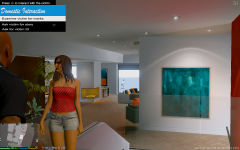 Just a preview of what's to come... Do NOT hound me about this. I will release it when it's all said and done. I want to perfect it before a public release. That's all for now..
 -
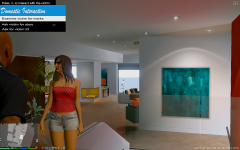 Just a preview of what's to come... Do NOT hound me about this. I will release it when it's all said and done. I want to perfect it before a public release. That's all for now..
© Adam DeLuca
-
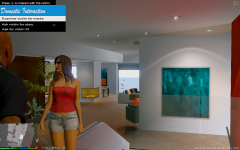 Just a preview of what's to come... Do NOT hound me about this. I will release it when it's all said and done. I want to perfect it before a public release. That's all for now..
© Adam DeLuca
-
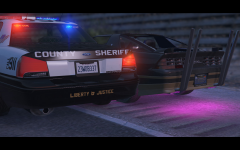 Heaven County Sheriff Units trading paint with a street racer.
 -
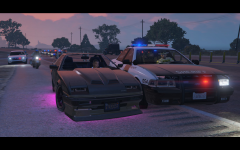 HCSD Unit attempting to shut down one vehicle involved in a massive street race down a San Andreas freeway.
 -
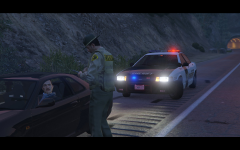 HCSD Deputy issuing a speeding citation on the freeway.
 -
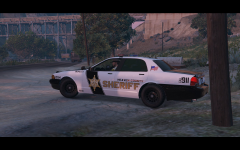 A Heaven County Sheriff Deputy staking out nearby traffic under the highway.
 -
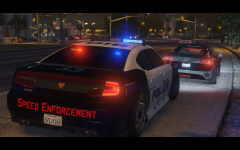 HHPD rolled out their new Buffalo S Speed Enforcement units to help counter the recent peak in street races around downtown.
 -
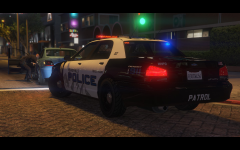 HHPD conducting a vehicle search on a suspicious car along the street.
 -
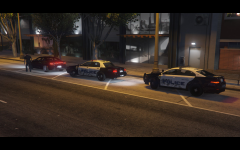 Heaven Hills Police Department conducting a traffic stop on a possible intoxicated driver.
 -
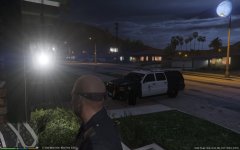 Local unit on scene of a domestic disturbance call in Mirror Park.
 -
Alexander has already updated Script Hook: http://www.dev-c.com/gtav/scripthookv/
-
Well according to the title it's just a showing not a release.
-
The download is coming soon. I'm currently looking for Beta testers for it first. Once I update the version, I will release the previous version to the public.
-
This is NOT for GTA IV. It's for GTA V...
-
Current Version: 0.1.0b Intro Prime Reality FX (PRFX) is an advanced graphic enhancement modification for Grand Theft Auto V (GTA:V). It is one of the first and most exceedingly powerful graphic modifications currently. PRFX is a customized, and powerfully reconfigured Reshade setting overhaul to achieve dominant performance in-game. Currently, PRFX is a private modification and not openly available to the public. This is however subject to change as future versions are developed. Per each new version of PRFX, the obsolete variation will be released publicly. This enhancement modification enables high-focused bloom, vibrance, lensflare, sharpening, advanced anti-aliasing, and more for your game. For best quality performance, PRFX should be paired with minimum settings of high textures, ultra reflections, FXAA, high post-FX, and anisotropic filtering enabled. The higher your settings, the better the experience of course. Media Requirements Retail version of GTA: V (Steam, DVD, etc) (We do not support illegal use of products/services) Solid FPS on High Settings at a minimum DX10, DX10.1, or DX11 Support GPU with support of AA in form of FXAA at least Credits DeLuca Modding for PRFX shader coding, PRFX configurations, and Reshade & SweetFX setting configuration Reshade Development Team for the Reshade & SweetFX post-processing framework Marty McFly for his MasterEffects All author references from Marty's MasterEffects
-
Loving the gameplay and solid frame rates for sure. Optimization is perfect and gives solid FPS on maximum settings.
-
-
That's still unknown at this time. We've got some learning time ahead of us before we know the in and outs of how V modding will play out.
-


