Skip to content
View in the app

A better way to browse. Learn more.

LCPDFR.com

A full-screen app on your home screen with push notifications, badges and more.

To install this app on iOS and iPadOS
  1. Tap the Share icon in Safari
  2. Scroll the menu and tap Add to Home Screen.
  3. Tap Add in the top-right corner.
To install this app on Android
  1. Tap the 3-dot menu (⋮) in the top-right corner of the browser.
  2. Tap Add to Home screen or Install app.
  3. Confirm by tapping Install.

Thomas199920

Members
  • Joined

  • Last visited

Files posted by Thomas199920

  1. Paleto Bay police department skin made by Thegreathah.
    Edited by me to: CVPI, Expedition, Impala, Tahoe, 2015 FPIU.
    • 57 Downloads
    • 2 Comments
    Updated
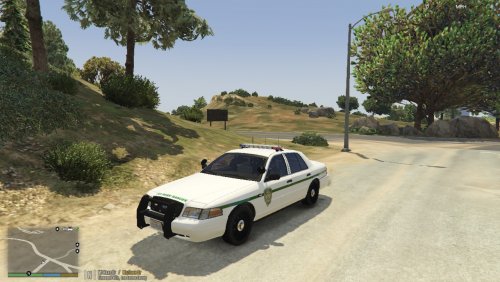
  2. CVPI San Andreas Park Ranger skins made by Thomas199920.
    It's made for CVPI's that use the DSF template.
    You can edit it for private use.
    Don't claim it as your own creation.
    The CVPI used in the screenshots is made by Carperino.
     
    • 124 Downloads
    • 5 Comments
    Updated
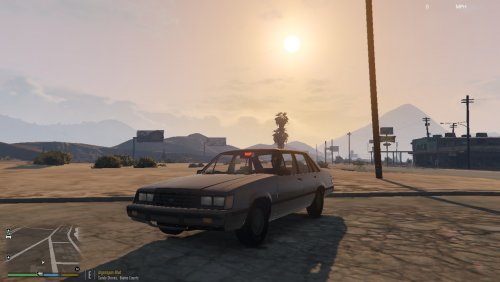
  3. A unmarked Ford LTD
    Known bugs: Glass doesn't break.
    Steering wheel doesn't move.
    • 434 Downloads
    • 6 Comments
    Submitted

Account

Navigation

Search

Search

Configure browser push notifications

Chrome (Android)
  1. Tap the lock icon next to the address bar.
  2. Tap Permissions → Notifications.
  3. Adjust your preference.
Chrome (Desktop)
  1. Click the padlock icon in the address bar.
  2. Select Site settings.
  3. Find Notifications and adjust your preference.