

Gijsjuh
Members
-
Joined
-
Last visited
Everything posted by Gijsjuh
-
I probably won't be the only one who has his GTA 5 installed twice. I have the modded versions which I use to play LSPDFR, but I also have the vanilla version which I use for GTA Online. I own the game within Rockstar Social Club (there's no Steam or Epic involved). I notice that when I try to boot up my modded copy of the game (which is called 'Grand Theft Auto V mod' RPH gets stuck on 'launching game' and simply launches my vanilla copy of the game. The GTA version that Rockstar Games Launcher uses as installation directory is the folder which contains the vanilla copy of the game. So basically everytime I try to boot up my modded copy, it boots up the Rockstar Games Launcher which automatically boots up the vanilla game. When I try to manually boot the modded game, it won't boot or it boots up the vanilla game again. I have read about quite a few people who managed to get this working, I am pretty sure I am doing something wrong. I just don't know what yet!
-
I do, I have installed this gameconfig: https://www.gta5-mods.com/misc/gta-5-gameconfig-300-cars with this heap adjuster: https://www.gta5-mods.com/tools/heap-limit-adjuster-600-mb-of-heap
-
Hello everyone, So since a while my game has been crashing randomly. This happens during traffic stops, pursuits but also when AFK. I tried the fixes I found online ,but none of them were able to fix the problem. I do use modded cars still, and also a 0,5 peds/vehicles gameconfig. I was hoping someone who understands the RagePluginHook.log files a little better than me could help me out with this! RagePluginHook.log
-
 That's odd, I don't remember me installing anything besides what was required for this mod to work. But I think you know your files a bit better than I do, so I must have done something wrong. Anyways, thank you for your reply. I will see if I can notice anything out of the ordinary.
- 954 comments
- 24 reviews
-
So I noticed this when I was playing LSPDFR. I have both the EUP packs installed into my game, is there anything I could try to fix this?
- 954 comments
- 24 reviews
-
EDIT: So after some more searching I tried San Andres Ultimate Backup, it is exactly what I was looking for. Thank you to those who read this
-
Hello everyone, I use EUP Menu with both packs, and I also use Ultimate Backup when playing LSPDFR. I found some mods that are supposed to add things to Ultimate Backup, and mods that give Ultimate Backup peds EUP outfits. For me it's quite confusing though, I am not sure which mods I should use for what I am looking for. I remember a few months back I was using these mods too, but I had another mod that added a lot more options for Ultimate Backup. I got to pick a lot of more options than I have right now. I was hoping someone over here could recommend me mods for the following: -I would like Ultimate Backup peds to spawn with EUP outfits -I would like more kinds of backup in Ultimate Backup, so more agencies or just different kinds of troops. Thank you very much for your time!
-
I don't have it through Steam :( Thanks!! Ill try this!
-
Hey guys, As you probably now GTA 5 has been updated, so mods like RPH, ScripthookV and LSPDFR will first have to update before they're playable in this version. I am wondering if there's a way to play the game without installing the updates. I have backed up my game with RPH, but everytime I revert back to it I get some error (7002.1). I have tried adding -scOfflineOnly to my commandline.txt, but the game won't even launch if i do this. I read some possible solutions online but none of them have been able to actually fix this. I was wondering if there's a more up to date fix out there somewhere. If no, I guess I will have to be patient 🙂 Thank you in advance. I have attached my RPH.log for those who need it! RagePluginHook.log
-
Thank you so much! I did try doing a similar thing to backup.xml, without any succes. I will try this and be sure to let you know!
-
I recently installed this mod for LSPDFR: https://www.lcpdfr.com/downloads/gta5mods/misc/22439-extra-police-car-slots/ This mod adds the possibility to add more police car slots, so you aren't limited to the vanilla game car slots. I am wondering if there's a way to make NPC officers also drive these vehicles, in traffic and as backup. I have no idea if this is even possible, but I would like to know! Thank you in advance!
-
I did try to downgrade a while back, this went without succes. I will try it again but first I will back up my current game. This issue isn't gamebreaking or anything, but if I can fix it I will fix it! Thank you for the replies, I know what to do!
-
Good afternoon everyone. I play LSPDFR along with some other mods on my version of GTA 5. I have succesfullly managed to get it all working well without the occasional crash. I decided to add a trainer so I could do some things faster than before. I tried out a few ones, all of these made my games crash. I eventually tried the NativeTrainer that comes with ScripthookV. This trainer was the only one that didnt make my game crash, but in comparison to trainers like Menyoo it's a little primitive. I have a custom gameconfig with 0,5 peds and traffic and I have the GTAVHeapadjuster and the PackfileLimitadjuster but still my game crashes not more than 10 seconds after I use the trainer. It's not the biggest problem in the world or anything, but it's something that I have been experiencing even before the latest update. I am not under the impression that my game is running out of memory, because this issue only happens when I add a trainer. ScriptHookV.log RagePluginHook.log AdvancedHookV.log
-
Thank you for your reply! There's not really a lot I can do against it is what I understand from this?
-
Hello everyone, I am trying to learn LCPDFR, the thing is that my keys show up different than they are. The actions that I do by pressing the E button are shown as a: . by the game. Every other key is also shown as a different key, so I have no idea how to do most things. Is this a common issue? And does anyone know how to fix it?
-
I have tried LML various times and I just couldn't get the hang of it. I wasn't succesfull in loading the mods into the game, even while following guides and tutorials. I will give it another go when I am home again. Got exactly the same issue man, it's really weird.
-
Alright then. But if it's not an LSPDFR issue it could possibly be caused by the new update. Are there more complaints like these?
-
I have an issue with my models. I put them in Patchday23ng and did everything I normally do (like the meta file). Some models are loading while others are just loading in their default form. It's odd because all of these files are in the exact same location, so that makes me wonder why certain ones work while others don't
-
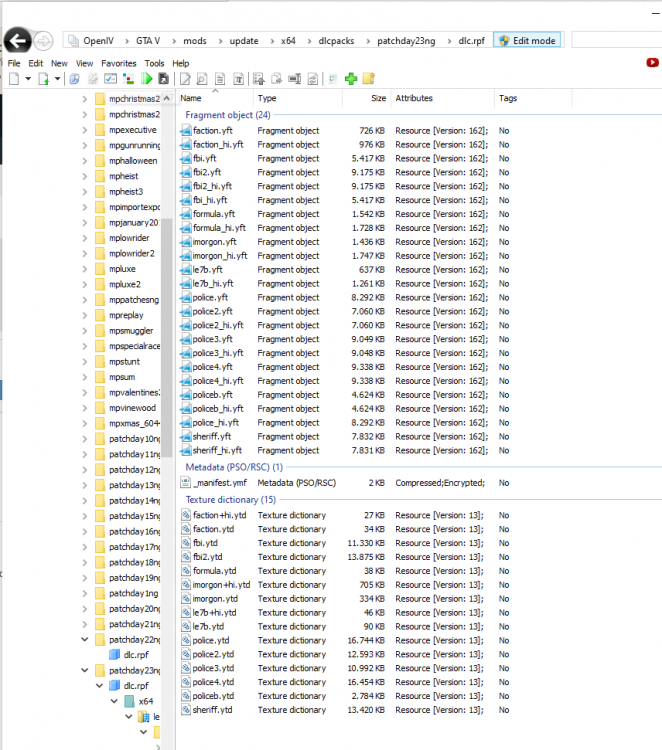
I have tried putting the cars into patchday22ng which for some reason made more models load. I have tried various packs but so far I haven't been a 100% succesfull. POLICE works, POLICE2 doesn't, POLICE3 does but also doesn't (spawns both original model and modded model), POLICE4 does work. Then both FBI slots work, Sheriff works but Sheriff2 doesn't. PoliceB also doesn't work. I have tried putting the files in various patchday folders, kept getting the same results. The weird thing is that the ELS lights work very well on the original models, while the ELS lights were made for specific modded cars with different appearances than the original models. I have no idea if this is supposed to happen. EDIT: I have added a picture of my OpenIV, this is where I put the modded cars. As I previously mentioned some of these models work without a problem and some of them simply refuse to spawn. I use this pack: https://www.lcpdfr.com/downloads/gta5mods/vehiclemodels/26793-els-sahp-code-3-pack/?do=download&r=370635&confirm=1&t=1&csrfKey=4e10384968e9d08af94bf832fd71af95
-
It's funny now you say so, take a look if you want. I attached mine to this comment. I just gave my dlclist a look and I already thought it had changed. I haven't been modding for that long so I am not entirely sure what the dlclist should look like, but to me it looks all messy and out of order. I will see if I can 'restore' it. I am gonna back it up though. dlclist.xml
-
Hello everyone, I have installed some police car models through OpenIV into my Patchday23 folder. I have done this various times without any issues. I booted up my game, expecting to finally get to play LSPDFR again with some car models. I spawned some and came to the conclusion that some cars were replaced while others weren't. I put all of the files into the same Patchday folder, and all of them were part of the same megapack. I only had to edit one vehicle in the meta file. I have no idea how this is possible, I was hoping someone over here might!
-
That must've happened just now, thank you for letting us know!I succesfully managed to get everything downgraded, now I found out I don't have a RPH 1.78 installation and I can't find it anywhere. But I totally agree, these updates suck. Rockstar doesn't seem to like people who mod their game though. To answer Will, ELS needs ScripthookV right? Many people including me will have installed modded cars that use ELS, it simply sucks to work around these issues because it requires time. Let's hope for a quick ScripthookV update, till then I guess we will need to be patient!That explains a lot, however I have no idea what is going wrong but the game doesn't seem to recognize the installation anyways!