DaWoodz
Members
-
Joined
-
Last visited
Everything posted by DaWoodz
-
Darkmyre, I thank you for no more craziness .. but I like your mod is their a way to have my ballas and fam to be enemies not in cars but if they see each other they hate like real La I changed their attire to bloods and crips but I don't want them attacking in cars.. is it possible ? or did rockstar limit that option .. could you make me a relationship dat toned down like that for realism ?
-
yes thank you I believe it was from the vision 2.0 the relationship dat. was in there. I will try restoring old backup to see if it works.. now that I have the path.
-
I think it has to do more with what was installed with my graphics mod... vision 2.0 but I'm not 100% sure
-
I tried keep calm and it doesn't work very well with my situation ... I have gang members driving cars a lot and stopping and shooting people and have gang fights constantly it's nice to see interaction for realism but as I cop I can't do a simple traffic stop because the AI peds are freaking out on the gun shots please enlightening me on the the current situation thank you.
-
Can anybody help or lead me in the right direction for this issue??? Msg me please...
-
Hi I can't wrap my head around it, I have white tailights when the sirens are on the CHP bike from the old tv show CHIPS .... My 2008 Tahoe is messed up like the ford explorer tailights being more white than red . The Suburban was supposed to have red and blue sirens but in game does not ... has purple sirens ..can someone in the community help me resolve this issue .. Thank you for your time. GTA5 2016-02-09 12-55-57-07.bmp GTA5 2016-02-09 12-57-37-89.bmp GTA5 2016-02-09 12-58-21-55.bmp
-
Thank You Tozza it worked now I can keep modding ... :)
-
I can see the images that the file asks you to determine but it wont download after I press submit ... I pick the right ones too... I would like to know if anyone has the same issue... I use firefox and cleared my cookies and disabled pop up blocker and even used a different browser so to no avail. I have the same issue. Please if anyone can enlighten me on this subject I haven't been on here for about a month or so, did something change???
-
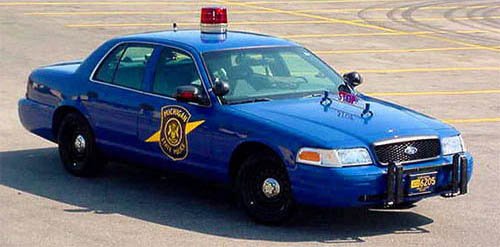
Anybody in the community can create the single siren that the MI state police use ... I would really appreciate to bring that to life in GTA V.... Please message me if you know anybody or yourself could create that for me.....
-
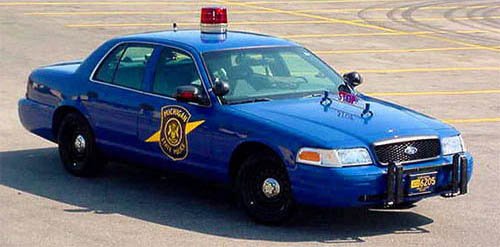
I've been waiting patiently can anybody out there mod the red rotating single siren... In GTA V plus the the Stop it's the law on the hood like this picture???
-
 thanks I figured it out ... I'm having a issue with being short on memory? I know it's not possible... but I think the virtual is low...
- 10 comments
- 2 reviews
-
-
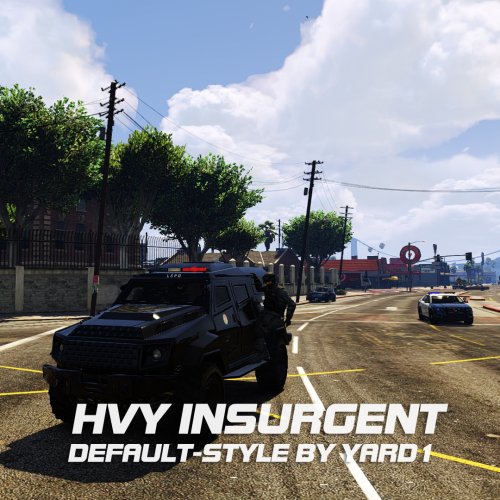 I'm trying to figure out to spawn the insurgent 2 and have it spawn for wanted levels ... please enlighten me on this slight issue I have installed it in open iv and it shows there but wont spawn it correctly. I didn't quite understand what path or line in the readme I needed to do to make it spawn for wanted levels.
- 27 comments
- 4 reviews
-
-
I see the the MI police cars on here ... I thank you but can someone create the red domed siren??
-
Well for a vehicle texture mod .... I have the original vehicle rpf file in the "mods" folder so I edit the vehicle rpf to change the texture it's in the file.... then I launch the modified files but it doesn't work ... am I suppose to have all the folders that branch out to vehicle rpf? .... the path I use is update\x64\DLC packs\Patchday4ng\dlc\x64\levels\gta 5\Vehicles ... I just have the vehicles rpf in the mods folder... is that wrong???
-
-
I tried changing the mods folder to lower case and it still will not load my mods but it's not updating now so I believe I'm close to the answer.... this is beginning to be a pain...
-
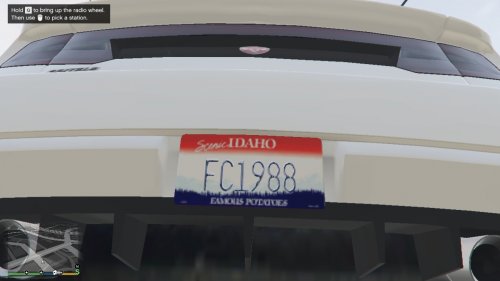 Could U make a few Michigan Plates?
 -
I'm having the problem where no vehicle or ped mods stay in the files in open iv because when I launch rage .020 it says launcher needs attention downloads update then I have the original files back instead of the modded ones .. So I ask what is the proper procedure to have the mods stay in tack while I launch and not get replaced by originals... ????
-
I've updated my LSPDFR to .2a and I had .16 ragehook and console use to open for me until I updated .2a....... Any ideas? how to resolve the issue?
-
Anybody have issue where the console from ragehook the newest version will not enable?
-
I don't unsterdand the only way I can get to use taser in game is I have to remove that file.... by doing so I don't get very many callouts and sometimes backup callout by finkone doesn't work.... if the file is removed . I wonder if someone can enlighten me on this issue??? Thank you
-
I had to remove my hook int asi for mine to work but then I have the problem with the backup callouts not working so I'm stuck in the same boat if I want backup callouts no taser or vice versa.. if anybody could enlighten me with this issue be much appreciated :)
-
This defenitely sounds like a good script idea..... :) Can't wait to see....