

ViceSquad
Members
-
Joined
-
Last visited
Everything posted by ViceSquad
-
-
-
-
True But My Luck Had been Horrible! Also You Ignoring This post Would have Been Helpful.
-
Thank You My Good Sir! Have a Great Rest Of Your Weekend! Do You have Any For ESU?
-
Anyone Know where To find a NYPD Ped Pack? The Help Would be Greatly Appreciated! Anyone Know Where I can find a NYPD SUV And Ford Explorer? The Help Would be Greatly Appreciated! Topics merged - Staff
-
-
End Of Watch Wed, 1/28/15. Cause:Gunfire. RIP Pepper You Will be Missed! You've completed your Job and Served Your Community Well. ~ Sorry For the Late Post I've Been Offline and This is a New Account~
-
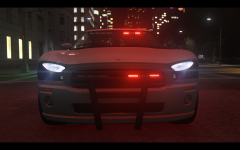 Not Bad! Good Job! Keep Up the Great Work!
 -
Evening! I had a Interesting Idea! I think It would Be Neat to Have a LCPD:FR Script That Also Install ELS And a Starter ELS Police Car. If anyone Has completed that Or Is Willing To Let me Know!