Creators: Due to background reprocessing of files, approvals and file security checks may be delayed. Thanks for your patience.

POLICESCO
Members
-
Joined
-
Last visited
Everything posted by POLICESCO
-
 I may consider it if it bothers to many people it's uses white in real life which I like thats the only reason I added it man
- 51 comments
- 17 reviews
-
-
 I only set it up for Policeold slot because all mine were full. You can use it in fbi or Police 4
- 81 comments
- 25 reviews
-
-
-
It's the same for me it's just the way the textures show up in game with bright police lights
- 81 comments
- 25 reviews
-
 You can change them via the els panel so they flash back and forward between white and red or blue
- 36 comments
- 13 reviews
-
-

- 1
-
-
I have no idea what you have done but I've tested numerous times and it works fine. Try reinstalling No I'm afraid not
- 81 comments
- 25 reviews
-
I've been looking into it tonight. Els does work but the environmental lighting only shows in the rear of the car because of the car variation file I'll need to edit it
- 81 comments
- 25 reviews
-
-
-
-
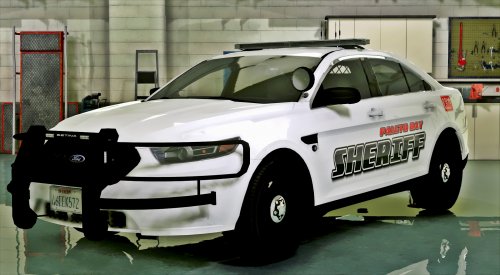
Version 0.2 added the following Added realistic vertexs to the front headlight housing Changed antennas also thanks to @GravelRoadCop for helping me out Model 2016 Unmarked FPIS Yeah not another model right? Here is my version of the 2016 Unmarked FPIS its made for the policeold2 slot old sheriff cruiser in game because all my other slots were full you can use as fbi or police4 but you may have to edit the handling because i haven't tested it in those slots its comes with a gorhino pushbar same as before set as extra12 you can use this as you see fit i have spent a lot of time lately doing models so if you do like them be sure to leave me a review If you wish to download my other ELS Unmarked vehicles the links are below Please install all the files correctly before you leave a review Readme is in the download folder DO NOT COPY/RIP OR UPLOAD ANYWHERE ELSE I WILL NOT BE HELD RESPONSIBLE FOR DAMAGED TO YOUR GAME Thanks POLICESCO Credits • Vehicle textures by POLICESCO • Lights Edits/Setup by POLICESCO •Computer Ripped From Unconverted DSF Crown Victoria By Ubisoft Reflections By KillerFirstHand - Converted And Modified To A Motorola Mobile Workstation By KillerFirstHand - Textures By KillerFirstHand • M/A-Com Radio by OfficerUnderwood •Whelen Cencom Sapphire scratch modeled by Five0/OfficerFive0 converted to gta 5 by Five0/OfficerFive0 •Soundoff Fascia by SgtGoetz •Computer Ripped From Unconverted DSF Crown Victoria By Ubisoft Reflections By KillerFirstHand - Converted And Modified To A Motorola Mobile Workstation By KillerFirstHand - Textures By KillerFirstHand •Rear TA Plus bumper lights by Bueno •Spotlight Model from Dodge Charger provided by Cynax Converted and edited by Black Jesus •GoRhino Wraparound by Carper, Textures by Carper Whelen Vertex scratch modeled by Five0/OfficerFive0 converted to gta 5 by Five0/OfficerFive0 Lojack antennas scratch modeled by Five0/OfficerFive0 Model Credits •2010 Ford Taurus SHO by Turn 10 Studios, modified into 2016 Ford Taurus Police Interceptor by OfficerUnderwood Rear bumper, headlamps, & dash by be fast, modified by OfficerUnderwood & Carper Front bumper by Ridgerunner, Grill by Vertex3D, modified by OfficerUnderwood Chassis parts by Ubisoft, Reverse lights by OfficerUnderwood Rims by BxBugs123, Centercap by Carper
- 81 comments
- 25 reviews
-
-
- 20
-
-
-
-
-
-
-
 Thanks man i need to convert the whole pack over to els but i will when i get time
- 47 comments
- 26 reviews
-
-
- 1
-
-
-
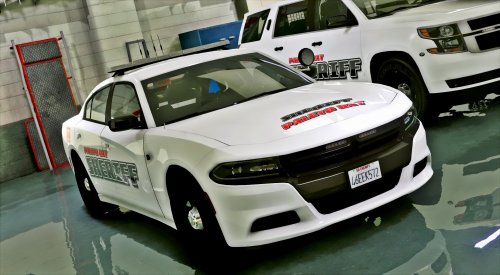
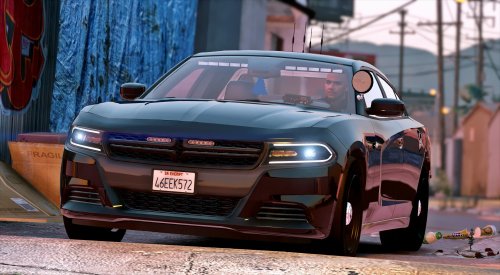
Model 2016 Unmarked Dodge Charger Here is my latest model for you guys its a 2016 Unmarked Dodge Charger it has all the same components as my Los Santos Police version but i have changed the pushbar and added some more lights the pushbar is set as extra_12 same as before if you wish to download anymore of my pack the links will be below enjoy! Please install all the files correctly before you leave a review Readme is in the download folder DO NOT COPY/RIP OR UPLOAD ANYWHERE ELSE I WILL NOT BE HELD RESPONSIBLE FOR DAMAGED TO YOUR GAME Thanks POLICESCO Credits • Vehicle textures by POLICESCO • Lights Edits/Setup by POLICESCO •Computer Ripped From Unconverted DSF Crown Victoria By Ubisoft Reflections By KillerFirstHand - Converted And Modified To A Motorola Mobile Workstation By KillerFirstHand - Textures By KillerFirstHand • M/A-Com Radio by OfficerUnderwood •Whelen Cencom Sapphire scratch modeled by Five0/OfficerFive0 converted to gta 5 by Five0/OfficerFive0 •Model & els lights scratch made and uv mapped by halopcdraco •Soundoff Fascia by SgtGoetz •Dash Buumper and Rear TA Lights by Bueno •Spotlight Model from Dodge Charger provided by Cynax Converted and edited by Black Jesus •Whelen Vertex scratch modeled by Five0/OfficerFive0 converted to gta 5 by Five0/OfficerFive0 •Stalker DUAL made & converted by Caleb3019 •2014 & 2015 CHARGER WESTIN PURSUIT PIT by Carper, Textures by Carper •Dodge Steel Rims Model by GerryStudio Mapped, and Converted to GTA V by MattJeter •GoRhino 2015 Charger Wraparound by Carper, Textures by Carper Model Credits -Base model extracted by DMN from Forza Horizon 2 Converted and textures by Thehurk Converted to PPV By Thehurk AWD Rims scratch modeled and converted By RoegonTV -AWD Logo by IronicRainbow
- 47 comments
- 26 reviews
-
-
-

- 19
-
-
Well it's set up correctly extra 7 and 9 i didn't use 8 because it already had lights in the position
- 36 comments
- 13 reviews
-
-
It must be your handling mod. My car handles fine on default settings for handling
- 51 comments
- 17 reviews
-