DeputySkager
Members
-
Joined
-
Last visited
Everything posted by DeputySkager
-
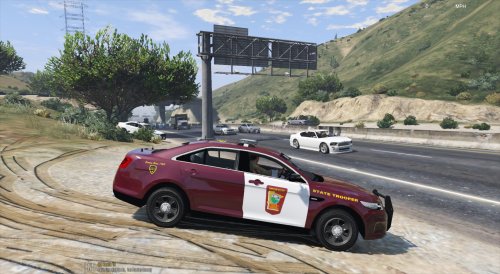 Is there an edit for the skins to have "San Andreas" instead of "Minnesota?" Same for the North Memorial ambulance like you did for the Hennepin County squad car? As much as I love the hennepin county emergency services, I'd love to have the extra realism in the game. Living in hennapin county myself I see the cars all the time and I really appreciate the work that was put into the skins!
- 14 comments
- 3 reviews
-
Oh my god! I'm so dumb! I was putting ELS in my Vanilla Back Up! Jesus! xD It actually works!
-
I don't get an error message. It just wont work. Here is my ELS.ini file. I've highlighted the things I've changed.
-
I'll try that when I get home today! I hope it works!
-
Oh, of course! I did forget the screenshots, didn't I? Here you go and my apologies! I am using ELS v.8, Trainer and an ENB but none of them seem to work. YouTube tutorials were helpful and I followed them EXACTLY, yet nothing works. If you need more info just ask! Many thanks!
-
I'm new to LCPDFR and I'm not sure if anybody else has ever had the same problem I am, but my ELS version 8 isn't working. I've downloaded it right from lcpdfr.com and followed the instructions from several YouTube tutorials, however it just wont work. I've gone through the .ini file as well, but it still wont run appropriately. Am I doing something wrong? I've, also, tried several other modifications and none, other than lcpdfr, seem to work. I get no error messages at all so I'm not sure what to do. Please Help me. I would appreciate it a lot! Many thanks to those who help.