


spaghetti
Members
-
Joined
-
Last visited
Everything posted by spaghetti
-
-
Some updates: I added spotlights to the roof rack all angles but rear. Added wrap around pushbar (to add to the robust look and balance the car's durability look considering the industrial roof rack.) Also added rear ions and grille ions but the grille ones will be moved to the push bar and mapped to extra 7,8,9 for traffic direction capabilities even though they are on the front. I've seen it in real life so dont hate. They will be red/blue not amber. Here's some pics:
-
mmmm yes. I'll probably put a TA in the back of it..Or on the top of the back bars. Maybe even slide it to the rear some or make it longer. I'll post some updates soon. lol, thanks!!
-
Thanks! Great to have feedback. Any suggestions? mmmm steak and green beans.. am i right?
-
Any suggestions regarding this project? Should I continue with the robust metal look on the car? Or should I tone it back a bit. Please give me feedback. Maybe different/more/less lights on the roof rack. LATEST UPDATE: 4/8/15 10:00 PM Eastern Standard Time Added heavy duty truck wheels to balance industrial look with pushbar and roof rack. Added curved ions on pushbar for 180 degree lighting visibility on front. Added Quadflares to the rear. Red. Added vertexes to the bottom of trunk and will be visible when trunk is opened (red/blue). Added wires to detail the front pushbar ions. Here's the latest pics. Scroll down to see earlier pictures. First Posted Images: (Updates today above) Just had a thought. Maybe something like this??
-
-
-
This might be a little late lol but how bout something like this?
-
Wrong ELS extras. To be accurate they should be flat circles for each LED in the modules. If you have no idea how to make them use them from another light like the predator 2's or something. looks horribly inaccurate to the one in GTA V for that respect. Obviously the lightbar is the same. So what actually did you convert? Because from my understanding these are released on dv as .obj (which imports into zmodeler just fine no conversion needed.)
-
-
lol LOVE the scene you setup in the screenshots, also I've been looking for something like this for a while now, short, has the havis bend usually leading up to the stock car radio which is very helpful. Thanks so much. The components along with it are a nice addition aswell. Next you should make some higher poly more detailed radio and module control boxes, that would be cool. 5/5 lol thanks so much.
- 14 comments
- 2 reviews
-
-
Ugh, another car with a the same whelen liberty that is on about 20 other same exact cars released. Switch it up guys.... ITS ALREADY BEEN DONE! Not even a newer liberty model either. I see nothing worth to download. Sorry, some advice for the future, use different lightbars! Kygo just released a whole array of his good lookin bars. Take advantage of them instead of using the same Whelen Liberty that was released 4 years ago on lcpdfr.
- 16 comments
- 5 reviews
-
Ok so...Any reason the mounts for the lightbar are attach to the doors instead of the roof. So if you open the doors it is just floating...Great job.
- 20 comments
- 7 reviews
-
-
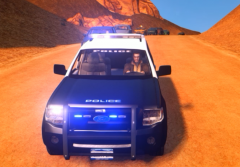 Lol I would take a look at how many comments he's leaving, he's constantly monitoring it for new posts and looking at all of them. He's thirsty for this expedition bro. And sorry I can't give it to you either :/
 -
Honestly bro I think you might be a little upset that I didn't release it or give it to you. Very sorry but I'd appreciate you stop commenting worthless crap on my post so I don't have to disable them on this aswell. I don't know if you just really want it or what it is driving you to constantly comment literally 24/7 now... I realize it's a very nice vehicle and there are no others like it in the gta modding community but I'm very sorry, you just can't have it.
-
If people do not get any facts before they comment with criticism then it's very annoying. I usually just take that as some 12 year old trolling me.
-
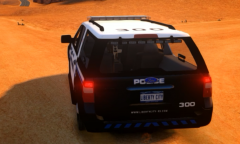 Why don't you show me yours then? If it's "better" ?
 -
Lol? Wasn't going to give it to you? Ya thought! lol
-
Guess what, the SSV in person, is the short version LOL. The longer version is more boxy :P. XD failure
-
From the pics you cannot tell unfortunately you would have to get it in-game. But sorry lol never going to happen for you guys :D.
-
I don't think that's a serious comment
-
there are two versions, the short version and the longer version. The the Suburban to the Tahoe. While the expedition's longer version looks more "boxy". But also like I said, find a better released model for gta 4 to compare it to then I will join this little debate.
-
There you go, better pic---> http://gyazo.com/45317c2dcd49a36f1d1be18b80da04cd


