




Mantic Studios
Members
-
Joined
-
Last visited
Everything posted by Mantic Studios
-
.thumb.png.bdbccfe59b084eae614d0372c2995c9e.png) Fairfax County, VA-based SAFR Logo & Patch Set.
Fairfax County, VA-based SAFR Logo & Patch Set. -
.png.a97590ef92c1d757dc00e2ee46bf8567.png)
From the album: San Andreas Fire & Rescue Logos & Patches
-

From the album: San Andreas Fire & Rescue Logos & Patches
-
.png.f493273ef68b90d1b17beca56d70e5c1.png)
From the album: San Andreas Fire & Rescue Logos & Patches
-

From the album: San Andreas Fire & Rescue Logos & Patches
-

From the album: San Andreas Fire & Rescue Logos & Patches
-
.png.0af1e5382903644bd961422fcb6aa5f8.png)
From the album: San Andreas Fire & Rescue Logos & Patches
-
From the album: San Andreas Fire & Rescue Logos & Patches
-
.png.4578e2d6a21ad2b4f2b2886198402f25.png)
From the album: San Andreas Fire & Rescue Logos & Patches
-
.png.ad35e48ed4d4311da554f1e718ec7f4c.png)
From the album: San Andreas Fire & Rescue Logos & Patches
-
From the album: San Andreas Fire & Rescue Logos & Patches
-
.png.58c8d64d3d70afcaf82f8dbdc9f60b88.png)
-
.png.3ebb83cb07b20b12dadd2156b136b7c7.png)
-
.png.7713f1e6c8971732cae66ae5e4a022be.png)
-

-
-
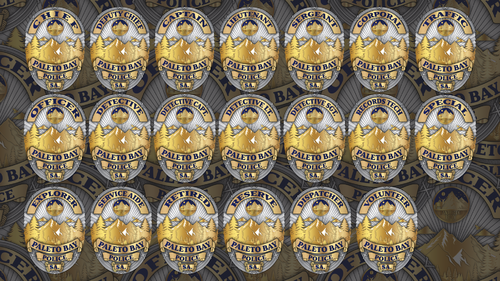 The Paleto Bay Police badge is a symbol of honor, integrity, and community service. The design features a golden mountainous landscape framed by tall pine trees, representing the rugged natural beauty of Paleto Bay. At the top center of the badge, a circular emblem showcases a majestic deer standing before the mountains under a crescent moon, symbolizing vigilance and strength. The words “OFFICER” and “PALETO BAY POLICE” are prominently displayed in bold navy blue lettering, highlighting authority and professionalism. The badge is bordered with a silver frame, embodying resilience and unity. At the base, the letters “SA.” denote the state jurisdiction, while the intricate detailing and metallic sheen convey dedication to duty and pride in service. PARTNERSHIPS NOW OPEN CONTACT ME TO GET INFORMATION
 -
.thumb.png.10018dfe293cd5360281d9ad12af62bf.png) This emblem proudly represents the Los Santos Fire Department, symbolizing strength, unity, and service. At the center stands the Los Santos City Hall, a landmark signifying the department’s deep connection to the heart of the city and its people. The traditional Maltese Cross design embodies courage and dedication, while the gold and deep red tones reflect honor, valor, and sacrifice. The inclusion of firefighting tools—a ladder, hook, and axe—pays tribute to the essential skills and unwavering readiness of every firefighter. The banner below, inscribed with “Fire • Rescue • EMS,” highlights the department’s comprehensive commitment to protecting life and property across all emergencies.
This emblem proudly represents the Los Santos Fire Department, symbolizing strength, unity, and service. At the center stands the Los Santos City Hall, a landmark signifying the department’s deep connection to the heart of the city and its people. The traditional Maltese Cross design embodies courage and dedication, while the gold and deep red tones reflect honor, valor, and sacrifice. The inclusion of firefighting tools—a ladder, hook, and axe—pays tribute to the essential skills and unwavering readiness of every firefighter. The banner below, inscribed with “Fire • Rescue • EMS,” highlights the department’s comprehensive commitment to protecting life and property across all emergencies. -
.thumb.png.7dc3908bff02e1564de5c5b5486d9fcc.png) The image is a commemorative badge logo for the San Andreas Fire Department, designed to celebrate America’s 250th anniversary (1776–2026) — also known as the Semiquincentennial. The badge has a traditional shield shape, combining gold and silver metallic tones. At the top, a banner reads “1776 – 2026”, symbolizing 250 years of American independence. Below that, the text “AMERICA’S” is prominently displayed in bold black letters. At the center, there is a red fire department emblem featuring the words “SAN ANDREAS FIRE DEPT.” in gold, along with the bold text “AMERICA 250” — the central focus of the badge. The lower section includes another gold banner that reads “SEMIQUINCENTENNIAL,” emphasizing the 250-year milestone. Beneath this banner is a patriotic section featuring the American flag and the head of a bald eagle, representing courage, strength, and national pride. The badge blends elements of firefighting tradition, American symbolism, and historical celebration into a unified, professional design.
The image is a commemorative badge logo for the San Andreas Fire Department, designed to celebrate America’s 250th anniversary (1776–2026) — also known as the Semiquincentennial. The badge has a traditional shield shape, combining gold and silver metallic tones. At the top, a banner reads “1776 – 2026”, symbolizing 250 years of American independence. Below that, the text “AMERICA’S” is prominently displayed in bold black letters. At the center, there is a red fire department emblem featuring the words “SAN ANDREAS FIRE DEPT.” in gold, along with the bold text “AMERICA 250” — the central focus of the badge. The lower section includes another gold banner that reads “SEMIQUINCENTENNIAL,” emphasizing the 250-year milestone. Beneath this banner is a patriotic section featuring the American flag and the head of a bald eagle, representing courage, strength, and national pride. The badge blends elements of firefighting tradition, American symbolism, and historical celebration into a unified, professional design. -
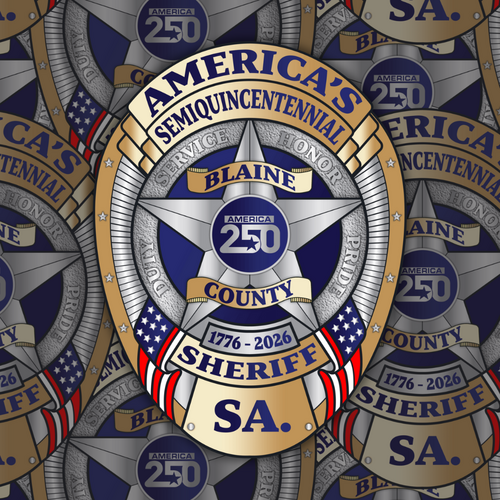 The Blaine County Sheriff’s America 250th Badge Logo is a commemorative emblem celebrating the 250th anniversary of the United States (1776–2026). The badge features a silver and gold shield design with a prominent five-point star at its center. Within the star, a blue circle bears the “America 250” logo, symbolizing the nation’s semiquincentennial. Encircling the star are the words “SERVICE,” “HONOR,” “DUTY,” and “PRIDE,” representing the core values of the sheriff’s department. Across the top, a gold banner reads “AMERICA’S SEMIQUINCENTENNIAL,” while another banner in the center displays “BLAINE COUNTY.” The lower portion of the badge features the years “1776–2026” and the title “SHERIFF,” set above the initials “S.A.” Decorative American flag motifs and silver stars border the sides, enhancing the patriotic theme. The badge’s overall appearance conveys honor, service, and national pride, marking a historic milestone for both the United States and the Blaine County Sheriff’s Office.
 -
.thumb.png.a2f3e75c269321244d35fe5b5d12dcc4.png) Celebrate a historic milestone with the Los Santos Police America's 250th Anniversary Graphics — a tribute to 250 years of dedication, service, and protection. These badge-shaped designs honor the legacy of American law enforcement, blending patriotic elements with classic police insignia style to create bold, distinguished visuals. Perfect for commemorative events, in-game roleplay, or collectible displays, each graphic symbolizes tradition, honor, and commitment to keeping our communities safe.
Celebrate a historic milestone with the Los Santos Police America's 250th Anniversary Graphics — a tribute to 250 years of dedication, service, and protection. These badge-shaped designs honor the legacy of American law enforcement, blending patriotic elements with classic police insignia style to create bold, distinguished visuals. Perfect for commemorative events, in-game roleplay, or collectible displays, each graphic symbolizes tradition, honor, and commitment to keeping our communities safe. -
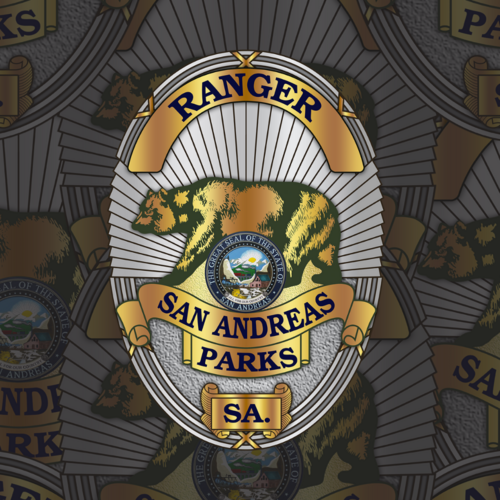 San Andreas Parks Ranger Badge Logo A bold, emblematic crest symbolizing the authority, stewardship, and heritage of the San Andreas Parks Ranger Service. The badge features a classic shield outline, its metallic tones evoking strength and tradition. Centered within is a stylized landscape—towering pine trees, rolling hills, and a distant mountain peak—framed beneath a radiant sun, representing the natural beauty and diverse ecosystems under the rangers’ protection. Surrounding the imagery, a clean border carries the words “San Andreas Parks Ranger” in strong, serif lettering, conveying both professionalism and pride. The overall design balances official law-enforcement gravitas with a deep connection to the wild lands it safeguards.
 -
.thumb.png.4fa2ee565bcbe2625404e1e98b174284.png) Stand out as the best of the best with these SAHP Logos, Can be used for EUP, Vehicles and Documents
Stand out as the best of the best with these SAHP Logos, Can be used for EUP, Vehicles and Documents -
.thumb.png.9d1f6d71ca23cc068d4c6e29d4a76f71.png) A unique oval badge for the Grapeseed Township Police Department
A unique oval badge for the Grapeseed Township Police Department -
.thumb.png.e240cba429459e194e952540bbade92e.png) Even security officers need good graphics/badges.
Even security officers need good graphics/badges.

.thumb.png.bdbccfe59b084eae614d0372c2995c9e.png)

.png.a97590ef92c1d757dc00e2ee46bf8567.png)
.png.f493273ef68b90d1b17beca56d70e5c1.png)
.png.0af1e5382903644bd961422fcb6aa5f8.png)
.png.4578e2d6a21ad2b4f2b2886198402f25.png)
.png.ad35e48ed4d4311da554f1e718ec7f4c.png)
.png.58c8d64d3d70afcaf82f8dbdc9f60b88.png)
.png.3ebb83cb07b20b12dadd2156b136b7c7.png)
.png.7713f1e6c8971732cae66ae5e4a022be.png)

.thumb.png.10018dfe293cd5360281d9ad12af62bf.png)
.thumb.png.7dc3908bff02e1564de5c5b5486d9fcc.png)
.thumb.png.a2f3e75c269321244d35fe5b5d12dcc4.png)
.thumb.png.4fa2ee565bcbe2625404e1e98b174284.png)
.thumb.png.9d1f6d71ca23cc068d4c6e29d4a76f71.png)
.thumb.png.e240cba429459e194e952540bbade92e.png)