IamN5
Members
-
Joined
-
Last visited
Everything posted by IamN5
-
[General] //This controls what language culture VocalDispatch will try to load. DO NOT change this unless you know what you are doing. //Editing this setting also requires you to translate the script.xml file into the desired language (if it is not English). Locale="pt-BR" //This controls whether or not VocalDispatch will display immersive messages instead of more technical (but less immersive) notifications. ShowImmersiveMessages=true //This controls whether or not VocalDispatch will play a tone when it begins listening to simulate a police radio push-to-talk sound. PlayPTTSound=true //The distance from the player backup will spawn - lower numbers are quicker but less realistic. This only affects internal VocalDispatch functions, not any external functions VocalDispatch uses from other plugins. MinimumSpawnDistance=300 //This must use the format that the System.Windows.Forms.Keys uses //RMenu refers to the Right Alt key and not the actual menu key. BeginListeningKey=RMenu PanicModifierKey=RControlKey //The available options here are as follows: //None,DPadUp,DPadDown,DPadLeft,DPadRight,Start,Back,LeftThumb,RightThumb,LeftShoulder,RightShoulder,A,B,X,Y BeginListeningButton=DPadUp PanicModifierButton=LeftShoulder //Your division, unit, and beat. Dispatch may use this to identify you when speaking. Valid numbers for division are 1 through 10. Valid numbers for beat are 1 through 24. Division=01 Unit=GAMMA Beat=10
-
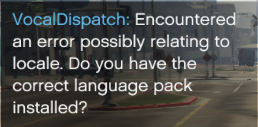
this is the error (I have the correct language pack installed, as its my native one):
-
Hey @turbofandude, I translated the mod to pt-BR (Brazilian Portuguese) and set the Locale="pt-BR" but I keep getting that error when I go on duty. RagePluginHook log: RagePluginHook.log