Deputy40cal
Members
-
Joined
-
Last visited
Everything posted by Deputy40cal
-
They brought Alaska State Troopers back
-
All blue, but from what I heard red shows up better in the day than blue so a lot of the new cars have a mix of red/blue, But still I vote for BLUE!!!!!!!!!!!!
-
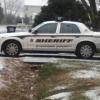
I was wondering if anybody could make a skin or car like my local sheriff's office, not the best pictures in the world but I was able to get a few pics from my neighbor's car Details: In some pics the lettering is blue, it is but most of the newer ones have black lettering so I would prefer black lettering Gold trim on the strip above sheriff and outlining the world sheriff Car number on roof, same letter font as sheriff is in, number 273 please Sheriff on hood (This only counts if you decide to make the whole car instead of skin) All blue lights 2 blue "strobe style" grill lights 1 single led blue light in rear window next to brake light Blue Whelen edge lightbar with 2 red lenses on back side Push bumper in front Skins will be fine but the whole car would be awesome! Thank you.