


Panos1221
Members
-
Joined
Everything posted by Panos1221
-
 Readme has everything you need. With the same command you turn it on
 -
 The mod is currently in beta only from patreon. There is no date set for the next public release.
- 365 comments
- 20 reviews
-
-

- 1
-
-
The plugin works fine the issue is on your end. Please send the appropriate log in my discord if possible (for a quicker response) or here
-
-
The mod is in beta right now. It will be re-released for the public when it's fully ready and completed. Information can be found in the front page and my discord server. Send your log in my discord server please.
- 365 comments
- 20 reviews
-
You mean game crash or plugin crash? If it's a game crash its probably caused of something else.
-
Have you loaded the DroneSystem plugin first? You can load it from the console by running the command LoadPlugin DroneSystem.dll (or something similar)
-
Hello, detailed instructions can be found in the Readme file.
-
-
Uhm maybe you have a shortcut that spawns a vehicle? My mod definitely doesnt do that thought
-
In that case he should upload a log and add more details.
-
Alright glad you fixed it.
-
Explain the steps that you are doing. It seems like the drone gets deleted. Try running without any other plugins and see if it works then
-
No problem hope you like it!
-
There is a ReadMe file included which can answer your questions. Please take a look at it.
-
Thank you! I cant understand you.
-
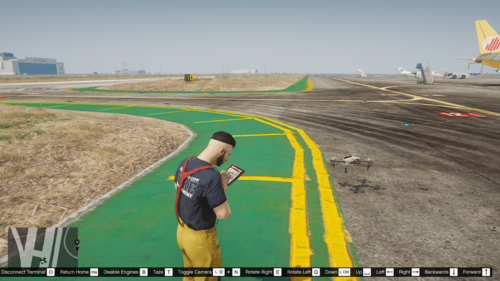
Welcome to DroneSystem! This standalone RagePluginHook plugin provides a remote-controlled drone with a live camera and many more features which enhances the gameplay of the players. It can be used in various situations such as search and rescue, car chases and everything else you can imagine. It can be used as well with LSPDFR. Detailed List of Features: Remote controlled drone with a live camera that can be zoomed in. Thermal imaging. Night vision. Ability to automatically return to the player. Ability to tase people (which can be turned off in the DroneSystem INI File). Ability to disable engines of vehicles (which can be turned off in the DroneSystem INI File). Highly customizable initialization file in which you can change the controls, the speed and acceleration of the drone and more. You can also change the model of the drone to a custom one if you want and adjust the necessary values in the DroneSystem INI File. The plugin requires the latest versions of RagePluginHook and RageNativeUI. You can start the drone system by running the rage console command ToggleDroneSystem (with the toggle bool set to true) and stop it with the same command by setting the bool to false (The Rage console can be opened by default by F4) This plugin is free for personal, non-commercial use. Special thanks to all my amazing Patreons who have donated to support the mod development. Members of my patreon receive early access to new mods and betas for unreleased ones. Anyone is welcome to use this plugin in videos. If you do thought I would appreciate if you could post a link for the mod in the description! Installation is very simple (drag and drop) but please follow the provided ReadMe. If you have any issues please let me know in the comments section or my Discord.
-
-
-
-
Yeah there are still things that need to be fixed first, new things to be added and a lot of things that are already in the mod to be reworked
- 365 comments
- 20 reviews
-
-
-
-
There are many bodyguard mods out there. You can use whichever you want but they won't help you
- 365 comments
- 20 reviews

