



DySands
Members
-
Joined
-
Last visited
Everything posted by DySands
-
It was a directx issue, update your directx and it is all fine, get the web update ;) Had a good talk with dev of Openiv.
-
-
It shows up nothing, it shows up the blue screen when i exit out of Openiv and when i exit that i get the 2 error messages.
-
Well i have experience with making a game, have been a project leader myself, i can do almost everything except for programming in C# C++ and .net other then that, a team of 4-5 people is enough to make a good game, also, 1000 dollar is enough to start the first fundings, includes advertisement and website. You also got allot of options for engines, unity, Cry Engine. Unreal which are free to use for non commercial, but once you got a good working concept out allot of people would want to pay for it and then the team can afford to buy a engine.
-
That is so stupid. Yeah but where do i make a topic/ticket
-
Hmmpff i can only find the bug tracker where i could put something up but it doesn't send me the email, so i have no clue anymore.
-
 oh yeah it looks nice
 -
Yeah exactly, it's something totally new to me, really odd.
-
What is that ENB?
-
![[WIP] Fire hose - FireFighter mod by gangrenn](//s3-gallery.int-cdn.lcpdfrusercontent.com/gallery/album_547/sml_gallery_2101_547_799735.png) What is that ENB you are using?
What is that ENB you are using? -
Yesterday i was working with openiv, and at a point where i restarted my pc and tried to open the the files in the cdimages i got these errors in the order from top to bottom. First i clicked the X of Openiv, got this: http://prntscr.com/4sy5xk Then i clicked X on that and got this: http://prntscr.com/4sy5r7 Second time i tried i got this different error: http://prntscr.com/4sy5zq I have Reinstalled the Game and Openiv twice today and am still having the same issue
-
-
You definently where! A Customization of Vision ENB.
-
- Name : New Jersey State Police, Chevrolet Tahoe 2008 - Car Model: Model is original "Chevrolet Tahoe" by 4x4 Full Driver - Hummer H2, converted to GTAIV by Stiopa. - Rims: Wheels By Bxbugs123, Textures by Lt.Caine - Extra: Model improvements & Modified By Bxbugs123 - Optimized for: Polpatriot.wft and wtd ========================================================================================================================= Video: ========================================================================================================================= - Lightbar: Whelen Liberty scratch made by PFCBarefoot - Rambar: Setina PB450-S scratch made by DySands - Additional lights: Wig Wags back and front by DySands - Extra: Arma Console converted by evanscornelius. Rockwell Collins Laptop Made & Converted by Bxbugs123. Setina The Bodyguard Partition by Bxbugs123, Shotgun by Grimm. - Skin: New Jersey State Police skin scratch made by DySands ========================================================================================================================= Files Included: Polpatriot.wft Polpatriot.wtd Readme 4 Pictures ========================================================================================================================= Additional Notes: This file has been originally posted on LCPDFR.com and Preforce.com, you may not release this product on any other site without the permission of DySands. You cannot make any changes to the skin without the permission of DySands. Enjoy the vehicle! DySands
-
Still looking for a better background though, lol.
-
awesome video, and i love blackmill man haha
-
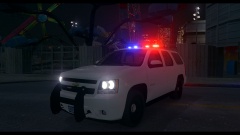 Jup Just finishing up the New Jersey State Police Tahoe
 -
From the album: DySands Designs
Guess Which State! (little tip: you guys have been waiting and asking for it) Tahoe Work In Progress -
i'm a 110% sure that it will be coming to pc, you an already pre-order it on steam so they gotta explain that if they don't want to release a pc version anymore.
-
Hahaha that is awesome, thanks for the support guys and let me know what to make next :/
- 10 comments
- 2 reviews
-
-
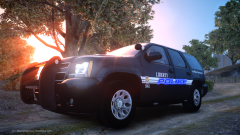 Whahaha Cleveland Police Rip-of Nice try though!
 -
- Name : Cleveland Police, Dodge Charger 2012 - Car Model: Original Model Civilian 2011 Dodge Charger R/T from SimRaceWay converted to IV by Dhruv Edited To Police Package By Lccop - Rims: Mopar Wheels by GerryStudio Edited & converted for GTA IV by Bxbugs123 - Extra: N/A - Optimized for: Police2.wft and wtd ========================================================================================================================= Video: ========================================================================================================================= - Lightbar: Whelen Justice Modeled & converted for GTA IV by Bxbugs123 Main textures made by Bxbugs123 & Lt.Caine - Rambar: Setina Dodge Rambar scratch made by DySands - Additional lights: Rear windscreen lights scratch made by DySands & Wig wags rear and front. - Extra: Rockwell Collins Laptop Made & Converted by Bxbugs123. Whelen Par46 Spotlight modelled and converted by Tim98. Setina The Bodyguard Partition by Bxbugs123, Shotgun by Grimm. Boot Antenna scratch made by DySands - Skin: Cleveland Police skin scratch made by DySands ========================================================================================================================= Files Included: Police2.wft Police2.wtf Readme 4 Pictures ========================================================================================================================= Special Thanks to: Sgt.Kanyo Sergiyj ========================================================================================================================= Additional Notes: This file has been originally posted on LCPDFR.com and Preforce.com, you may not release this product on any other site without the permission of DySands. You cannot make any changes to the skin without the permission of DySands. Enjoy!
- 10 comments
- 2 reviews
-
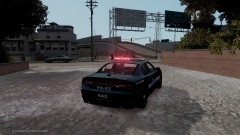
From the album: DySands Designs
Cleveland Police, Dodge Charger 2012 Coming Soon! -
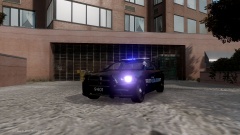
From the album: DySands Designs
Cleveland Police, Dodge Charger 2012 Coming Soon!


![[WIP] Fire hose - FireFighter mod by gangrenn](http://s3-gallery.int-cdn.lcpdfrusercontent.com/gallery/album_547/sml_gallery_2101_547_799735.png)
