


Officerparks24
Members
-
Joined
-
Last visited
Everything posted by Officerparks24
-
I as well, am in the same situation, having completed the above steps too
-
 More excellent content from Sereous. I was skeptical - having no experience with mission maker styled callouts. And it's clear Steve put a lot of time and thought into the callouts and scripts for each callout. The way it flows between the text and triggering between objectives feels natural and well done. I installed the regular version for the sake of being able to integrate it into normal patrol callouts which is great. These calls definitely more real, and not another repeat callout from other packs. Definitely recommend to anyone, no matter if experienced in MM or not, it's extremely simple to use.
- 66 comments
- 16 reviews
-
-

-

- 2
-
-
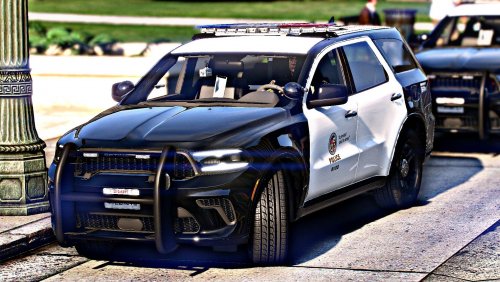 This is an Explorer, not a Durango
 -
 Adds alot of realism to the game. Rather than just cut and dry callout text.
- 184 comments
- 72 reviews
-
-
- 1
-
-
I've tried way too hard and put far too many hours into attempting to get the Realism Mod 2.21 to work and no longer wish to use it. Which files do i take out, and replace, in order to get my game back and working again without crashing on the load screen
-
After trial and error, I understood that I cannot place a police file into a patchday folder if it does not contain that file. For example, i attempted to replace the Sheriff.ytf and Sheriff.ytd which were in the patchday3 folder. This almost worked. The vehicle attempts to load if you view it from a distance, but when my character gets up close to the vehicle, the textures revert to default and the wheels do not load. Any suggestions as to why this is?
-
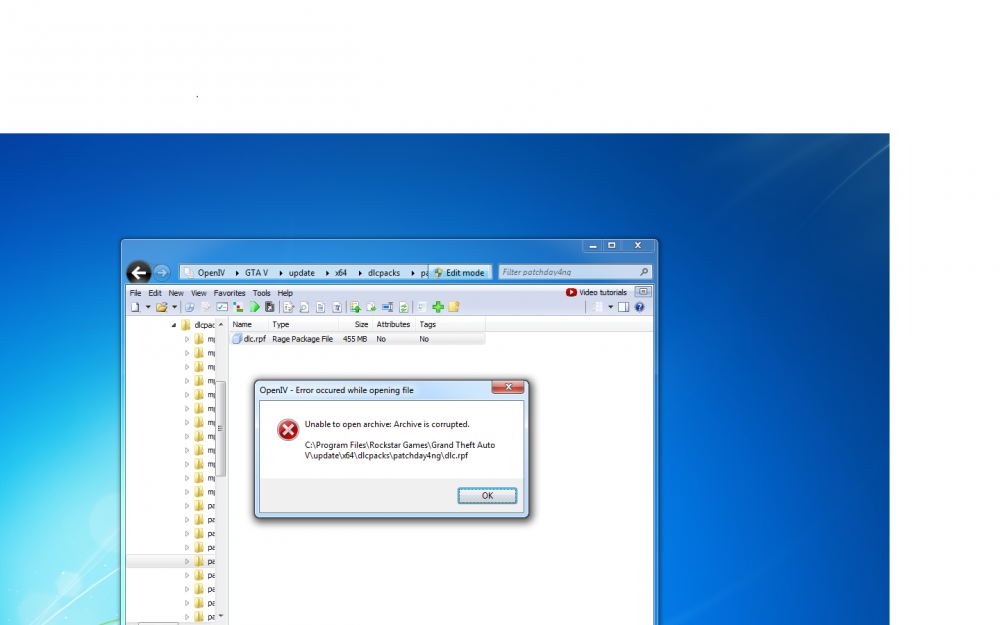
I noticed when i opened up the vehicles.rpf through that particular folder in the patchday4, it did not contain the regular police.yft file, only police3. I figured to attempt it anyways, and add the regular police.yft and .ytd files into that folder, and i ended up with this....which i had a feeling would happen.
-
When I drag the files for example, police.yft and police.ytd into the GTA5/mods/64e.rpf/....vehicles folder using openiv, they do not load into the game. The default vehicles are still there for me. I have tried using the function in openiv to manually replace each file with the selected one by browsing but still that doesn't change anything. And of course when i drag the downloaded ytd and yft files into the NON mods folder, just into the regular 64e.rpf..then it redownloads the necessary files when i attempt to launch my game. Even though i have ASI loader. Anyone know what i'm doing wrong? I've watched several videos and they're doing exactly what i'm doing, or so it seems. I'm sure i'm making some silly mistake.
-
I have tried what i feel, as everything. I attempt to overwrite the police.ytd and police.yft files in OpenIV with ones that i have downloaded. At first, i was doing this incorrectly, and hadn't created a "mods" folder with the x64e.rpf file within it. Also, i did not have the asi loader, which caused me to constantly have the game update everytime i would launch the game. Now that i have done all of that, i repaired the game with the necessary files, and according the several videos, installed the files through openiv, into my x64e.rpf file that is located in the "mods" folder in my GTA5 root folder. Can somebody explain, why when i run the game, is the zlib call error now becoming an issue, and telling me that i need to verify my game files once again...or at least how to fix it.
-
-
 Yeah Fin has been working on that and had certainly taken notice. It seems that when you're error reporter logs it, and attempts to restart your game, your backup script either doesn't load, or loads but gets an error (which isn't showing up in the console commands). Even once you are playing the game after it attempts to restore your game, if you use console commands, the callout still has no luck unfortunately.
- 132 comments
- 23 reviews
-
-
-
Damn this looks awesome! Much appreciated for the hard work that has already gone into it so far!
- 132 comments
- 23 reviews
-
-
- 1
-
-
Looks pretty good to me. Better than the last model, that's for sure!
-
-
Alright yeah that worked perfectly. I'll have to remember this because i have that feeling it'll happen again if i try to place a sound file in OpenIV again. But i am currently downloading SparkIV so hopefully all problems should be set aside. Thanks guys, appreciate it.
-
I attempted to change my weapon sound files, which ive done several times before. I extracted the WEAPONS sound file using OpenIV, and placed it on my desktop. I renamed it to WEAPONS.ivaud, and using GTAIVAUD i opened the file and changed the files to that of which i wanted. I saved the file and renamed it back to simply WEAPONS. This used to work perfectly. Now for some reason, it has automatically changed the WEAPONS.IVAUD file to simply a GTAIVAUD type file, and it has the gtaivaud icon now. When i try to import it into OpenIV, it recognizes it as a sound file, and now my Gta crashes when i attempt to run it as an admin. I've read forums on how to set your default programs, but none of which seemed to target what i'm getting at. Any suggestions?
-
Definitley a Mercedes C-Class if thats the model of your uncle's vehicle. Ladies can't turn that down. Or well, i should say your partner rather. I forgot it's the 21st century. AND if you can't get ahold of one, then as mentioned above, Crown Vic all the way
-
Yeah thank you guys, i fixed it. I originally had the file on my desktop because my antivirus wouldn't allow me to move it to my root folder. I had to turn off my antivirus, move the file to the root folder, AND THEN add the file to my AVG whitelist. Now everything seems to work. Appreciate the help.
-
Now that i've been modding GTA for the past few months and grown more comfortable with it, i've attempted to do more things. Upon screwing up my game, i had to reinstall LCPDFR, and i always prefer to use the manual files. For some reason, even though i go into properties and command to order the tool to run as an admin, i cannot for the life of me, move the diagnostic tool into my GTA root folder. I figured out as to why. Everytime i move it to my desktop and attempt to run the program, my computer freezes for a second, and then my AVG antivirus shows up, and it removes the diagnostic tool, saying that it contains a trojan. I've had LCPDFR in my computer many times, so im curious as to how that happens. I've redownloaded the entire file off of LCPDFR again, and once again, the diagnostic tool cannot be moved into my GTA root folder, and again, it is removed due to a trojan. I've tried to turn off my AVG, and that just results in alot of adware on my internet browser. If there are any suggestions it'd be greatly appreciated. Also, the reason i screwed up my GTA was because i downloaded custom texture files to make the map more realistic. My map had a lot of trouble loading. Not necessarily textures, but the entire map itself. So i assumed the modded textures were the reason, so i replaced all the files with my vanilla backup ones. After rerunning the game, im still having the same issue. Even as a vanilla game. I have a Dell XPS i7 with plenty of RAM and 2 TB of memory with a ATI Radeon Graphics Card. My computer can handle GTA, so why won't my map load? Thanks in advance, Officerparks24 Att. AVG removing LCPDFR


