Skip to content
View in the app

A better way to browse. Learn more.

LCPDFR.com

A full-screen app on your home screen with push notifications, badges and more.

To install this app on iOS and iPadOS
  1. Tap the Share icon in Safari
  2. Scroll the menu and tap Add to Home Screen.
  3. Tap Add in the top-right corner.
To install this app on Android
  1. Tap the 3-dot menu (⋮) in the top-right corner of the browser.
  2. Tap Add to Home screen or Install app.
  3. Confirm by tapping Install.

KillerCam

Members
  • Joined

  • Last visited

Everything posted by KillerCam

  1. @BlackADITUM @Charlie686 thank you guys for the help. Its running fairly stable for now. Its a shame my essential mods are all out of date. What do you guys use?
  2. @BlackADITUM thank you! but none of these have been the solution and the same error occurs
  3. Ive seemly solved that issue but am now running into another. It appears to be from the stealth commons but I dont know where thats coming from
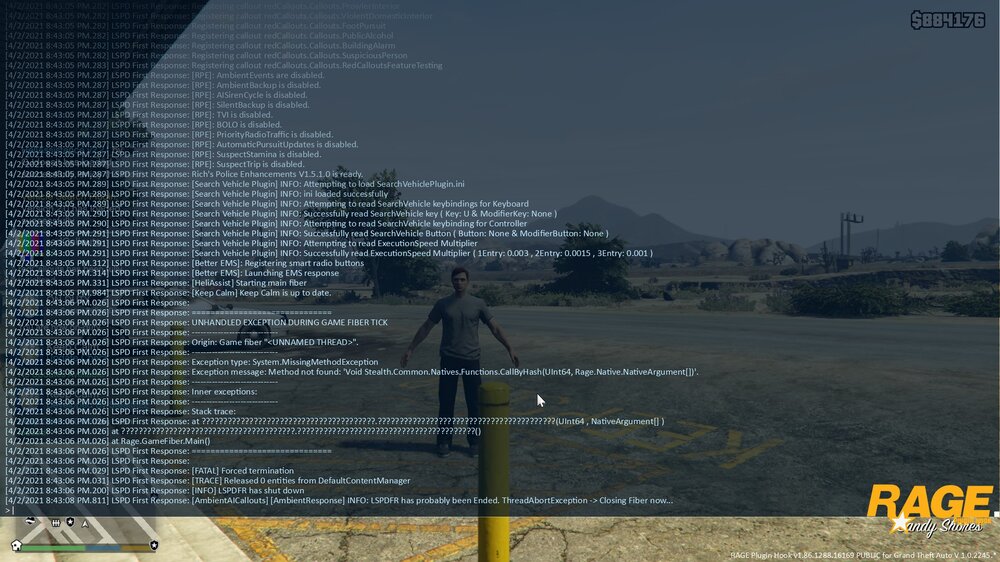
  4. Hey guys after taking a long break I'm trying to get back into LSPDFR but forgot what a pain in the ass it is to get set up (rip albos mods) I've already tried and gave up on the new auto mod manager downloader thing and am now trying to manual install. I don't currently feel like dealing with ELS or modding vehicles yet the game is still crashing on me.

Account

Navigation

Search

Search

Configure browser push notifications

Chrome (Android)
  1. Tap the lock icon next to the address bar.
  2. Tap Permissions → Notifications.
  3. Adjust your preference.
Chrome (Desktop)
  1. Click the padlock icon in the address bar.
  2. Select Site settings.
  3. Find Notifications and adjust your preference.