


jarwolf
Members
-
Joined
-
Last visited
Everything posted by jarwolf
-
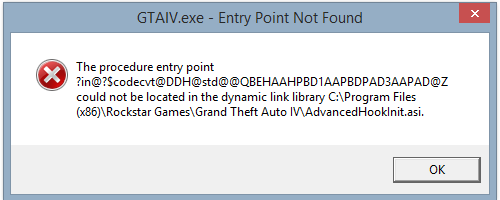
Okay; I deleted the AdvancedHookInit.asi and this pops up. (with the DSOUND))--doesnt seem to load script no matter what) ---------------------------------------------------------------------------------------------------------------------------------------------------- (With xlive --deleted advancedhookinit.asi for both sides of ASI Loader's while installing the mod--i game it says Error in script Loader.Loader {Something of the sort.} It's just not working no matter what I do.. :'(
-
I will try to remove this and see if this will work or not ((currently intalling the game again to fresh copy.))
-
I also get this when I go to enter the game. How do you install the ScriptHool properly. (I know it sounds dumb; but I just grabbed a random one from off the internet and placed it in the root GTA folder.) I don't think I have any other external script mods besides the native trainer. Yep; I installed Scripthook;and ASI Loader (Dsound.dll) and the same thing keeps popping up. In the spoiler; the only problem I see(I am not good at error codes--but)) I see [Log Check] asilog.txt lists failed load: 0x00000000
-
Hello there! I recently found out about this LCPDFR mod! I can say; the 0.95 RC2 works just fine on my game but I want the updated version! I am having multiple problems! Iv'e unistalled the game, installed the game, tried every single newer version of the LCPDFR and nothing but errors. I ran the diagnosis tool and everything said it was okay except the check log. Here is the check log. I have xlive.dll . The xlive.dll I need in order to play the game. I am not sure if I can have it in the GTA IV folder. If not, which is the best? But please, someone help me with this! I know my computer specs are good enough to play this game; so it's not that;I am almost positive.
-
If it lets you enter the game after installed; try re-loading a saved game;it MAY work after that; but please, don't hold your breathe on it.
