


Dewey
Members
-
Joined
-
Last visited
Everything posted by Dewey
-
-
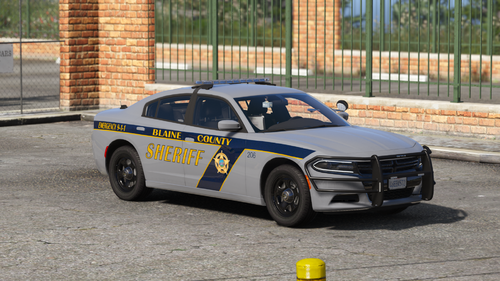 Try repairing your vehicle to see if that fixes the issue. Any damage caused to the pushbumper may shift the light emissive because of how I set up the sirens coronas. Deformation of the pushbumper effects the light modules.
- 20 comments
- 8 reviews
-
-

- 1
-
-
If you have previously installed version 1.0 of the pack, please change the name in the dlclist.xml to reflect the updated one. Overview: This pack includes two vehicles. A 2018 Dodge Charger Pursuit and a 2020 Chevrolet Tahoe PPV equipped with a Federal Signal lighting package. Both vehicles feature a hybrid lighting setup which utilizes both ELS and the default carcols lighting. The livery is based off the Bergen County Sheriff's Office. Special thanks to @Getinmybelly for the amazing livery along with @L1MITED and @Cartres for their help testing. Installation: Please view the readme file included in the download for installation instructions. Optimized for: Sheriff & Sheriff2 Lighting equipment: Federal Signal Integrity, CN SignalMaster, & MicroPulse. Multiple Liveries: Supported, but not included. Known Issues: FAQ: Q: How do I install this dlc? A: Please view the readme file included in the download for installation instructions. Q: My lights are flashing in different directions, how do I fix this? A: You may have an overlapping carcols id. Please ensure that you do not have any other vehicles with the same carcols id as this will cause errors with light rotations. If that is not the case, please refer to the installation instructions as you may not have installed the addon dlc correctly. Q: Can you add "this" car to the pack? A: I eventually plan on adding additional cars when I have more free time. For now this is what you get. Q: What visual pack do you use? A: VisualV and RadianceV. Q: Can I use this on my FiveM server? A: I do NOT permit the use of any of my vehicles on any FiveM server. Disclaimer: I am not responsible for any damage these vehicles may cause to your game. If you have an issue with installation, please refer to the readme file.
- 20 comments
- 8 reviews
-
-
-

- 17
-
-
Random creations
-
-
-
-
-
-
-
-
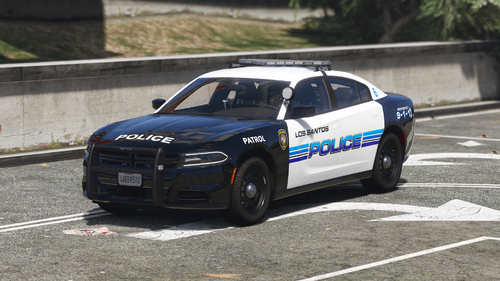 I've gone ahead and included a link to the template in the file description for the time being. I'll be sure to include it in the download when I go to make my fixes.
- 30 comments
- 10 reviews
-
-
- 1
-
-
I had originally planned on doing that, but ran into some complications. I’ll be sure to include that in an update alongside the 3 other cars I’m doing.
- 30 comments
- 10 reviews
-
-
- 1
-
-
-
Finally decided to release something publicly. This is a fictional vehicle based off of the Paramus Police department. Special thanks to DJCave for creating the livery, Jumperman09 for helping with the pattern, and Cartres for beta testing. The included vcf is required for the lightbar to work properly! Template: https://imgur.com/KApVnZM
- 30 comments
- 10 reviews
-
-
-
- 19
-
-
For both of Hurk's dev tahoes, I followed this exact video to get the glass to a breakable state. You need to add a crash value to whichever material the glass is tied to under in the material browser (Glass Outer for the 2015), as well as add a crash value under user defined options under the properties tab when the window collision is selected. Hope that helps.
-


