
OutCast
Members
-
Joined
-
Last visited
Files posted by OutCast
-
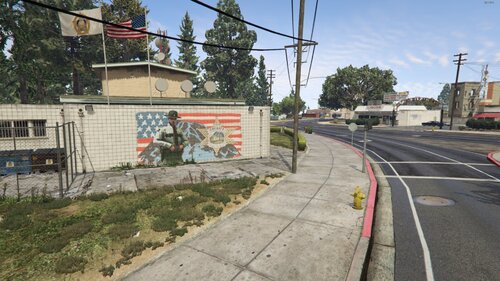
After doing the PB SAHP/CHP station, I’ve been driving around PB a lot more, and seeing a policeman in what’s supposed to be a sheriff mural on a sheriff station wall gives me anxiety attacks each time (xD). So, I did a quick edit in GIMP to remake it while also removing the ugly hater "pigs" graffiti. Just wanted to upload it and share it with anyone who might want to try it too.
SUMMARY
Two mural replacements to chose from, one done by me and another one by AlexVonShep.
1.1 UPDATE
Added another sheriff mural I found on the internet while editing/removing the hater "pigs" graffiti.
Credits AlexVonShep.
INSTALL
Replace:
cs1_16_police_building.ydr
cs1_16_police_building+hidr.ytd
in mods/x64q.rpf/levels/gta5/_hills/country_01/cs1_16.rpf
Replace:
v_47_sheriff2_ext.ydr
in mods/x64h.rpf/levels/gta5/interiors/v_int_47.rpf
ALSO
If you have a picture or something that can improve (replace) it, share it and I might do an update to add it.
- 95 Downloads
- 3 Comments
Updated -
You don't need to download anything, just modify a file with OpenIV.
After installing martinct's German Shepherd / Malinois - K9 Dog (link below) I've noticed that this k9 model was spawning randomly around the world, so I made a fix:
If you don't want to see this model being spawned in the world, used by peds as a pet, go to
mods/update/update.rpf/common/data/ai/ambientpedmodelsets.meta:
and search for <Name>ANIMAL_DOG_SHEPHERD</Name>
You will see this:
Two Options:
1. Replace the model (some people have issues having the new replaced dog model spawning still with the vest on, dunno why this issue is, I think due to be using another k9 model mod).
...
<Item type="CAmbientModelSet">
<Name>ANIMAL_DOG_SHEPHERD</Name>
<Models>
<Item>
<Name>A_C_shepherd</Name> REPLACE TO <Name>A_C_Rottweiler</Name> FOR EXAMPLE
<Variations type="NULL" />
<Probability value="1.000000" />
</Item>
...
or
2. Set to 0 the spawn probability to make it not spawn at all. Works for everyone.
<Item type="CAmbientModelSet">
<Name>ANIMAL_DOG_SHEPHERD</Name>
<Models>
<Item>
<Name>A_C_shepherd</Name>
<Variations type="NULL" />
<Probability value="1.000000" /> SET TO <Probability value="0.000000" /> TO NOT SPAWN AT ALL
</Item>
Retriever. Using martinct mod I can replace the model without any issues, tried this with a fresh k9 mod install.
Here is a list of the 6 dogs (excluding Chop and Border Collie) that you can also try to replace to.
- 273 Downloads
- 17 Comments
Updated -
INTRODUCTION:
I like to play as SAHP more than any other agency, and after a while, the lack of a dedicated SAHP station makes the experience feel quite unimmersive—especially when using LSPDFR Enhanced/Extended.
After searching on the internet for stations to download, none of them satisfied me (either too basic/unimmersive or too complex (e.g., poorly mapeditor/menyoo autoloads, FIVEM, extra dlcprops, paywalled)). So I started making my own ones.
I took the Davis station as a base and remodeled it to better fit the SAHP aesthetic—removing unnecessary assets, resizing elements, adding blue window bars, SAHP logos, flags, some vegetation, and additional props to enhance realism. I usually play around the east side of the map, and after searching for a suitable location, I found an empty lot in Paleto Bay that seemed perfect. This location also provides flexibility in choosing which direction (east or west) to patrol to.
WHAT'S NEW IN V2.7?:
Reworked Parking Lot. Remodeled and fixed glitched polygons, custom HD textures with terrain blending, more decals, one more parking slot. Also improved the backyard/doghouse area. Added a custom edited security hut model (scale, textures, door, collisions) as an access control. Fully enhanced with props. Improved the stations banner, resized and added holes to match the hanging ropes. Beautified a lot of props and areas around the station.
Hotfix 29/03/2025:
Updated the dropoff location due to conflict with the booth. Now is:
<DropOffPosition>-281.25f, 6127.16f, 31.31f</DropOffPosition>
HOW TO INSTALL:
Drop bpsahp folder in mods/update/x64/dlcpacks/ Add this line as the last item in mods/update/update.rpf/common/data/dlclist.xml:
<Item>dlcpacks:/bpsahp/</Item>
LSPDFR Station functionalities (Optional) (skip if updating): Add these lines to \Grand Theft Auto V\lspdfr\data\stations.xml in order to have LSPDFR station functionalities:
<Station>
<Name>Paleto Bay SAHP Station</Name>
<Agency>sahp</Agency>
<ScriptName>pbsahp</ScriptName>
<Position>-289.5428f, 6120.8761f, 31.5151f</Position>
<Heading>110</Heading>
<CamPointOffset>-17f, -43f, 3f</CamPointOffset>
<CamEndOffset>10f, -5f, 1f</CamEndOffset>
<DropOffPosition>-281.25f, 6127.16f, 31.31f</DropOffPosition>
<GaragePosition>-299.21f, -6131.80f, 31.50f; 121.31</GaragePosition>
<GarageSpawnPosition>-297.41f, 6132.11f, 31.49f; 279.8097</GarageSpawnPosition>
</Station>
Skaters spawning in lot fix + Hwaycops ped ambient spawn. (Optional) (if updating replace cluckin_bell.ymt to add extra hwaycop in hut): Replace cluckin_bell.ymt in mods/update/update.rpf/x64/levels/gta5/scenario/
Add (not replace) the line bellow in mods/update/update.rpf/common/data/ai/ambientpedmodelsets.meta: (if you already have done this from any of my other SAHP station mods, then it's already done, skip it)
<Item type="CAmbientModelSet">
<Name>SAHP</Name>
<Models>
<Item>
<Name>s_m_y_hwaycop_01</Name>
<Variations type="NULL"/>
<Probability value="1.000000"/>
</Item>
</Models>
</Item>
KNOWN ISSUES & TROUBLESHOOTING
Stop The Ped Conflict (Jail Drop-Off)
Issue: Stop The Ped overrides LSPDFR’s jail drop-off system, making it non-functional with any new/custom station. Solution: Use the Arrest Manager plugin to add extra jail drop-off locations. Simply call for transport or use the nearby Sheriff Station for processing.
Crash when nearing the station
Cause: It happens because the game tries to call the added "SAHP" peds but they don't exist (aren't added). Can be due to installing a mod that replaces ambientmodelsets.meta therefore removing the added code for SAHP peds, or the existance of another new ambientmodelsets.meta that is loaded after this one Fix: Add the SAHP peds code in the last loading ambientmodelsets.meta or use the original cluckin_bell.ymt (backup provided in the .rar).
FUTURE PLANS (TBD)
Remove litter and grass props. Improve LODs. Add nighttime window emissions. Make an installer. Make spawned cars not stealable. Just had a carjacking event lol. Add interiors.
25/03/2025:
I've made a garage interior and also have an office interior to add in. But I don't know how to activate the garage mlo once the player has selected vehicle and tp'd there via lspdfr (tping above a portal doesn't work), or to make it exterior but need to remove the original props (weeds) first that spawn inside without copying the whole rpf (3gb) to mods folder. Editing the props in hei_cs1_06_strm_2.ymap (and also it's LOD versions) directly and copying them into the dlc makes the hd/stream ymap not load while all area goes to a LOD level, editing using guid from my custom ymaps does't work either. Any advise will be helpful, until then I'm stuck and holding the new update/release.
CHECK OUT MY OTHER STATION
Whatever question, request or advise, feel free to share as everything can be improved (read TBD). Thanks.
- 2,838 Downloads
- 53 Comments
Updated -
Introduction
Recently, I’ve been more annoyed than usual while playing as SAHP or deputy, backup will randomly yell out agency names they don’t match with, mostly shouting "LSPD," breaking my immersion.
When using EUP models, all backup NPCs share the same model (freemode) and use a random voiceset from a random agency. So I had the idea to edit every voiceline where they claimed to be from the LSPD.
Investigating other voicesets, I discovered that even in the trooper and sheriff ones, they sometimes refer to themselves as "sheriff" or "SAPH," while at other lines they suddenly jump over to "Los Santos Police" or just "police" for no reason. Some sheriff and trooper voicesets even call themselves LSPD entirely, and females only have/use the LSPD voiceset (Rockstar, finish your game...). So not even assigning their true voicesets would quickfix this issue. So, I edited those fragments as well, while at the same time it explains the overwhelming amount of LSPD shoutouts.
Also, I expanded the minivoicesets into full. This should ensure more dialogue, as missing lines (like megaphone chase commands) would go unspoken when the game requests them.
Lines that were purely agency-specific (e.g., "This is Los Santos Police!") have been replaced with equivalent lines from other voicesets but with the same or similar voice actor.
Summary (TLDR):
Quick mod that edits/removes every agency-specific references in the voicelines, All NPCs (Freemode EUP, and even vanilla voicesets) refer to themselves as LSPD at some point, which becomes even more noticeable when inside vehicles. All female voicesets only use LSPD voicelines, even when they represent other agencies. All of this has been edited in this mod. With 1.2 "Kifflom" has been replaced with 2 different versions: generic greetings like "Hi" and "Hello" or the "show me some ID" voicelines from GTAIV. You choose which you prefer at the download. Female cops don't have the "show ID" voicelines in GTAIV to transfer from (doesn't exist), so I created them on my own using AI voice.
Particularly useful if you’re roleplaying any agency other than LSPD since it keeps the interactions generic.
(Once someone discovers how to assign specific voicesets to specific NPC agencies, I could revamp the voicesets again to ensure NPCs correctly identify themselves by their assigned agency. Until then, and even so, this mod will ensure that they act generically without causing any FPS loss, unlike using a plugin or script to reasign the voicesets since this is just audio edit).
Examples:
"Los Santos Police! Stop your car now!" → "Stop your car now!" "San Andreas Highway Patrol! Pull your vehicle to the side of the road!" → "Pull your vehicle to the side of the road!" "Sheriff, stop or I’m gonna shoot ya!" → "Stop or I’m gonna shoot ya!" "This is Los Santos Police!" → "Pull your car over now! Last warning!" (while in vehicle chase, on foot changed accordingly. To avoid duplicity these voicelines are taken from other voicesets with a similar voice actor) (New 1.2) "Kifflom" → "Can you show me some ID, please?" or "Greetings" (depends on the version you choose to download)
How to Install:
Place the .awc files into their corresponding .rpf archives under the following path:
/mods/x64/audio/sfx/
S_FULL_SER.rpf S_MINI_SER.rpf
If you don’t have these files in your mods folder yet, copy the files from the original paths into your mods folder.:
x64/audio/sfx/S_FULL_SER.rpf
x64/audio/sfx/S_MINI_SER.rpf
Then, drop the .awc files into the copied files.
Issues:
Let me know if you find any issues.
- 2,299 Downloads
- 12 Comments
Updated -
INTRODUCTION:
I play as SAHP a lot, and after some time (especially playing with LSPDR Enhanced/Extended), lacking SAHP stations to start the playthrough with feels bitterly unimmersive.
After searching on the internet for stations to download, none of them satisfied me (either too basic/unimmersive or too complex (e.g., poorly mapeditor/menyoo autoloads, FIVEM, extra dlcprops, paywalled)). So I started making my own ones.
After successfully making a Paleto Bay SAHP station (link below) I started looking for a place to make another one south, and after taking a close look at few candidates/empty lots I made my decision.
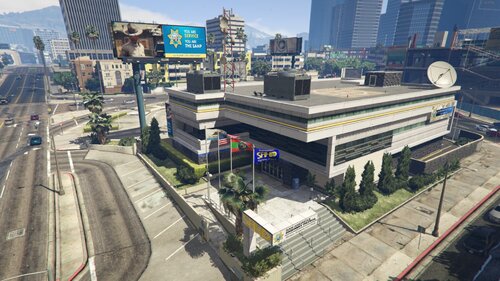
DE-REVAMPING THE WEAZEL NEWS BUILDING
Upon closer inspection of the files, I found that this building is actually called kt1_12_policedep, meaning that at some point during development, it was indeed a police station before being revamped as the Weazel News building. It still even has a Polmav car generator on the roof (singleplayer disabled) and a striking resemblance to the Vinewood and Mission Row Police Stations.
WHAT'S NEW IN V1.6?:
Improved ambient SAHP officers spawn. They will be Cops instead of Hwaycops with the LAPD livery. Added LAPD and CHP liveries to the station. Inlcuded a NVE compatibility fix inside each file. Improved textures and logos.
HOW TO INSTALL & UPDATE:
Follow the guidelines in the readme, but basic install is:
Drop the lssahp folder into mods/update/x64/dlcpacks/
Add this line in mods/update/update.rpf/common/data/dlclist.xml
<Item>dlcpacks:/lssahp/</Item>
MY OTHER SAHP STATION:
NEXT (TBD):
Optionally add working customizable vehicles to spawn in the parking spaces (since SAHP doesn't have og vehicles). Improve textures. Make ped spawn more stable. Make an installer.
KNOWN ISSUES & TROUBLESHOOTING
Stop The Ped Conflict (Jail Drop-Off)
Issue: Stop The Ped overrides LSPDFR’s jail drop-off system, making it non-functional with any new/custom station. Solution: Use ArrestManager and add extra jail drop-off locations. Alternatively, use the nearby stations for processing.
Crash when nearing the station
Cause: Installing a mod that replaces the actual ambientmodelsets.meta, or the existance of a new one that is loaded after the edited one, game tries to call "SAHP" peds but they don't exist (not loaded). Fix: Add the SAHP peds in the last loading ambientmodelsets.meta or use the original files.
SPECIAL THANKS TO BEAR82!
The LAPD is been made entirely by him while also helped me out improving and creating new awesome textures for the other stations!
If you have any questions, complains or requests, feel free to share, as everything can be improved. Thanks!
- 1,785 Downloads
- 25 Comments
Updated -
INTRODUCTION:
Sandy Shores feels small. And, for me, it's too small to be patrolling there for too long.
After searching and downloading many different Sandy Shores map mods, I wasn't satisfied with any of them. The authors added buildings that seemed quite off: no props, no fences, no cars, or any signs around them; types of buildings that seemed out of place (houses that looked like they were from the GTA3 beta, others very polygonal with walls painted like in The Sims 2, none showing any signs of wear, suddenly expensive houses between shacks and dirt, buildings from another city, etc.). All of this broke my immersion. So, I decided to make my own.
I managed to literally copy the already existing buildings in Sandy Shores and paste them into the many lots available for housing in the town, while also slightly extending the area near the Motel. For now, there are 24 added same-style homes that visually bring more life and density while maintaining immersion.
HOW TO INSTALL:
Drop the sandyplus2 folder into (mods/update/x64/dlcpacks) Open/Edit the dlclist.xml file located in:
(mods/update/update.rpf/common/data/)
Add the following line to the end of the DLC list:
<Item>dlcpacks:/sandyplus2/</Item>
EXTRA: INCREASE SANDY SHORES POPULATION (PEDS & CARS):
Navigate to:
(mods/update/update.rpf/common/data/levels/gta5/popcycle.dat)
Customize the SANDY_SHORES settings.
If you want to double the population, multiply each value in the columns (#Peds, #Scenario, #Cars, #prkdcrs) by 2.
Each column represents a 2-hour time block (e.g., the first column is 12-2 AM, the second column is 2-4 AM, etc.), covering 24 hours in 12 columns.
Note: Each value represents the percentage drawn from the base population preset in the gameconfig data.
You can use my setup as an example:
K9 SHEPHERD MODEL
You can often see the shepherd model spawning around, if you have this model edited for k9 you can replace the spawn of this model for the whole game in ambientpedmodelsets.
Navigate to mods/update/update.rpf/common/data/ai/ambientpedmodelsets and look for this item and replace the model.
<Item type="CAmbientModelSet">
<Name>ANIMAL_DOG_SHEPHERD</Name>
<Models>
<Item>
<Name>A_C_Rottweiler</Name>
<Variations type="NULL"/>
<Probability value="1.000000"/>
</Item>
ISSUES:
Some buildings have low LODs and disappear when viewed from very far away. This will be fixed in the next update.
NEXT STEPS:
Add more buildings other than residences (shops, offices, workshops, amenities, etc.).
Add emissions.
Replace abandoned/ruined buildings with new habitable ones.
Extend the town further west, near the gas station.
Replace/Add more building variety.
Beautify the already added residences.
Optionally add a rework/enhancement to the sheriff station.
Make an installer.
- 302 Downloads
- 5 Comments
Updated