



FEAR2105
Members
-
Joined
-
Last visited
Everything posted by FEAR2105
-
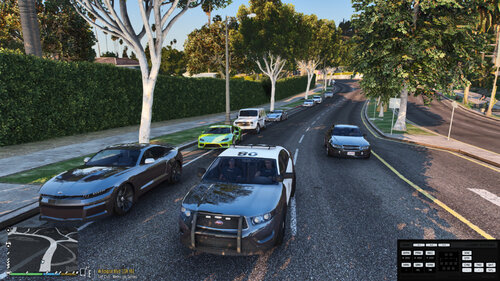 This mod aims to add most of unused cars of the game into traffic in realistic way. Currently in early beta test versions so if you encountered any bugs or strange spawns in game, mention it in commencts section. 1: This mod is an .oiv install package so you just need to install it with "OpenIV". 2: You need some trainer to prevent despawning of Multiplayer DLC cars. 3: You may need some modified "gameconfig.xml" and/or "Heapadjuster". Here are links to some of mentioned required files. Trainer: Simple Trainer for GTA V - GTA5-Mods.com Gameconfig: (Choose one) Gameconfig (1.0.2699) for Limitless Vehicles - GTA5-Mods.com GitHub - pnwparksfan/gameconfig: GTA V Gameconfig Heapadjuster: HeapAdjuster - GTA5-Mods.com IMPORTANT Note - Created and tested on Latest version of GTA V (1.0.2699) No guarantee for early versions. Changelogs: v0.1 basic version of new realistic traffic v0.2 Added new realistic way to spawn different sort of cars in different areas (Hyper cars - Antique cars - Custom Bikes and more) Better spawn of cars in city areas Added support of county parts for new traffic Added Offroad cars roaming in some offroad areas Added police cars and sheriff spawns into traffic in their territories Minor changes for better realism and lore Minor bug fix of traffic spawn
 -
 I Haven't downloaded yet so can someone confirm that unmarked Charger and Durango have breakable glasses or not? (on all front back and sides windows) much appreciated.
- 119 comments
- 11 reviews
-
 Hello, I had the same problem as you. and its common for every loadout plugin out there. just try set flashlight in loadout1, 2 , etc to opposite. for example if it is flashlight = true -> flashlight = false or vice versa. this will fix the crashing problem of loadout plugins There is another way to fix it but needs more effort because you are using one or more plugins which edit loadouts on their own, for example "herocop", or "agencycallouts" or other plugins which I dont know about them. you need to remove them or edit their loadout edit terms. in my Experience if I set "agencyloadouts" enhanced loadouts to YES I need to set flashlight in loadout ini files to TRUE and if its NO I need to set them to FALSE I hope I helped.
- 68 comments
- 12 reviews


