Skip to content
View in the app

A better way to browse. Learn more.

LCPDFR.com

A full-screen app on your home screen with push notifications, badges and more.

To install this app on iOS and iPadOS
  1. Tap the Share icon in Safari
  2. Scroll the menu and tap Add to Home Screen.
  3. Tap Add in the top-right corner.
To install this app on Android
  1. Tap the 3-dot menu (⋮) in the top-right corner of the browser.
  2. Tap Add to Home screen or Install app.
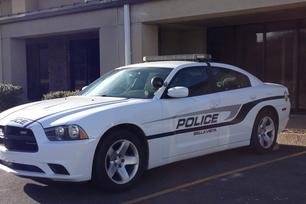
  3. Confirm by tapping Install.

Lt. Nolan

Members
  • Joined

  • Last visited

  1. I've been playing LSPDFR since the literal first ever release of the mod, WAY back when. Like, GTA 3 mods haha. I used to play LSPDFR, ALL the time a few years ago, maybe around 2019 so on and so fourth. I had mods, that I could stop the ped and ask them questions about where they were going, and traffic related questions, to make an arrest, and escort and all that. LSPDFR+ was an incredible mod, that is now outdated, very very sadly. Long story short, I'm looking for another Computer Plus mod, and another Stop the Ped mod, that is currently updated to work with the GTA V most recent update, but also, more mods that make the game feel more immersive, and realistic. Because right now, traffic stops feel so stale and boring. I would love something that made traffic stops feel more explorative. If you have seriously ANY recommendation, I would greatly appreciate it. Thank you to anyone who replies to this.
  2. Well I managed to get it working, I just have to launch the game normally, without RPH. Then what it's loaded, I launch RPH and it works, for whatever reason.
  3. Same here, I just posted about the same issue. Do you have other mods installed?
  4. I have no other mods besides LSPDFR. I have a fresh install of GTA and have been a developer of plugins for a long time, although I am baffled at what's making the game crash. Here is my crash log:
  5. Hey all! First, this is like one of my first time's posting ever, even though I've been here for years (yeah I'm a lurker.) Odd situation, in 0.3 when you would turn on your lights/sirens (with els) it would disable the radio station from popping up in your screen, and would also let you press "B" with your controller. (Keep in mind I use a controller to drive, whilst on foot I use Keyboard and mouse.) and it would cycle the sirens, and disable the cinematic view. In this update however it puts you in cinematic view. There may be a easy fix I just can't seem to figure it out. On a sidenote, my LSPDFR+ and the Computer+ is crashing when I go to run somebody in the car, like you hold "E" and then click on a name, that's when it crashes. I'm not to sure why it's crashing but I've yet to try a few things. Thanks all, Nolan.
  6. For the template that you have in the files, how would one install those? Cause in the game, the vehicle loads default as a black texture. Wasn't sure how to change that
  7.    Lt. Nolan reacted to a comment on a file: 2014 Dodge Charger "SSPD"
  8.    RobertTM reacted to a comment on a file: 2014 Dodge Charger "SSPD"
  9. That's insane. You did a great job, it's literally an exact replica of our cars. You did a great job.
  10.    RobertTM reacted to a comment on a file: 2014 Dodge Charger "SSPD"
  11. Lt. Nolan changed their profile photo
  12. https://puu.sh/Bum6m/598ee95f6d.jpg Holy crap did you make my PD's skins? Me and my buddy have been dreaming of this happening. We both work for the PD. So it's insane for us to have this in-game. Do you live in Bella Vista?
  13. So, just bought GTA IV. I've been wanting to play LCPDFR for like 3+ years, and never had the PC to be able to run it until now. Which is really depressing cause, LCPDFR won't work right now. Here's my log: 2014-09-01 13:20:55 - Initializing ScriptHookDotNet v1.7.1.7 BETA (on GTA IV version 1.0.7.0 with C++ Hook version 0.5.1) 2014-09-01 13:23:32 - Direct3D device created! 2014-09-01 13:23:33 - SEARCHING FOR SCRIPTS... 2014-09-01 13:23:33 - Loading scripts in Assembly 'scriptsLCPDFR Loader.net.dll' ... 2014-09-01 13:23:33 - ...found script 'LCPDFR_Loader.Loader'! 2014-09-01 13:23:33 - ...found script 'LCPDFR_Loader.PublicScript'! 2014-09-01 13:23:33 - DONE! 2 valid scripts found! 2014-09-01 13:23:33 - STARTING SCRIPTS... 2014-09-01 13:23:33 - INFO: Phone number checks are not available! 2014-09-01 13:23:33 - ...successfully started script 'LCPDFR_Loader.PublicScript'! 2014-09-01 13:23:33 - ...successfully started script 'LCPDFR_Loader.Loader'! 2014-09-01 13:23:33 - Error during Tick in script 'LCPDFR_Loader.Loader': System.Reflection.TargetInvocationException: Exception has been thrown by the target of an invocation. ---> System.IO.FileNotFoundException: Could not load file or assembly 'AdvancedHook.dll' or one of its dependencies. The specified module could not be found. at hq.a(String A_0) at LCPD_First_Response.Engine.Main.d() at LCPD_First_Response.Engine.Main.Main_Tick(Object sender, EventArgs e) --- End of inner exception stack trace --- at System.RuntimeMethodHandle.InvokeMethod(Object target, Object[] arguments, Signature sig, Boolean constructor) at System.Reflection.RuntimeMethodInfo.UnsafeInvokeInternal(Object obj, Object[] parameters, Object[] arguments) at System.Reflection.RuntimeMethodInfo.Invoke(Object obj, BindingFlags invokeAttr, Binder binder, Object[] parameters, CultureInfo culture) at LCPDFR_Loader.Test.Tick(Object sender, EventArgs e) at LCPDFR_Loader.Loader.Loader_Tick(Object sender, EventArgs e) at GTA.Script.TryTick() at GTA.Script.DoTick() at GTA.ScriptThread.OnTick() If someone could please help. I'd love you forever.

Account

Navigation

Search

Search

Configure browser push notifications

Chrome (Android)
  1. Tap the lock icon next to the address bar.
  2. Tap Permissions → Notifications.
  3. Adjust your preference.
Chrome (Desktop)
  1. Click the padlock icon in the address bar.
  2. Select Site settings.
  3. Find Notifications and adjust your preference.