Valium
Members
-
Joined
-
Last visited
Files posted by Valium
-
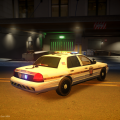
[ V1 ]PENNSYLVANIA STATE POLICE SKINS PACK FOR GRAND THEFT AUTO IV ( for cj24's and dsf cvpi models ):
I relased the V2 version which is fixed and contains more texures !
1. IMPORTANT INFORMATIONS YOU SHOULD KNOW AT FIRST :
- AUTHOR: Valium ( http://www.lcpdfr.com/user/144758-valium/ )
- THESE SKINS WERE MADE ONLY FOR WWW.LCPDFR.COM
- DO NOT EDIT OR UPLOAD THESE SKINS ANYWHERE ELSE OTHER THEN LCPDFR.COM
IF YOU WOULD LIKE TO EDIT OR UPLOAD THESE SKINS, PLEASE ASK ME ABOUT PERMISSION AT FIRST !!!!!
2. ABOUT PACK :
Some time ago I noticed that there wasn't any PSP skin for
DSF Crown Victoria model, that's why I decided to try to make
my own skins.
THE PACK INCLUDES 6 SKINS FOR DSF CVPI MODEL:
- Version 1 ( THE LATEST ) is devided into two folders:
a) with numbers on trunk ( 2 skins )
b) without numbers on trunk ( 2 skins )
In Version 1 I used the real PSP logo which I found in the Internet,
I edited it and used elements from skins made by MatthewLamede and
Hawkeye.
- Version 2 contains 2 skins which contain a few elements from
MattherwLamede's PSP skins pack ( including logo, etc. )
I used some elements from :
- MatthewLamede's PSP skins pack
- Hawkeye's PSP skin for cvpi
Thanks for help guys.
IF YOU HAVE ANY QUESTIONS, YOU WOULD LIKE TO ASK ME ABOUT PERMISSION
TO EDIT IT OR UPLOAD IT, CONTACT ME ON WWW.LCPDFR.COM
I recommend to use my Pennsylvania State Police Computer Screen too.
ENJOY!
Valium
- 69 Downloads
- 9 Comments
Updated -
[ v2 ]PENNSYLVANIA STATE POLICE SKIN PACK DESIGNED BY VALIUM FOR DSF CVPI MODEL :
1. IMPORTANT INFORMATIONS YOU SHOULD KNOW BEFORE USING SKINS
- AUTHOR : Valium [ http://www.lcpdfr.com/user/144758-valium/ ]
- These skins were created ONLY FOR WWW.LCPDFR.COM
IT IS FORBIDDEN TO:
- UPLOAD THIS SKINS ANYWHERE ELSE OTHER THEN LCPDFR.COM
- EDIT SKINS FOR PRIVATE (PERSONAL) USE
- EDIT SKINS AND UPLOAD EDITED VERSION
IF YOU WOULD LIKE TO EDIT OR UPLOAD THESE SKINS, PLEASE ASK ME ABOUT PERMISSION AT FIRST !!!!!
2. ABOUT PACK:
This pack is including three folders:
A) THE OLDEST VERSION [1.0]( I don't think about improving it )
- for DSF CVPI model
- it contains almost all details from MatthewLamede's PSP skins pack
- simplified rear ( the line over the lights )
- wrong DIAL NUMBER
Only two textures:
- K2 [ K district texture ]
- M3 [ M district texture ]
Both have not number on trunk.
B) THE LATEST VERSION [2.0]
- it is for DSF CVPI model
- brand new design ( elements from MatthewLamede's, Hawkeye's PSP skin packs, real photos and
my improvements :) )
- the new real PSP logo which was taken from HQ pictures of real PSP cars
- improved rear ( the new line over the lights and others )
- improved the DIAL NUMBER from 991 to 911 ( mistake ;) )
- added versions with number on trunk and without them
- a few new districts textures were added ( more information below )
The latest version is including two folders with textures with number on trunk and without them.
Both folders are including textures from a few real Pennsylvanian districts:
- G3 8
- G3 8 with number on trunk
- M3 2
- M3 2 with number on trunk
- M5 2
- M5 2 with number on trunk
- M0 5
- M0 5 with number on trunk
- K2 3
- K2 3 with number on trunk
C) PENNSYLVANIA STATE POLICE COMPUTER SCREEN CREATED BY VALIUM
( informations how to install it are in the folder )
ADDITIONAL INFORMATIONS:
I used some elements from :
- MatthewLamede's PSP skins pack
- Hawkeye's PSP skin for cvpi
- real HQ photos
Thanks for help guys.
Contact with me if you have any questions or ideas.
IF YOU WOULD LIKE TO EDIT OR UPLOAD THESE SKINS, PLEASE ASK ME ABOUT PERMISSION AT FIRST !!!!!
Enjoy!
Valium.
- 575 Downloads
- 11 Comments
Updated -
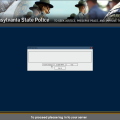
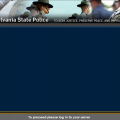
==== PENNSYLVANIA STATE POLICE COMPUTER SCREEN FOR GRAND THEFT AUTO IV ====
1. IMPORTANT INFORMATIONS YOU SHOULD KNOW AT FIRST :
- AUTHOR: Valium ( http://www.lcpdfr.com/user/144758-valium/ )
- THIS MODIFICATION WERE MADE ONLY FOR WWW.LCPDFR.COM
- DO NOT UPLOAD IT ANYWHERE ELSE OTHER THEN LCPDFR.COM
- DO NOT EDIT IT AND UPLOAD EDITED VERSION ANYWHERE
- EDITING FOR PERSONAL ( PRIVATE ) USE IS ALLOWED
IF YOU WOULD LIKE TO UPLOAD IT OR EDIT AND UPLOAD, PLEASE ASK ME ABOUT PERMISSION AT FIRST!
2. About modification:
This modification allows to change the standard screen in police computer
on screen with Pennsylvania State Police which I was designed.
The modification contains one file ( .png ). You have to find LCPDFR folder ( /GTA4/LCPDFR ).
When you open LCPDFR, you should notice 'mainmenu' file, so just replace this file.
The PSP computer screen is visible when you go to the police station and you'll be on duty.
When you enter to the car and press 'E' button, you should see the new screen. ;)
I RECOMMEND TO USE IT WITH MY PENNSYLVANIA STATE POLICE SKINPACK WHICH YOU CAN FIND BELOW:
EDITING FOR PRIVATE USE IS ALLOWED
IF YOU HAVE ANY QUESTIONS OR YOU WOULD LIKE TO UPLOAD MY MODIFICATION OR EDIT AND UPLOAD EDITED VERSION,
PLEASE ASK ME ABOUT PERMISSION BEFORE!
ENJOY!
VALIUM
- 48 Downloads
- 2 Comments
Submitted