


MikeMan123
Members
-
Joined
-
Last visited
Everything posted by MikeMan123
-
Hello all, A friend of mine had his forum account banned quite some time ago, and asked me to ask on his behalf what the process would be to go about getting that account unbanned? He said that Cyan might have known him back in the day... Thanks.
-
 Whats up with people using responce instead of response?
 -
What's the easiest way to go about making them brighter?
-
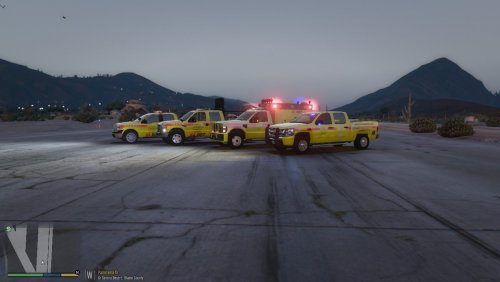
https://imgur.com/a/UDY2E Now noticing its only the lights behind glass, such as the lightbar, rear bar, and the inner bars that have the coloring issue. Still odd, but anyhow here's the screenshots.
-
Lights are fine on brightness, the graphics mod has an addon for brighter ELS lights, which works fine. My only current issue is the weird looking colors. I can provide screenshots if that'll help.
-
Hello All, I recently installed a graphics enhancement mod, NaturalVision Remastered, and ever since, the light colors on ELS vehicles is terribly off. Red becomes orange-ish and blue becomes light, light blue. I'm not exactly sure what's causing the issue or how to fix it, so some help would be appreciated. Also, all my settings are on very high/ultra. - Mike
-
Currently I have a Thermaltake TR2 600W power supply.
-
Thanks all for the support. Currently I'm considering buying new thermal paste, as well as a new CPU fan and two new case-mounted fans. Currently I'm running a 600W PSU, should I consider upgrading this as well?
-
Yeah that screenshot earlier was idling. I last cleaned it about a month ago, and I've never replaced the thermal paste. I've had the PC since Christmas 2012.
-
Wow, yeah I'm gunna say this is most definitely a temperature related situation. I had my iPad recording the stats on my second monitor and at the time of shutdown the CPU was at 85C and the GPU was at 72C.
-
Ah, thank you for that it makes much more sense. I'll boot up V and keep an eye on this stuff.
-
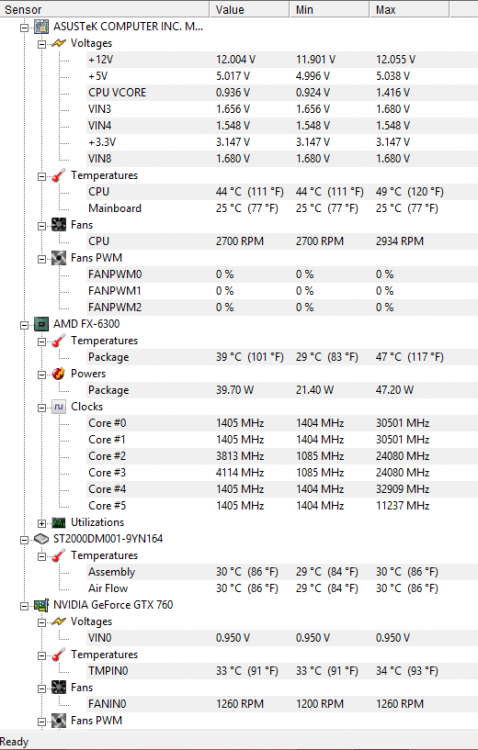
Thanks, I'll give that a try and see how it goes. Edit: Looks like it may be the CPU temp that's triggering the shut down. Not exactly sure how to read the program, but from what I'm seeing the CPU temp is exceeding the MAX without even running GTA V.
-
Hi all, Recently I have been encountering a hardware issue with my PC. I don't know much about the problem however I do have some ideas, but I'd like to hear what the community thinks. Right now my problem is whenever I play GTA V, or play any game while watching a YouTube or Netflix video on my second monitor (two monitor set up) my computer will randomly shut off. I am unsure whether its an issue with cooling (computer doesn't feel hot nor is it blowing out hot air) or if its an issue with power supply. Currently my specs are as follows; CPU: AMD FX-6300 Six-Core Processor 3.5 GHz RAM: 8GB DDR3 GPU: EVGA NVIDIA GTX 760 2GB HDD: 2TB Seagate Barracuda 7200RPM PSU: Thermaltake TR2 600W Currently I only have one fan plus a CPU fan installed in the computer, the side panel also has holes for ventilation. Any help or support is appreciated, thanks!

