LMS
Management Team
-
Joined
Files posted by LMS
-
If you are installing LSPDFR 0.4 for the first time, we strongly recommend that you do so on a clean copy of Grand Theft Auto V Enhanced without any other mods or plugins.
Welcome to the public preview of LSPDFR for GTA 5 Enhanced. We are very exciting to finally make this available to a wider audience! Please note that this is a preview version and as such not all features and functionality from the Legacy version are available. We will be continuously updating this version to achieve feature parity.
If you are wondering whether your favorite callouts and plugins work, the answer is most likely yes. There will be a few exceptions to mods that directly interface with the game's memory, but the vast majority should work just fine.
If you are playing GTA 5 Enhanced on an NVME, you may get a warning from RAGE Plugin Hook that DirectStorage is enabled. Please install the following fix (link also provided by RPH): https://www.gta5-mods.com/scripts/directstoragefix Please note that you need to use the xinput1_4.dll from SHV and replace the one included by default with RPH in this case.
LSPDFR 0.4 brings sweeping changes which have been implemented over a number of years and is the latest major version of LSPDFR, released in December 2018. LSPDFR turns the world of GTA V upside down, giving you the power to enforce the law as you see fit.
Please see the following resources for more information about LSPDFR and its features:
LSPDFR 0.4 Page: https://www.lcpdfr.com/lspdfr
LSPDFR 0.4 Wiki: https://www.lcpdfr.com/wiki/lspdfr/04
LSPDFR 0.4 Getting Started: https://www.lcpdfr.com/wiki/lspdfr/04/getting-started/
Installation Guides: https://www.lcpdfr.com/lspdfr/how-to-install/
Part of the First Response Mods family.
Community Callouts
Our community has made over 100 extra downloadable callouts for LSPDFR.
Browse Community Callouts- 199,009 Downloads
Updated -
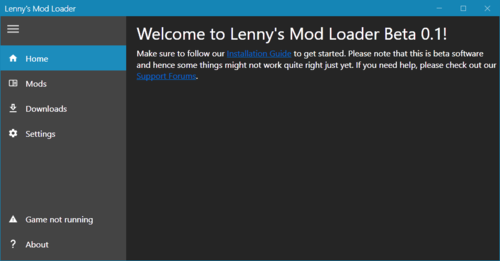
The general idea of Lenny's Mod Loader is to provide an easy way to install file modifications. This is achieved in two different ways depending on whether existing resources in the game are to be 'replaced' or if new resources are added to the game as 'addons'. To replace resources, the game file system can be modified on a per-file basis allowing you to quickly change the content of files without touching any RPFs. To add new resources, the new content can be loaded from disk directly into the game, again without the need for any RPF changes. Goodbye to patchday17 and dlclist.xml. Certain mods, such as vehicles, can even be loaded at runtime, making choosing your new favorite ride a breeze.
You can find more information on the dedicated Lenny's Mod Loader page here: https://www.lcpdfr.com/lml/index/
Getting Started Guide: https://www.lcpdfr.com/wiki/lml/lml-installation-guide-first-steps-r75/
- 645,900 Downloads
- 338 Comments
Updated -
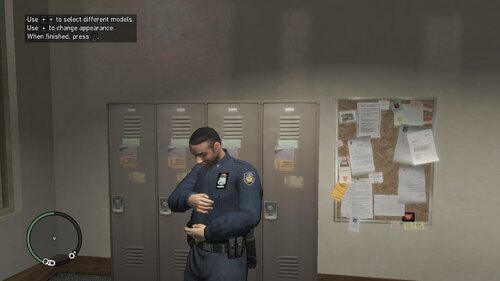
This file contains fixes for the various hooks required for most GTA IV mods including LCPDFR to make them work with the GTA IV Complete Edition. Please note that some features are disabled or might not work correctly as not everything has been updated. Most memory offsets have been ported to patterns to support future (if any) patches. Included are:
AdvancedHook.dll - Includes most of its original features except for the livery limit bypass. Many functions will not operate correctly as game offsets have changed
AdvancedHookInit.asi - Fully updated
aCompleteEditionHook.asi - Runtime fix for aru's C++ Script Hook (which is still needed!). Should be feature complete, albeit the original hook relies on field order for a few things and I might not have found all. The name is really just a simple way to make it load before any other asi files so it can fix up the hook early.
ScriptHookDotNet.asi - Fully updated except for the phone number feature
Installation
The files act as replacements to the original hooks with the exception of the aCompleteEditionHook.asi file, which still needs the original C++ ScriptHook to run properly. Feel free to change the name if you have asi files loaded earlier. Place all files in the GTA IV directory and launch the game. It is recommended to first install any mods before installing this fix to ensure you are using the latest fixed files.
Known LCPDFR issues
I only played LCPDFR briefly, so not much has been tested. One known issue is incorrect keys being displayed in the help boxes sometimes, for instance for the Enter key.
Support
Please note that I have no interest in providing any kind of support for GTA IV, LCPDFR or these fixes. I might update the files here occasionally to fix up more functions, but until then a debugger is your best friend if things go south.
- 747,037 Downloads
Updated -
This file contains a few examples to help you understand how to use the install.xml file. Please find a brief description of each example below:
AddonCar - Based on Rockstar's POLICE2 it shows how to add a car as an addon car, i.e. using POLICE2 also in POLICE6
Badge - Adds a new prop named prop_lspd_badge to the game. Based on Sam's Badge.
PedComponents - With the newly added support for ped components, I have included an example on how to add another shirt (jbib) to the female multiplayer model. Once loaded, index 325 will have a black casino vest (the vest itself makes your upper arms disappear, this is just the model). It also shows to adjust the hairstyle on selection of the component.
Shield - Based on Sniper's Shield this showcases how to re-use a ydr for multiple different textures.
VehiclesMetaChange - Shows how to replace a single xml file entry, in this case changing the handling for NINEF to AMBULANCE.
- 507 Downloads
- 5 Comments
Updated -
This example for Lenny's Mod Loader adds 50 (!) new police slots to the game, all based on POLICE2. The slots range from POLICE100-POLICE149. Please note that only POLICE100 and POLICE133 will have models (both the POLICE2 model) as I did not want to include models for all vehicles and two cars should be enough to understand how it works. Those two are the only ones that will spawn in-game by default. The data files are all set up so all you need to do is copy the model of your choice into the streaming folder, give them a name from POLICE100-POLICE149 and the next time you start the game, your new police car will be in that slot. Of course you can modify the entries for every slot, e.g. to change a vehicle's handling, but it is not necessary to get started.
Why 50 slots? Because why not.
I recommend to install this gameconfig first so the game can handle all the new cars.
- 5,762 Downloads
- 7 Comments
Updated -
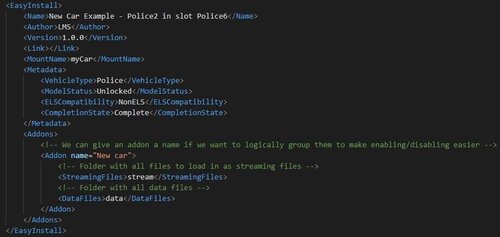
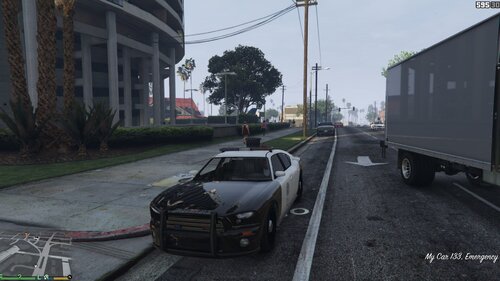
This example for Lenny's Mod Loader shows you how easy it is to make any vehicle an addon vehicle. The game's default POLICE2 will be added again as POLICE6, including a custom display name when entering the vehicle in-game ("My Car"). If you wish to add a different vehicle as POLICE6, simply replace the files in the "stream" folder. Ideally you create a new LML subfolder for each new vehicle and modify the stream and data files accordingly.
- 9,641 Downloads
- 26 Comments
Updated -
Because infinite boost means infinite fun! This RAGE Plugin Hook plugin equips your Oppressor bike afterburner with infinite boost, so you never have to leave turbo mode again. You can either toggle the turbo mode as usual (using the vehicle horn key) and it will stay active until you hit the key again or you can have even more fine control about your speed by only activating the turbo when you hold down the key. It's up to you. Please note that excessive speeding may result in legal consequences. If you get caught, that is.
As with all DLC vehicles, the oppressor is also despawned by default thanks to our very good buddies at R*. This plugin kills the shop_controller script to prevent this from happening. If you want to keep that script running and use a different method to keep the vehicles loaded (such as setting the global ptr), set DontKillShopScript to true. There are 3 .ini options in total:
ToggleMode = true // Whether or not the turbo mode is toggled.
DisableScreenEffect = false // Whether or not you want the "flash effect" when going full turbo (it is disabled entirely for non toggle mode to prevent epileptic seizures).
DontKillShopScript = false // Whether or not the shop_controller script should be killed to enable DLC vehicles
Only works on patch 1103!
- 926 Downloads
- 6 Comments
Submitted -
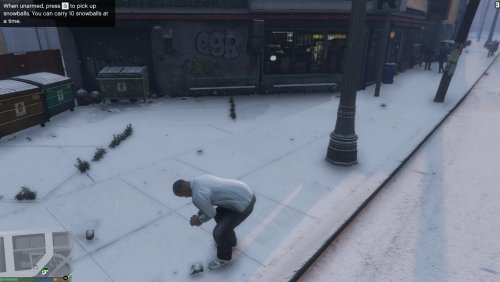
This modification brings the snow from GTA: Online to single player! Enjoy all of its glory with the latest additions & fixes by Rockstar to make a snowy Christmas happen in Los Santos! It also includes the ability to pick up snowballs from the ground, because why not?
Installation
There are two downloads provided, both installing exactly the same mod version.
SnowMod.rar just contains the plugin dll file. Put it into game folder\plugins as usual.
SnowMod_inst.rar contains an installer that will install the dll file for you automatically (note that the installer shows ad during the installation).
Usage
Snow Mod requires RAGE Plugin Hook 0.29 or later to run and is loaded as a plugin using the console (or automatically at startup if you have configured RPH that way). The snow effect is enabled automatically when loaded. To disable the snow effect in-game, use the console command ToggleSnow.
If there is no snow on the ground, but only a snowy weather effect, please disable Frame Scaling under Advanced Graphics options (see https://www.reddit.com/r/GrandTheftAutoV_PC/comments/3y1xjf/psa_if_you_cannot_see_the_snow_on_the_ground/ for more information).
Snowy Christmas guys!
- 48,583 Downloads
- 85 Comments
Updated -
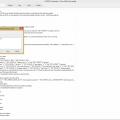
LCPD First Response Translation Tool 1.0
=== Tool usage ===
Browse: Open a saved project
New: Generates the default strings that you can edit.
Save: Saves your current project.
Compile: Compiles the project. Please note that you’ll have to specify a language code (en-US, de-DE). You’ll also need to create a folder with this same name in the GTA IV or EFLC root directory.
Note: You can also use any other software to edit the resource files and just use the tool to compile them.
=== In-game usage ===
Create a new folder with the language code in your game root folder (where the exe is) and drag your compiled language file in there.
Then change your language in the LCPDFR settings file either using an editor or the configuration tool.
Note: A few strings might be missing, but most should be covered.