Grantalaxy
Members
-
Joined
-
Last visited
Everything posted by Grantalaxy
-
You know you put that insanely well? I knew it would need some awesome ideas but couldn't put my finger on any. I support every one of those and I don't think that Sam and everyone else couldn't do it. I look forward to seeing what will come in later updates of LSPDFR!
-
Glad you didn't say "go see friends"... but it doesn't matter cause I have a lot of those... ha...haha... Right? No? ...
-
And that's 3 minutes they could've been looking over code to get it to us faster. I DO NOT understand what the big deal is here? It'll be out when it is out! Stop getting up in arms and get hyped about it while still being respectful.
-
Hello, Looks like you are getting the freval error. The freval error was fixed for some users by doing this: Open up your LCPDFR.ini in your LCPDFR folder in your GTA directory, look under "Main", it should look something like this by default: Now, add to the bottom of that part PreloadAllModels=True The "Main" part should now look like this:
-
Are you using any mods? If yes what ones? Those may be the cause.
-
Hello, The freval error was fixed for some users by doing this: Open up your LCPDFR.ini, look under "Main", it should look something like this by default: Now, add to the bottom of that part PreloadAllModels=True The "Main" part should now look like this:
-
Kids in my school are VERY open about it. I was in my math class just a few weeks ago while the teacher was talking a few kids were talking about who they sell weed to. I could name at least 5 people off the bat that sell/smoke it. There is even worse drugs like Triple C, coke, crack, meth going around in the school locker rooms. Worst part? These kids are in 6TH TO 8TH GRADE...
-
I think this would be a pretty nice addition to LCPDFR. On another note those need to be in a lot more cities and states. This could help a lot with chases.
-
Great idea. This would be wonderful for gameplay in my opinion.
-
That was great xD I love Brandon. Haven't seen this yet thanks OP for showing us.
-
Really not happy is an understatement xD
-
Random shots from the heart of LCPDFR
-
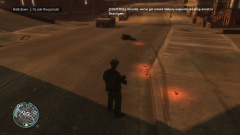
From the album: On Patrol
Pulled over a person and tased as he ran. He kept getting up and dropping more guns until I shot the suspect. (Tire tracks are from an ambulance... tried to kill me instead of save the suspect as usual) -
-
Here in New York we are supposed to get about a foot if all goes to how they are predicting it! Directly from National Weather Service: * LOCATIONS... ALL OF EAST CENTRAL NEW YORK... SOUTHERN VERMONT... WESTERN MASSACHUSETTS AND NORTHWEST CONNECTICUT. * HAZARD TYPES... HEAVY SNOW. * SNOW ACCUMULATIONS... 6 TO 12 INCHES OF SNOW POSSIBLE... WITH 10 TO 14 INCHES IN HIGHER ELEVATIONS OF THE EASTERN CATSKILLS... BERKSHIRES AND SOUTHERN GREEN MOUNTAINS. * MAXIMUM SNOWFALL RATES... ONE INCH PER HOUR.
-
-
On topic: WONDERFUL idea with the multiple pullovers. There is always that person that smashes into the back of your cruiser while pulling another person over! Off topic: Haha they are the worst
-
1st time I saw this I laughed as well.
-
Pretty accurate (coming from a person living in NY) The blue should be a little more on the black side ;)
- 6 comments
- 1 review
-
Compared to this video this one sounds the closest: '?do=embed' frameborder='0' data-embedContent>> Video:
-
-
Sounds like a really good idea. I would like to see this implemented.
-
Agreed
-
Good luck dude! Hope you make it! Let us know what happens.
-
Huh, Sounds interesting I would like to know as well...