


moddingisforfunyoufools
Members
-
Joined
-
Last visited
Everything posted by moddingisforfunyoufools
-
Hoffers new WIP
-
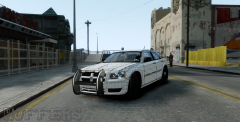
From the album: Dodge Magnum WIP
Newest WIP by Sgt.Hoffers Made to replicate KevinDV's Chevy Caprice. Model From EA games, Ripped and Converted by Trewq34 Wheels by GerryStudio, Edited & Converted for GTAIV by Bxbugs123 -
-
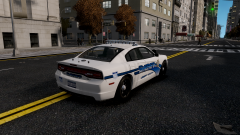 Really liking that skin! Who made it? Looks like something would muster up
 -
No worries :)
-
I think it has something to do with the enbseries.ini Try your Bloom tab? *Correct me if I am wrong, I am no ENB specialist. I will leave that to ""
-
I've got nothing
-
As you may know. This thread is a complete ball of fun/a major joke. I posted in this thread to continue the on going joke about Mongolians and Independence. I am not being serious in any of this, I am just being devious. *Smirks* Nice gif by the way. Made me laugh!Apologies. But this is no matter for fun. This is a Political break through. Kinda like the diplomatic debate between Left Twix and Right TwixYou implemented that yourself^ Man, I wish everyone would appreciate Mongolians and there independence. Well, for the selected few.. *cough* I don't even have some "fugitives" hiding in my basement *cough*.
