Skip to content
View in the app

A better way to browse. Learn more.

LCPDFR.com

A full-screen app on your home screen with push notifications, badges and more.

To install this app on iOS and iPadOS
  1. Tap the Share icon in Safari
  2. Scroll the menu and tap Add to Home Screen.
  3. Tap Add in the top-right corner.
To install this app on Android
  1. Tap the 3-dot menu (⋮) in the top-right corner of the browser.
  2. Tap Add to Home screen or Install app.
  3. Confirm by tapping Install.

Aznpride485

Members
  • Joined

  • Last visited

  1. Skye Griffith     Finished responding to a [UC] Reports of a Gang Shootout in Little Seoul, Ginger St
  2. Skye Griffith     Responded to a [UC] Reports of a Gang Shootout in Sandy Shores, Zancudo Ave
  3. Skye Griffith     Finished responding to a Arrest Warrant in Sandy Shores, Zancudo Ave
  4. Skye Griffith     Finished responding to a [UC] Welfare Check Request in Grapeseed, Grapeseed Ave
  5. Skye Griffith     Responded to a [UC] Welfare Check Request in Paleto Bay, Paleto Blvd
  6. Skye Griffith     Finished responding to a Arrest Warrant in Paleto Bay, Paleto Blvd
  7. Skye Griffith     Arrested Jack James in Mount Chiliad, Senora Fwy
  8. Skye Griffith     Responded to a Arrest Warrant in Mount Chiliad, Senora Fwy
  9. Skye Griffith     Finished responding to a HWY Motor Vehicle Accident in Mount Chiliad, Senora Fwy
  10. Skye Griffith     Finished responding to a HWY Motor Vehicle Accident in Braddock Pass, Senora Fwy
  11. Skye Griffith     Responded to a HWY Motor Vehicle Accident in Mount Gordo, Senora Fwy
  12. Skye Griffith     Finished responding to a [UC] Reports of a Stolen Emergency Vehicle (1) in Mount Gordo, Senora Fwy
  13. Skye Griffith     Finished responding to a [UC] Money Truck Theft in Mount Gordo, Senora Fwy
  14. Skye Griffith     Finished responding to a [UC] Jewellery Robbery In Progress in Mount Gordo, Senora Fwy
  15. Skye Griffith     Finished responding to a [UC] Reports of a Stolen Emergency Vehicle (2) in Mount Gordo, Senora Fwy
  16. Skye Griffith     Finished responding to a [UC] Money Truck Theft in Mount Gordo, Senora Fwy
  17. Skye Griffith     Finished responding to a HWY Pedestrian Struck by Vehicle in Mount Gordo, Senora Fwy
  18. Skye Griffith     Finished responding to a [UC] Heavily-Armed Terrorist Attack in Mount Gordo, Senora Fwy
  19. Skye Griffith     Finished responding to a HWY MVA Traffic Control in Mount Gordo, Senora Fwy
  20. Skye Griffith     Responded to a HWY MVA Traffic Control in Braddock Pass, Senora Fwy
  21. Aznpride485 changed their profile photo
  22.    Aznpride485 reacted to a post in a topic: Some Lights Are Bright and Some Are Not
    • 31 downloads
    • Version 1.0.0
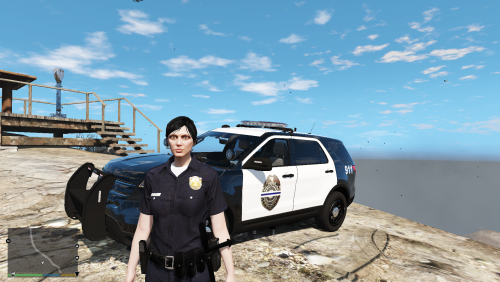
    Download The Vehicle Model for this texture (Created by Desmond98) Wanted to Create a texture for the Ford Explorer That's in my Town. I will also be creating a Crown Vic Texture For This Same Department. I Found only one Logo because My town is small and finding a Logo for my Police Department was Hard. I only found One with the Blue Line through it. The reason there is a Blue Line is because it Supports the Police. I understand That the Lightbar isnt the Same so I will be looking to add the same looking lightbar or possibly finding a new vehicle model with the same light bar and making a texture for that. I will be adding a Unit Number for the Back and Also the Crime Stoppers Sticker to the bumper in the future Updates. I will also be adding a Blue Tape Going across the Back Window Because its on all of our police vehicles in my town.
  23. No Problem. noticed it was very quiet when playing ill upload a louder version within 10 minutes
    • 939 downloads
    • Version 2.0
    Audio files recorded from LAPD Code 3 Scanner and edited to go with lcpdfr random police chatter. Contains mostly Code 2's and 1 Code 3 Call.

Account

Navigation

Search

Search

Configure browser push notifications

Chrome (Android)
  1. Tap the lock icon next to the address bar.
  2. Tap Permissions → Notifications.
  3. Adjust your preference.
Chrome (Desktop)
  1. Click the padlock icon in the address bar.
  2. Select Site settings.
  3. Find Notifications and adjust your preference.