




Mattesolo
Members
-
Joined
-
Last visited
Everything posted by Mattesolo
-
Awsome, Ill message you as soon i feel i have a good team
-
No, it will not be a clan pack, and yes, its supposed to be realesed to the public Glad to hear it, ill send the info for how were gonna communicate ones everyone thats gonna join has
-
So, i want to make a HUGE pack, with loads of cars, police, work trucks, fire, what ever. I want modelers to be part of a small team for the duration of the making of this pack. If you´re interested, please reply here or comment, and if you have any suggestions for cars, feel free to write them here aswell. Experience isnt a requirment, but i will most liekly not be accepting to many unexperienced modelers due to the fact that they will ned more help then experienced modelers. The pack isnt based on anything so far, but i will make sure to make a forum post to post updates whenever we start working.
-
 Ill add that before i do the video and then ill go ahead and upload a updated version
 -
I thought there was a lack of work/service vehicles for GTA 4 (Yes i still model for GTA 4, because i don´t have zmodeler3) So, here you go, a truck for the fictional "Liberty City Highway Safety Authority" Whos main purpose is traffic control on highways and help with broken down vehicles. (Can pretty easily be changed to like a road maintenance truck with a new skin) I hope you enjoy it! https://www.youtube.com/watch?v=bMGoCAPuYnw If ive forgotten any credits, please tell me!
-
Ok, ill try, im not sure how to though.
-
Well, it just keeps spining for me, is there any chance you could tell me how to fix it?
-
Sorry for the bump, but did you figure this out?
-
Did you figure this out?
-
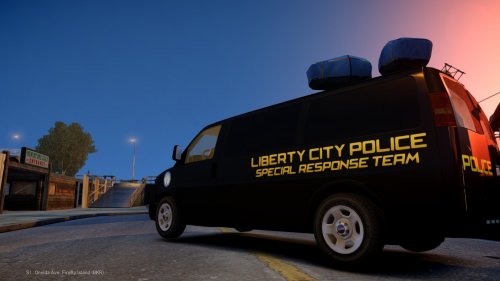 i am going to upload this model with prisoner transport equipment that came with the unlocked model. A undercover skin should be really easy to do, just color the template black and add plates
 -
Alright, ill see what i can do
-
Waht is it that you dont like about it? i may be able to get a skin pack to be uploaded, but for that i would need feedback
-
Thanks for shown interest in my S.W.A.T. or S.R.U. van. Also, huge thanks to ProGamerCharlie for the amazing skin. Below you can find: Video of the car in game and info of whats in the download Included in the download: Readme (Handling and credits) The car and textures Templates ELS config for both els 8 and 8.5
-
 Thank you, i forgot. I will add that as soon as i get home. I don´t know how that escaped me
- 7 comments
- 3 reviews
-
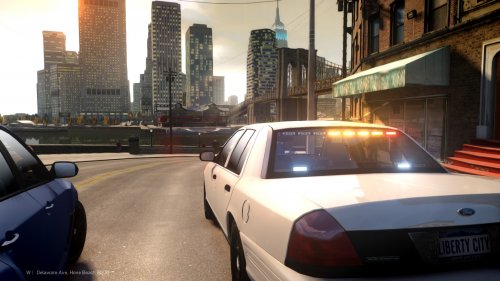
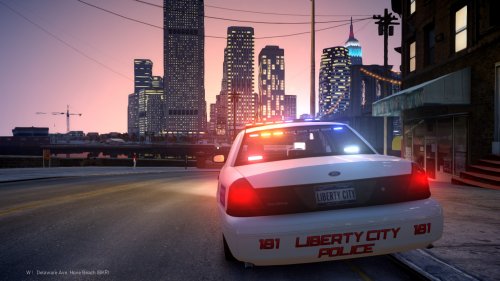 NOTE: Pictures are of version 1.0 Skin made by ProGamerCharlie (Huge thanks for that :) ) Well hello there. Happy to see you here. Thank you for shown interest in my CVPI cruiser. (This car also goes very well with my police cruiser) Below you can find Information about what light is what extra, and also information of whats in the folder. The lights are divided like this: Red and blues on the commander next to the traffic advisor, are extra 2/3 Lights on the pushbar are extra 1/4 on the inner and outer edges and the ones inbetween are extra 2/3. Rear lights under the commander are extra 1/4 and are a single colour. The lightbar is extra 1/4 on the outer edges and extra 2/3 on the inside. The Traffic Advisors are extra 7-9. There are also takedowns/white lights on the lightbar. extras 5/6. Whats included in the file? Readme with credits and handling line. Car model and texture file. Template for skin.
 -
-
I could add it, but i didnt feel a unamrked car would have a rambar, maybe im wrong though. i could also add it as a extra 10. That wuld make the rambar random.
- 7 comments
- 3 reviews
-
-

- 3
-
-
NOTE: Pictures are of version 1.0 Well hello there fellow officer. I hope you´re having a good day. Thank you for shown interest in my GTA 4 model, i hope you like it. Please remember to leave a review below. (This car also goes very well with my Unmarked Crown vic) Below you can find Information about what light is what extra, and also information of whats in the folder. The lights are divided like this: Red and blues on the commander next to the traffic advisor, are extra 5/6 (those are warning lights), the reason for it is that i wanted there to be more options for lighting patterns. Lights in the front are extra 1/4, they are dual coloured and that sadly means that some patterns wont work, without giving you some funky results. Rear lights under the commander are extra2/3 and are a single colour. Whats included in the file? Readme with credits and handling line. Car model and texture file. Template for skin.
- 7 comments
- 3 reviews
-
-
- 1
-
-
 What I meant was, that people might not like the light strip, but you can disable it,
 -
I understand people might not like it, but its easy to disable.
-
Alright, ill keep that in mind until the next model. I do like it myself though
-
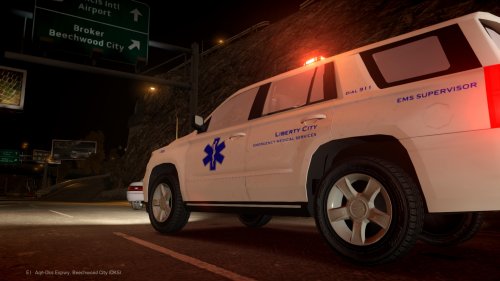
Alright, lets be clear. This car has issues, i put several hours into fixing alot of them. The trunk is a big one, where you can see through the sides of the car, when you open the trunk, its fine when its closed though. I tried several times to do a good looking fix, but i honestly couldent fix it in a good manor. Take the car as it is. I wanted a EMS supervisors car. so here it is. Have fun! Lighting: http://i.imgur.com/JvVitCA.gifv Note: To get the effect where the roof lights flash, but the ones for the takedown on the lightbar, does not, use TKDN in the ELS config under warning lights section.
-
-
-



