Skip to content
View in the app

A better way to browse. Learn more.

LCPDFR.com

A full-screen app on your home screen with push notifications, badges and more.

To install this app on iOS and iPadOS
  1. Tap the Share icon in Safari
  2. Scroll the menu and tap Add to Home Screen.
  3. Tap Add in the top-right corner.
To install this app on Android
  1. Tap the 3-dot menu (⋮) in the top-right corner of the browser.
  2. Tap Add to Home screen or Install app.
  3. Confirm by tapping Install.

Fdarr

Members
  • Joined

  • Last visited

Everything posted by Fdarr

  1. <Item> <parent>vehicles_poltax_interior</parent> <child>2010nypdbarriers</child> </Item> these lines are separate than the others.
  2. In vehicles meta.txt there are lines at the bottom that need to be placed in vehicles.meta of your mods folder. Don't mix them up with the other lines.
    • 977 downloads
    • Version 1.0.0
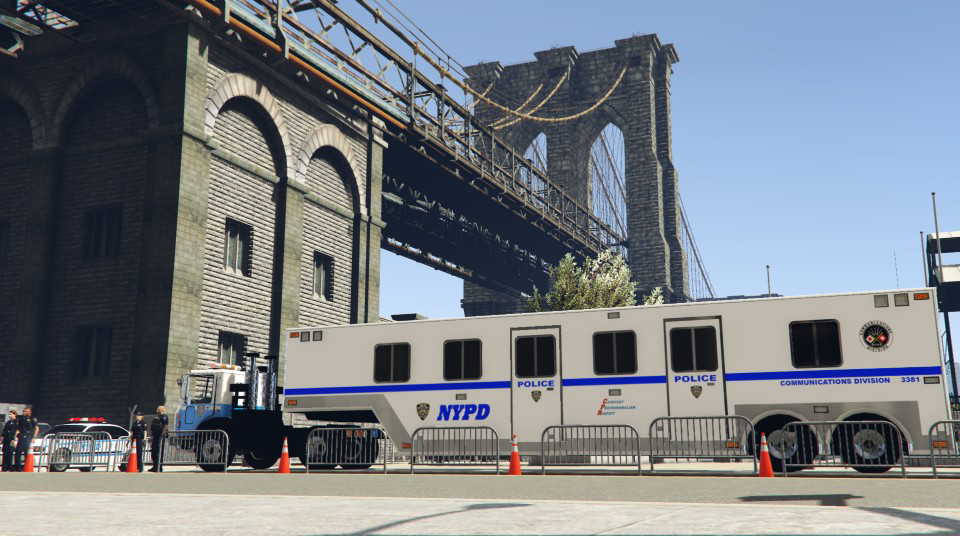
    2010 International Terrstar NYPD Barricades Truck ============================= RELEASED: July 2022 GAME: Grand Theft Auto V - Pc Version. ============================= Introduction ------------ the original truck model can be acquired from the website Hum3d. the original truck model was bought from hum3d by bfaith1407 This model was converted to GTA V by Fdarr. Model parts were built and added by Fdarr. Lightbar used: Federal Signal StreetHawk Model S1B-L by Solo. - Can be found in LSPDFR DEV Section. Carcols lines for lightbar bt Fdarr. THIS MODEL HAS ELS LIGHTS, THE ROTATING LIGHTS WORKS WITH CARCOLS. ------------ IMPORTANT ------------ The model is LOCKED. Unlocking/modifying/re-uploading online is not allowed. ------------ Installation. ------------ Copy the lines in carvariations meta.txt to your carvariations.meta file in your mods folder. Copy the lines in vehicles meta.txt to your vehicles.meta file in your mods folder. Copy the lines in carcols.txt to your carcols.meta file in your mods folder. COPY 2010nypdbarriers.xml in your ELS Folder. ------------ TEMPLATE AVAILABLE IN DOWNLOADED FOLDER. Save new template file name from TEMPLATE to barricade_1 ------------ I AM NOT RESPONSABILE TO ANY DAMAGE TO YOUR GAME/PC. ----------- Enjoy.
  3. If you know how by using blender I woulf gladly apriciate and learn 😉

Account

Navigation

Search
Search

Configure browser push notifications

Chrome (Android)
  1. Tap the lock icon next to the address bar.
  2. Tap Permissions → Notifications.
  3. Adjust your preference.
Chrome (Desktop)
  1. Click the padlock icon in the address bar.
  2. Select Site settings.
  3. Find Notifications and adjust your preference.