Pertinax
Members
-
Joined
-
Last visited
Everything posted by Pertinax
-
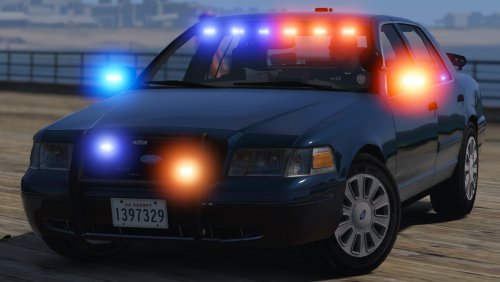
 Very nice mods, but kind of lazy of not placing the right lighting for ELS and no traffic advisor, no take down or spotlight.
- 70 comments
- 30 reviews
-
-
 I mean when I'm not in stage 3 of sirens. I just tried just by pressing T, nothing ;)
- 2,661 comments
- 234 reviews
-
Is there a Support Section for this mod? Couse I wanted to know if it's posible to make Bots (Vehicles) To move out of the way with a Siren tone on, like pressing T.
- 2,661 comments
- 234 reviews
-
Just need traffic advisors at the back of the light bars and it will be the best pack ever. plus addon cars like the FPIU and the and the crown vic
- 70 comments
- 30 reviews
-
Hello there! I'm Pertinax, Captain of the LSPD in Eclipse RP Server, I would like to explain what Eclipse RP is. Eclipse RP is a server Based on GT-MP (gt-mp.net) Modification that have over 80+ players online 80% of the time. And I would like to request to you if it's posible if some one could could Develop a NON-ELS model of the: Crown Vic 2011(for Police1), 2017 DODGE CHARGER R/T (For police 2), 2016 Ford Taurus Police Interceptor (Cristmas version, since we use it for High speed persuits, for Police 3), Crown Vic 2011 Unmarked Slipknot (for police4), A police tranporter ( IDK what model it imitates from the original of GTA) A police bike like the BMW (with lights all over xD The one we have doesn't have enought strobes), unmarked and slipknot 2017 DODGE CHARGER R/T (For FBI1), unmarked and slipknot 2016 Chevrolet Tahoe PPV (For FBI2) Armored SWAT vehicle (For the police riot) The Issue that I have is that Most of the models are ELS and in the game we don't have ELS. I know I'm asking a lot but a lot of people would be using it and we need a hole pack. I have been searching like crazy and I can't find any. I've have tried my self and i'm not that good with modeling, but I'm good with texturing. I would love that all vehicles have: Radar Antenas Push bars for PITs ( With better strobes) Re enforced back seat for suspects in cuffs. ALPR in the trunks Gun racks (For Carabine and Shotgun) Lights in: Grill Side Mirrors Side windows Pushbar Back windows Windshield Back window (with amber for traffic advisor) Mobile data computer Cones in trunk Game License plate that changes Code 3 Persuit Light bar for not slipknot vehicles (http://www.code3pse.com/products/product_info/Police/Lightbars/C_PURSUIT) And what ever you think it would look sick! The current pack we are using is this one: https://youtu.be/j3LjuOHIzQM But since is not optimized for each model it have bugs that float to other people that doesn't have the mods installed. (Ps the Cruiser that I love there, is the unmarked FCVI Unmarked and Slipknot) Idk if some one here can help us out with this project and from now, thanks for reading Here is our logo (we use it instead of the LAPD city logo) by the way, our department is based in LAPD :P PS: I really love Christmas tree cruisers, but not exaggerating it, like the unmarked cruisers of the video.

-
-
I complete the installation successfully but the blue and lights lighting environment aren't working. I would love some help here... I would even code the lighting point one by one on the vehicle in the carvariations.xml or in the carcols.xml but I don't know what line to edit. PS: I'm using GT-MP, and thanks for the help. Mod:
-
Same problem over here. Notes: I have installed Callout+ and WoutersCallouts Error Display at calling for a persuit: [ERROR - 12:08:45 PM] [script.CalloutManager] Error while processing callout: Breakdown: Object reference not set to an instance of an object. at CalloutsPlus.CalloutsPlusMain.RepairVehicle(Vehicle vehiclePar) at CalloutsPlus.Callouts.Breakdown.Process() at freval_130.Process() [WARNING - 12:08:45 PM] [script.CalloutManager] Failed to free callout properly: BreakdownObject reference not set to an instance of an object. at freval_285.eval_fr37() at LCPD_First_Response.LCPDFR.API.LVehicleBase.NoLongerNeeded() at CalloutsPlus.Callouts.Breakdown.End() at freval_130.fr2() Specs:
-
What he say, I use Windows 8 and i love it. Is much fasters with games than Win7.
-
So the Dev team found this errors interesting? or they were already reported?
-
Mate that false, These are my Specs and i have that errors. Processor Intel® Core i7-4770 CPU @ 3.40GHz Manufacturer Intel Speed 3.4 GHz Number of Cores 8 Mother Board Gigabyte Sniper B5 LGA1150 Video Card NVIDIA GeForce GTX 650 Ti Manufacturer NVIDIA Chipset GeForce GTX 650 Ti Dedicated Memory 2.0 GB Total Memory 3.9 GB Memory 8.1 GB (2 Kingstong HYPER 4gb/DDR3 1600MHz) Operating System Microsoft Windows 8 Professional Edition (build 9200), 64-bit Service Pack 0 Size 64 Bit Edition Professional Display Maximum Resolution 1920 x 1080 DVD DVD-ROM virtual de Microsoft CD DVD-ROM virtual de Microsoft Drive 1 Size 736.2 GB Free 561.1 GB Drive 2 Size 195.0 GB Free 139.0 GB
-
Crash When leaven the Duty Room after getting out of duty: [ERROR - 6:45:50 PM] [Main] CRITICAL ERROR DURING MAINLOOP! REPORT THIS ISSUE AT LCPDFR.COM BY INCLUDING THIS LOGFILE. [ERROR - 6:45:50 PM] [] System.Reflection.TargetInvocationException: Exception has been thrown by the target of an invocation. ---> System.NullReferenceException: Object reference not set to an instance of an object. at freval_138.eval_fr9() --- End of inner exception stack trace --- at System.RuntimeMethodHandle.InvokeMethod(Object target, Object[] arguments, Signature sig, Boolean constructor) at System.Reflection.RuntimeMethodInfo.UnsafeInvokeInternal(Object obj, Object[] parameters, Object[] arguments) at System.Delegate.DynamicInvokeImpl(Object[] args) at freval_162.fr1() at LCPD_First_Response.Engine.Main.fr2()
-
Other one: [ERROR - 11:07:54 AM] [Main] CRITICAL ERROR DURING MAINLOOP! REPORT THIS ISSUE AT LCPDFR.COM BY INCLUDING THIS LOGFILE. [ERROR - 11:07:54 AM] [] System.InvalidCastException: Unable to cast object of type 'freval_77' to type 'freval_89'. at freval_238.eval_fr0(freval_81 A_0, Boolean A_1) at freval_53.eval_2.eval_fr0() at freval_53.eval_2.eval_fr0(Object[] A_0) at LCPD_First_Response.Engine.Timers.DelayedCaller.fr0() at LCPD_First_Response.Engine.Main.fr2()
-
Yes, it works for me, I have GTA IV Steam Version! So go ahead install it.
-
-
Here I'm just reporting some of my crashes during the game play. [ERROR - 8:31:22 PM] [] System.NullReferenceException: Object reference not set to an instance of an object. at freval_19.eval_fr0(Single A_0, freval_101 A_1, Vector3 A_2) at freval_27.eval_fr0(Single A_0, freval_101 A_1) at freval_100.fr7(freval_202 A_0) at freval_3.eval_fr2(freval_202 A_0) at freval_37.fr8() at freval_27.fr8() at LCPD_First_Response.Engine.Main.fr2() [ERROR - 4:41:26 PM] [] Error while processing script: PoliceDepartmentManager: Invalid call to an object that doesn't exist anymore! at GTA.Ped.get_Position() at freval_211.eval_fr60() at freval_138.eval_fr15() at freval_138.Process() at freval_49.Process() at LCPD_First_Response.Engine.Scripting.Plugins.ScriptManager.Process()
-
Same problem But with some variants
-
Can some one with Full experience at LCPDFR 1.0 Can post a list of keys, like this post: '?do=embed' frameborder='0' data-embedContent>> Because the ones on the PDF Manual are not easy to understand. Thanks, (Besides that some one them, dosen't work)
-
This is the error that i have and i don't know how to fix it.
-
How do i take out the option of shortkeys?
-
How about Car Cars calls? In the radio you resive the call of a car crash, and maybe when you arrive a car could be on fire. And disputes between the two owners.