


Realz
Members
-
Joined
-
Last visited
Everything posted by Realz
-
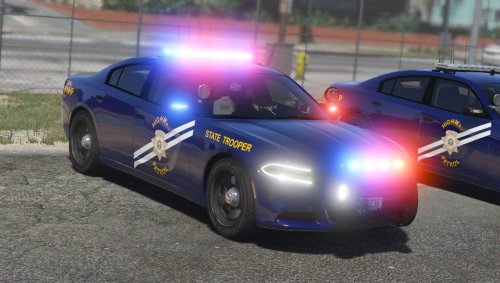 I love the car and lighting, looks very professional. Excellent work. More lights :) Didn't mean to post 3stars..
- 38 comments
- 19 reviews
-
Must not be to good of a trick, considering that was the very first thing i've done to install it after a fresh install of windows, notice my signature, I have used LCPDFR, this isn't my first rodeo, with the program, or any others like it, just for some odd reason it will not install correctly and when it does, it doesn't work.
-
Alright, so i've been using LCPDFR for quite sometime now, never had an issue, crash, error, installation error...nothing recently just re-installed windows, downloaded GTA from my steam, which is current to date with patching / so on I tried to install LCPDFR, and magically, nothing works, installation went good. cannot bring up console, cannot start on duty, or force duty. everything else i'm running script wise works, so I cannot explain why this is failing So i tried to reinstall as administrator but I get this as an error: Installation component 'LCPDFirstResponse' error'd! at System.IO.__Error.WinIOError(Int32 errorCode, String maybeFullPath) at System.IO.FileStream.Init(String path, FileMode mode, FileAccess access, Int32 rights, Boolean useRights, FileShare share, Int32 bufferSize, FileOptions options, SECURITY_ATTRIBUTES secAttrs, String msgPath, Boolean bFromProxy, Boolean useLongPath) at System.IO.FileStream..ctor(String path, FileMode mode, FileAccess access, FileShare share) at System.IO.File.WriteAllBytes(String path, Byte[] bytes) at G17MediaSetupEngine.Stuff.ExtractResourceToPath(String resourceName, String destName, Boolean pureres) at G17MediaSetupEngine.Installation_Components.LCPDFRComponent.beginComponent() at G17MediaSetupEngine.UI.Interface.wizardControl1_SelectedPageChanged(Object sender, EventArgs e) at G17MediaSetupEngine.UI.Interface.wizardControl1_SelectedPageChanged(Object sender, EventArgs e) : I do apologize if this is already an topic, I didn't feel like going through every single post to see whose having same issue as me. I try running game as administrator, and nothing seems to help aswell. Thanks LCPDFR Community. -Realz
-
If anyone wants to play anytime, you can hit me up on windows live or steam, to setup with any necessary modifications, I'm on a'lot & always down to play Windows Live: x II Realz II x Steam: N2RPro
