TheFireman504
Members
-
Joined
-
Last visited
Everything posted by TheFireman504
-
-
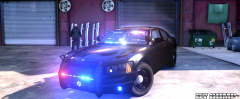 Could add some ions on the side, maybe some vortex in the wheel wells, lights on the mirrors, vortex on the side of the pushbar... haha Seriously though that would be awesome xD Anyways, it looks amazing as always! The only thing I dont like is the push bar extending to the headlights... Cant wait! ~J. Ordoyne W.V.F.D.
 -
-
Both not a problem, thanks as always!
-
Well, just suggestions... 1.) If its possible to make a file so we can make liverys, We can add like a water department logo and a KEEP BACK or VEHICLE MAKES FREQUENT STOPS on the back. It would blend in great. 2.) Since we cant turn off the mini lightbar at light stage 3, is there anyways to add blue lights in the headlights/reverse lights? this could make it easy to point out this vehicle as a police car. I understand if you dont want a lot of lights, but atleast enough to stand out. *Sorry, not trying to be demanding, just suggestions(: I am still very thankful lol
-
I am struggling to install a golf cart. I really would like to make it noose. It says made for any, but I cant figure it out. Game crashes when I try to load the car. Thanks in advance for the help! '?do=embed' frameborder='0' data-embedContent>>
-
1.) Thats fine then, im still happy lol 2.) I did that, but I found the reason. Its because I have the truck saved in my garage. Once i spawned a new car it worked fine. Thanks!
-
Installed, looks amazing! Love everything about it, hope others do too! Quick questions: 1.) Any way to turn off mini lightbar on roof at LightStage3? 2.) My truck keeps spawning white with blue rims. I have to change the color in trainer. Any way to fix that? Anyways, thanks so much! Hope others love it as much as i do!
-
WILLPV23, That looks amazing! Also, feel free to add as many lights as you'd like. The more the merrier. I don't really want to be a hassle, so whatever is fine. anyways, it looks really good! I can't wait! Also, the reason for the blue lights is because my fire department is now allowed to have Red and Blue, so my police department is switching to ONLY Blue or Blue/White in front and Blue or Blue/Amber on sides and rear. As always, thank you so much, and I cant wait!!! :D
-
Hello fellow gamers! I have a wonderful idea, but I don't know if anyone is very capable of doing it. anyways, here is goes: A yellow newer model F-150 with a amber light on top (Beacon light or minilightbar[LED PLEASE]). Also, with blacked out tint, have a blue visor light and a blue/white dash light in the front. In the rear, an amber directional and a blue stick. On ELS light stage one, the amber light on top can flash along with some white strobes. This makes the truck look like a construction truck. On light stage two, the amber rear directional can light up. Finally, on light stage three, the blue visor, blue/white dash light, and the blue rear stick can light up. It would be a perfect undercover unit. Please comment with any questions. I would love someone to be able to do this! Thanks, and happy gaming! J. Ordoyne, W.V.F.D.