Skip to content
View in the app

A better way to browse. Learn more.

LCPDFR.com

A full-screen app on your home screen with push notifications, badges and more.

To install this app on iOS and iPadOS
  1. Tap the Share icon in Safari
  2. Scroll the menu and tap Add to Home Screen.
  3. Tap Add in the top-right corner.
To install this app on Android
  1. Tap the 3-dot menu (⋮) in the top-right corner of the browser.
  2. Tap Add to Home screen or Install app.
  3. Confirm by tapping Install.

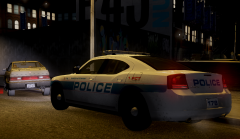
DSPD 178 In Action

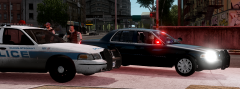
Unit 178, just after pulling over a Blista that ran a red light. 178 is one of only a handful of Chargers in the DSPD fleet. They are primarily assigned to traffic duties on major avenues within DSPD's jurisdiction, but can be seen patrolling the streets of Dukes at any time of the day, especially when a number of other patrol cars are in for maintenance.

  • From the album:

    Dukes-Steinway

    · 23 images

    Account

    Navigation

    Search

    Search

    Configure browser push notifications

    Chrome (Android)
    1. Tap the lock icon next to the address bar.
    2. Tap Permissions → Notifications.
    3. Adjust your preference.
    Chrome (Desktop)
    1. Click the padlock icon in the address bar.
    2. Select Site settings.
    3. Find Notifications and adjust your preference.