

Skip to content
View in the app

A better way to browse. Learn more.

LCPDFR.com

A full-screen app on your home screen with push notifications, badges and more.

To install this app on iOS and iPadOS
  1. Tap the Share icon in Safari
  2. Scroll the menu and tap Add to Home Screen.
  3. Tap Add in the top-right corner.
To install this app on Android
  1. Tap the 3-dot menu (⋮) in the top-right corner of the browser.
  2. Tap Add to Home screen or Install app.
  3. Confirm by tapping Install.

Vehicular Checks

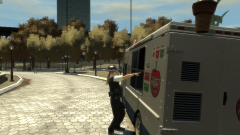
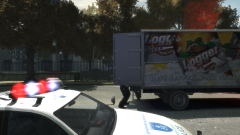
Just before the gates were opened to the general public, meanwhile, the GLP were up and around the delivery bay checking the latest delivery - a lorry full of Logger beer kegs, due for the bar. The driver was stood outside, mouthing curses about lateness and puffing on a cigarette, while a team of four checked every nook and cranny of the lorry, which was eventually released without a hitch.

Copyright

© Hullian111
  • From the album:

    Operation - Ashahara

    · 30 images

    Account

    Navigation

    Search

    Search

    Configure browser push notifications

    Chrome (Android)
    1. Tap the lock icon next to the address bar.
    2. Tap Permissions → Notifications.
    3. Adjust your preference.
    Chrome (Desktop)
    1. Click the padlock icon in the address bar.
    2. Select Site settings.
    3. Find Notifications and adjust your preference.