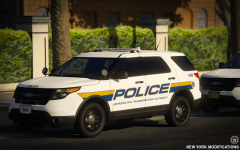
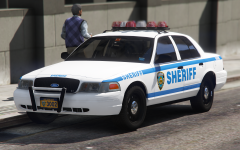
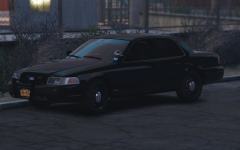
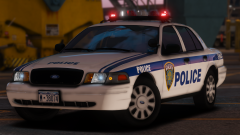
New York Police Department Share https://www.lcpdfr.com/gallery/image/91396-new-york-police-department/ Share on Facebook Share on X {lang="reddit_text" More sharing options... Followers NYPD Highway Patrol CVPI Unmarked version, will be adding a marked slicktop livery to it, and of course a marked version of the vehicle. Credit New York Modifications Copyright © New York Modifications
t0y Members October 17, 20178 yr Author stats 35 minutes ago, Joshxpt said: they actually look pretty god damn nice :) 23 minutes ago, Maurice97 said: Hot like you Thanks boys
t0y Members October 17, 20178 yr Author stats 19 minutes ago, UndeadxLegends said: sex 53 minutes ago, jman5625 said: Ho-ly shit! no u
AC-Teddy Members October 18, 20178 yr Author stats looking good but will probably be released with unbreakable windows like all your mods.. shame
t0y Members October 18, 20178 yr (edited) Author stats 5 hours ago, AC-Teddy said: looking good but will probably be released with unbreakable windows like all your mods.. shame Yes. Let's assume off of the CVPI I released 3 months ago with a different base that this will not have breakable windows. (It does. Thank you) Edited October 18, 20178 yr by t0y
FishtheDestroyer Members October 18, 20178 yr Author stats 9 hours ago, AC-Teddy said: looking good but will probably be released with unbreakable windows like all your mods.. shame Leave my master alone
Hullian111 Members October 19, 20178 yr Author stats 22 hours ago, AC-Teddy said: looking good but will probably be released with unbreakable windows like all your mods.. shame Hey, at least you can say they're armoured for RP purposes.
AC-Teddy Members October 20, 20178 yr Author stats 21 hours ago, Hullian111 said: Hey, at least you can say they're armoured for RP purposes. Yeah! OR ya'll can start accepting some constructive criticism.
PhillBellic Members October 27, 20178 yr Author stats Liking that PAPD Livery. Thought of a New Jersey License Plate variant?
t0y Members October 27, 20178 yr Author stats On 10/20/2017 at 6:07 AM, AC-Teddy said: Yeah! OR ya'll can start accepting some constructive criticism. Or you can stop assuming something? Maybe form it in a question and be mature about it like, "Hey t0y, I was wondering will these have breakable windows? I noticed some of your previous cars do not" then maybe you wouldn't come off as cunty. What you said was neither constructive criticism or criticism... or constructive... you didnt merely suggest that I add breakable windows, instead you automatically assumed it didnt, I find it hard to believe you cant see that. 10 hours ago, PhillBellic said: Liking that PAPD Livery. Thought of a New Jersey License Plate variant? Thanks, probably not as it is specifically New York Modifications ;) Maybe though... We need to make the custom font though, but I think we can handle it if needed.
Deactivated Member Deactivated October 27, 20178 yr (edited) Author stats 3 hours ago, t0y said: Or you can stop assuming something? Maybe form it in a question and be mature about it like, "Hey t0y, I was wondering will these have breakable windows? I noticed some of your previous cars do not" then maybe you wouldn't come off as cunty. What you said was neither constructive criticism or criticism... or constructive... you didnt merely suggest that I add breakable windows, instead you automatically assumed it didnt, I find it hard to believe you cant see that. shut your fuck up.................................. and fix the windows Have gud today, Edited October 27, 20178 yr by Lundy
t0y Members October 27, 20178 yr Author stats 3 minutes ago, Lundy said: shut your fuck up.................................. and fix the windows Have gud today, On 10/18/2017 at 3:31 PM, t0y said: (It does. Thank you) A.K.A It was fixed months ago. Thanks for reading.
Deactivated Member Deactivated October 27, 20178 yr Author stats 1 minute ago, t0y said: A.K.A It was fixed months ago. Thanks for reading. i am credit for fix for window be welcome.
PhillBellic Members October 28, 20178 yr Author stats 9 hours ago, t0y said: Thanks, probably not as it is specifically New York Modifications ;) Even an one off would make me happy. :)





Recommended Comments
Join the conversation
You can post now and register later. If you have an account, sign in now to post with your account.