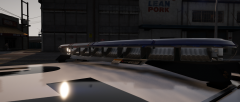
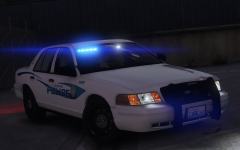
Here comes the LAPD Experts Share https://www.lcpdfr.com/gallery/image/89625-here-comes-the-lapd-experts/ Share on Facebook Share on X {lang="reddit_text" More sharing options... Followers Just a test of some new and more accurate Federal Signal S2 modules I made. They're based quite heavily off of KevinDV's and are utilizing his textures. Spoiler Credit steinberg, Five0, Solo, Scuderio, KevinDV, Desmond98, EVI Copyright © West Valley Designs
Deactivated Member Deactivated September 2, 20179 yr Author stats Wrong setup. LAPD uses quads for their polygons, not triangles
steinberg4145 Members September 2, 20179 yr Author stats 7 minutes ago, Lundy said: Wrong setup. LAPD uses quads for their polygons, not triangles U right u right
SeaHawk14 Members September 2, 20179 yr Author stats Does that mean you're on the LAPD hype train as well? Or is this just concept testing?
steinberg4145 Members September 2, 20179 yr Author stats 3 minutes ago, SeaHawk14 said: Does that mean you're on the LAPD hype train as well? Or is this just concept testing? I'm not on the LAPD band wagon, that's what scuderio and desmond are for. This was just a test of the new modules.








Recommended Comments
Join the conversation
You can post now and register later. If you have an account, sign in now to post with your account.