






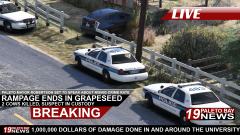


Rampage in a... Prius

By t0y
- 2,412 views
- View t0y's images
Grapeseed (SA) - On Sunday 5/7/2017 at around 11:00AM a Toyota Prius with a single occupant drove through Grapeseed causing chaos. The driver drove his vehicle through several farms killing 2 farm animals, and driving through fences and through the streets of Grapeseed for over 30 minutes. The driver then drove through another fence and into a wall being knocked unconscious as the Grapeseed Township Police responded to the scene and detained this suspect. No one was injured in the rampage other than the farm animals, suspect is facing serious jail time and several fines. The Grapeseed Township Police chief will be giving a report on the incident later tonight.


Credit
t0y, Him1250
Copyright
© t0y
Recommended Comments
Join the conversation
You can post now and register later. If you have an account, sign in now to post with your account.