Skip to content
View in the app

A better way to browse. Learn more.

LCPDFR.com

A full-screen app on your home screen with push notifications, badges and more.

To install this app on iOS and iPadOS
  1. Tap the Share icon in Safari
  2. Scroll the menu and tap Add to Home Screen.
  3. Tap Add in the top-right corner.
To install this app on Android
  1. Tap the 3-dot menu (⋮) in the top-right corner of the browser.
  2. Tap Add to Home screen or Install app.
  3. Confirm by tapping Install.

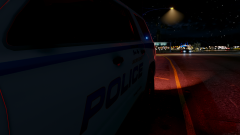
New Year, New Pursuit.

Shortly after the clock struck twelve, Lakeview County Police were called for a possible intoxicated driver. Upon locating the vehicle and attempting to stop the vehicle, the operator then proceeded to speed away from the officers, who began to engage in a chase. Approximately five minutes after the pursuit was started, the subject was brought to a successful halt after a PIT manoeuvre was performed.

  • From the album:

    Termination Media

    · 223 images

    Account

    Navigation

    Search

    Search

    Configure browser push notifications

    Chrome (Android)
    1. Tap the lock icon next to the address bar.
    2. Tap Permissions → Notifications.
    3. Adjust your preference.
    Chrome (Desktop)
    1. Click the padlock icon in the address bar.
    2. Select Site settings.
    3. Find Notifications and adjust your preference.