Due to overzealous filtering on Microsoft’s side, some emails to Outlook and Hotmail addresses may not be delivered. If you’re affected, please use a different email address or try again later.
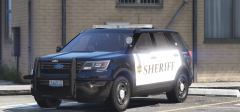
With my Snoho pack released, I've noticed a lot of people dislike the accurate flash patterns (They aren't my favorite either), so I decided to start on a Mill Creek PD pack. It has a very similar lighting setup (Ions, Whelen Liberty II) but it's a little more "generic".












Recommended Comments
Join the conversation
You can post now and register later. If you have an account, sign in now to post with your account.