
Skip to content
View in the app

A better way to browse. Learn more.

LCPDFR.com

A full-screen app on your home screen with push notifications, badges and more.

To install this app on iOS and iPadOS
  1. Tap the Share icon in Safari
  2. Scroll the menu and tap Add to Home Screen.
  3. Tap Add in the top-right corner.
To install this app on Android
  1. Tap the 3-dot menu (⋮) in the top-right corner of the browser.
  2. Tap Add to Home screen or Install app.
  3. Confirm by tapping Install.

That SD Though

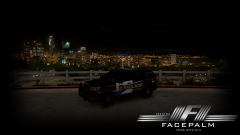
Well, I outfitted Captain's LSPD pack he is working on with some of getinmybelly's San Joaquin Theme ! I am gonna keep working on outfitting these cars maybe even do my own custom design with this ! One of many skins I now have <3

Credits to Captain for letting me test his fleet out for him, Should be released soon!

Belly for sending me his skin and letting me outfit to other vehicles ! Turned out pretty well I think !


From the album:

My GTA V Fleet

· 261 images

Account

Navigation

Search

Search

Configure browser push notifications

Chrome (Android)
  1. Tap the lock icon next to the address bar.
  2. Tap Permissions → Notifications.
  3. Adjust your preference.
Chrome (Desktop)
  1. Click the padlock icon in the address bar.
  2. Select Site settings.
  3. Find Notifications and adjust your preference.