






Blaine County's new Rescue Vehicle

By Deactivated Member
- 873 views
- View Deactivated Member's images
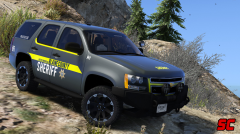
After numerous calls for help from hikers at Mt. Chilliad, the Blaine County Sheriff's office have designed a purpose built vehicle to respond and help hikers who are injured, stuck or in need of medical assistance and rescue them.
The Chevrolet Tahoe, which used to be a regular cruiser, was modified by Los Santos Customs into a capable off roader. Modifications include; raised suspension, heavy duty off road tires and a front bullbar. The car also features a new lighting system that the Sheriff's Office is trialing.
Blaine County Sheriff's Office Chief Mr Baker said that the car will benefit greatly to the community.
"Mt. Chilliad is a very popular hiking destination, with people coming from around the world to visit the tallest mountain in San Andreas. There is bound to be a few accidents, and helicopter recovery is simply not efficient."
"We are working alongside Fire and Rescue to further expand our resources."
The vehicle can also be used for patrolling at Raton Canyon, the Paleto Bay Forest and the Grand Senora Desert, as well as normal traffic enforcement.
-
Anyway, this is a part of a skin pack i'm making. Normal livery will also be included along with some other cars of course.
Recommended Comments
Join the conversation
You can post now and register later. If you have an account, sign in now to post with your account.