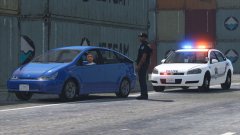
Port of LS Police Impala Share https://www.lcpdfr.com/gallery/image/67136-port-of-ls-police-impala/ Share on Facebook Share on X {lang="reddit_text" More sharing options... Followers Still have to line up the trunk part of the skin, add an extra spawning rear deck bar, and maybe some lights around the rear plate. Ignore the antennas, they're chrome but I forgot the textures. Credit Black Jesus Copyright © Black Jesus
xDZYx Members July 2, 20169 yr Author stats Damn this looks amazing hope to see soon your Port pack :D
Illusionyary Members July 2, 20169 yr Author stats I think just some small deck lights (like an Avenger or something) in the rear window would be nicer than a full bar or plate lights.
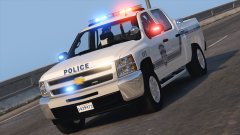
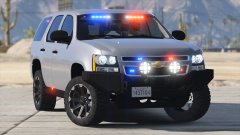
Black Jesus Members July 2, 20169 yr Author stats 4 minutes ago, Illusionyary said: I think just some small deck lights (like an Avenger or something) in the rear window would be nicer than a full bar or plate lights. I'm trying to keep the lighting to one company, and I don't have perms for small FS deck lights, which is why I was considering my setup. But since I had 2 whelen lights on my truck, so I might actually do 2 avengers
Illusionyary Members July 2, 20169 yr Author stats 24 minutes ago, Black Jesus said: I'm trying to keep the lighting to one company, and I don't have perms for small FS deck lights, which is why I was considering my setup. But since I had 2 whelen lights on my truck, so I might actually do 2 avengers Any decklights will do. I think they'll compliment your setup more than a solid long bar or license plate lights.
OfficerFive0 Members July 3, 20169 yr Author stats 7 hours ago, Black Jesus said: I'm trying to keep the lighting to one company, and I don't have perms for small FS deck lights, which is why I was considering my setup. But since I had 2 whelen lights on my truck, so I might actually do 2 avengers what lights are u using on the sides?
OfficerFive0 Members July 3, 20169 yr Author stats 9 hours ago, Illusionyary said: Any decklights will do. I think they'll compliment your setup more than a solid long bar or license plate lights. 9 hours ago, Black Jesus said: I'm trying to keep the lighting to one company, and I don't have perms for small FS deck lights, which is why I was considering my setup. But since I had 2 whelen lights on my truck, so I might actually do 2 avengers if i have time ill try to make some fedsig viper s2's if ur interested in using them
Black Jesus Members July 3, 20169 yr Author stats 6 minutes ago, OfficerFive0 said: if i have time ill try to make some fedsig viper s2's if ur interested in using them Nah it's alright. I'm gonna use avengers instead, but thanks m8
OfficerFive0 Members July 3, 20169 yr (edited) Author stats 7 minutes ago, Black Jesus said: Nah it's alright. I'm gonna use avengers instead, but thanks m8 alright np also were u using micropulses on the sides? Edited July 3, 20169 yr by OfficerFive0
Black Jesus Members July 3, 20169 yr Author stats 4 minutes ago, OfficerFive0 said: alright np also were u using micropulses on the sides? Yea
OfficerFive0 Members July 3, 20169 yr (edited) Author stats 4 minutes ago, Black Jesus said: Yea ah, u interested in using better ones? im making some tonight for a friend and can send some your way Edited July 3, 20169 yr by OfficerFive0
Black Jesus Members July 3, 20169 yr Author stats 3 minutes ago, OfficerFive0 said: ah, u interested in using better ones? im making some tonight for a friend and can send some your way Nah man I'm good with the ones I have, thanks again doe lol






Recommended Comments
Join the conversation
You can post now and register later. If you have an account, sign in now to post with your account.