


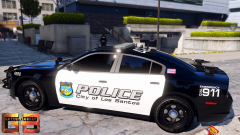
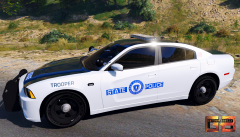
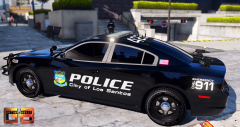






Take it down a notch, try something more rudimentary..

By Getinmybelly
- 555 views
- View Getinmybelly's images
Time for uncle belly to get real wich y'all. As most of you can tell (I hope to god..) I make these skins for fun and also just as a stress reliever. That being said, i'm taking a much needed break from my computer because it's good to change pace now and then. Sitting at the computer sure as hell aint the best thing I could be doing with my time, when I could be doing something like adventures or being a lady magnet. As much as I wish I could make each of these into a pack, it is truly impossible with the one man show that is belly. So your overly sarcastic uncle belly will be working on the red and silver stripe design that appeared to get the most love when he returns from his much needed vacation.
Thanks for all the love that these have been getting. Again, this is all just to pass time on my end. I will admit, it can look like an attention whore attempt throwing these up with the love they get without release but it excited me to see just how far I have improved. If you dare venture back to the early pages of the textures download section, you'll find belly in his texturing infancy. Blahhhhhh
Reflection over, see y'all in a week or so

Recommended Comments
Join the conversation
You can post now and register later. If you have an account, sign in now to post with your account.