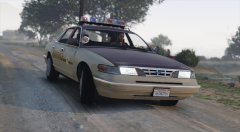
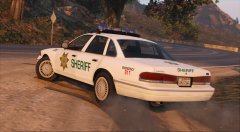
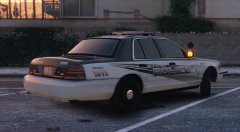
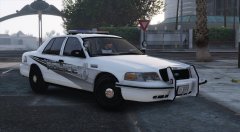
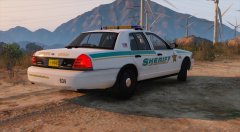
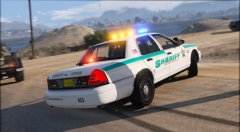
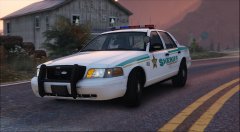
Los Santos Police Share https://www.lcpdfr.com/gallery/image/64141-los-santos-police/ Share on Facebook Share on X {lang="reddit_text" More sharing options... Followers Something I whipped up from one of my Caprice textures for GTA IV, I'm not sure about the solid white so any suggestions would be appreciated. I don't want it to be too similar to my two tone concept design though.
Virzza Members May 11, 201610 yr Author stats It looks good but I agree the solid white seems a bit odd. I don't really know what instead but the white kinda just puts it off
Illusionyary Members May 11, 201610 yr Author stats 16 minutes ago, Virzza said: It looks good but I agree the solid white seems a bit odd. I don't really know what instead but the white kinda just puts it off I'm completely stumped on colours. Black and white won't work because the stripes are a grey gradient and white just looks strange so I decided to make the texture transparent and see what GTA could throw at me. I'm not too keen on the solid black because the stripe vanishes but silver blue certainly looks interesting. Not completely sold on it though. Spoiler
Getinmybelly Members May 11, 201610 yr Author stats Add some blue maybe? It'd be tough to add some kind of outline to the points because it may become much too crowded and erase the color between them, but changing the color might add something. Or perhaps move the "city of los santos" below the door trim
Illusionyary Members May 11, 201610 yr Author stats 2 minutes ago, getinmybelly0627 said: Add some blue maybe? It'd be tough to add some kind of outline to the points because it may become much too crowded and erase the color between them, but changing the color might add something. Or perhaps move the "city of los santos" below the door trim Weirdly enough I was actually thinking of blue too. I might change the whole gradient style to be a different colour.
Illusionyary Members May 11, 201610 yr Author stats 19 minutes ago, getinmybelly0627 said: Add some blue maybe? It'd be tough to add some kind of outline to the points because it may become much too crowded and erase the color between them, but changing the color might add something. Or perhaps move the "city of los santos" below the door trim I changed the gradient to both a red and blue and it looks quite interesting. However I think the two tone style might be the way to go. Spoiler
Getinmybelly Members May 11, 201610 yr Author stats 27 minutes ago, Illusionyary said: I changed the gradient to both a red and blue and it looks quite interesting. However I think the two tone style might be the way to go. Hide contents Perhaps, it looks like there is a void in the rear of the vehicle in the absence of the two tone concept where the black off-sets the white
Illusionyary Members May 11, 201610 yr Author stats 3 minutes ago, getinmybelly0627 said: Perhaps, it looks like there is a void in the rear of the vehicle in the absence of the two tone concept where the black off-sets the white Yeah it was designed to be on a white base so it looks a bit wonky. I need to play with it a lot more colour and text positioning wise.
Fartknockr Members May 12, 201610 yr (edited) Author stats Good luck lol. I did the exact same skin design for the Charger and CVPI looked horrid. I couldn't make it look good besides what the actual design itself is like. I changed font, colors, etc and nothing. This is one of those skins that is truly ... a bitch. I ended up making the colors a bit lighter and changing some things, including the font and style to a design I already did and it ended up looking much nicer, but no cigar(Of course, this was at the end of November when I did this): Edited May 12, 201610 yr by Fartknockr
Illusionyary Members May 12, 201610 yr (edited) Author stats 5 hours ago, Fartknockr said: Good luck lol. I did the exact same skin design for the Charger and CVPI looked horrid. I couldn't make it look good besides what the actual design itself is like. I changed font, colors, etc and nothing. This is one of those skins that is truly ... a bitch. I ended up making the colors a bit lighter and changing some things, including the font and style to a design I already did and it ended up looking much nicer, but no cigar(Of course, this was at the end of November when I did this): Yeah, I did it for the Caprice last year, same problem. The Caprice looks good but the CVPI doesn't. I like the design as a two tone (as posted above), but it's very similar to my other two tone design. Edited May 12, 201610 yr by Illusionyary







Recommended Comments
Join the conversation
You can post now and register later. If you have an account, sign in now to post with your account.